Wednesday, May 28, 2008

Finally robotic beings rule the world

robotSafety.jpgTook some time out today to visit National Manufacturing Week here in Sydney at Darling Harbour.

What a fantastic show!

The best bits for me were the surface mount assembly machines, the printed circuit fabricator that uses a flat drill bit and stepper motors (for under $10k take home), and of course the robots.

There were huge metal benders, cutters - both laser and plasma, lathes and even some fine industrial footware.


Here's one of the robots in action, I like the warning label that is shown above.

I've put a gallery here.

Thursday, May 22, 2008

Social networking and the future of customer care

Had a chat on ABC Radio National with the very hip Steve Cannane this morning about how social networking is starting to be used for pro-active customer care. Check it out here.

iPhone in Australia with dual sims?

My Vodafone contract has expired and naturally I'm waiting for the iPhone to come to Australia before signing up again.

Just had a call from Vodafone asking me to start a new contract. Told the guy I was waiting for the iPhone and he said he was too.

He said a few other interesting things, all just from this outbound sales rep..

  • Vodafone will have about one month of exclusivity in Australia
  • New iPhones will have slots for dual sims, one for data and the other for calls
  • Launch in Australia is mid June


As I said, just claims by an outbound sales rep.

Friday, May 16, 2008

Web controlled Icom radio using python cgi

Modern radios have serial remote control interfaces but they're a little difficult to use. There is a wonderful library called hamlib but for some reason I can't get it to build at the moment on my Mac.

A remote control radio is a wonderful thing, I wish there were more around. You can listen to your own signal from far away to see how it really sounds and if the remote receiver is in a quiet location with a decent antenna it might be much better than listening from your home QTH.

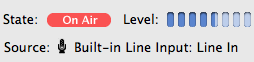
Picture 3.pngI've set up a simple web page controlled remote receiver. The audio is streamed using Nicecast which is a great implementation of a streaming mp3 server that can be received using lots of different software on all platforms. One neat feature is that it automatically configures the port forward on my router.

Initially I used an external USB audio input device but after about 18 hours the sound deteriorated. I think there's a bug in the Mac's USB audio chain somewhere.

For the web interface I chose a very simple cgi using python.

Unfortunately I can't really offer this up to the world as I pay for upload on my internet connection and I'm already on target to run out this month.

I hope others can build on this and set up some more remote receivers around the place.

Here's the little python cgi:


#!/usr/bin/env python
# By VK2TPM Peter Marks http://marxy.org
# You are free to use this for any purpose.
#
# Thanks to df4or.de for notes on CI-V here:
# http://www.plicht.de/ekki/civ/civ-p31.html
#
# The BCD utilities come from
# Rigserve by Martin Ewing
# http://sourceforge.net/projects/rigserve
#


import serial
import time
import cgi
import sys
import time
import string
sys.stderr = sys.stdout

SERIAL_DEV = "/dev/cu.PL2303-000013FD"
SERIAL_BAUD = 4800
INTRO = "\xfe"
TO_ADDR = "\x70"
FROM_ADDR = "\xe0"
SET_OPERATING_FREQ = "\00"
SET_OPERATING_MODE = "\x06"
READ_OPERATING_FREQ = "\x03"
READ_OPERATING_MODE = "\x04"
EOM = "\xfd"

STREAM_URL = "http://XXXXXXXXXXXXX/listen.m3u"
SCRIPT = "/cgi-bin/radio.py"

def main():
log = open("log.txt", "w")
log.write("started %s\n" % time.ctime())
ser = serial.Serial(SERIAL_DEV, SERIAL_BAUD, timeout=1)
form = cgi.FieldStorage()
if form.has_key('frequency'):
freq = form.getvalue("frequency")
log.write("freq = %s\n" % freq)

setFrequency(ser, float(freq) * 1000)
if form.has_key('mode'):
mode = form.getvalue("mode")
log.write("mode = %s\n" % mode)
setMode(ser, mode)
else:
log.write("no form submit\n")
freq = getFrequency(ser)
mode = getMode(ser)
if mode == "LSB":
mode1 = "SELECTED"
mode2 = ""
mode3 = ""
elif mode == "USB":
mode1 = ""
mode2 = "SELECTED"
mode3 = ""
elif mode == "AM":
mode1 = ""
mode2 = ""
mode3 = "SELECTED"

htmlTemplate = """<html><head>
<title>VK2TPM</title>
<style>body,td,a,p{font-family:arial,sans-serif}</style>
</head><body>
<h1>VK2TPM Web controlled radio</h1>
<form action="$script">
<table>
<tr><td>Frequency:</td><td><input name="frequency" value="$freq">Hz
<a href="$script?frequency=$freqDown&Submit=Submit">-5</a>
<a href="$script?frequency=$freqUp&Submit=Submit">+5</a> </td></tr>
<tr><td>Mode:</td><td><SELECT NAME="mode">
<OPTION VALUE="LSB" $lsbSelected>LSB
<OPTION VALUE="USB" $usbSelected>USB
<OPTION VALUE="AM" $amSelected>AM
</SELECT></td></tr>
</table>
<input name="Submit" type=submit value="Submit"> <a href="$script">Refresh</a>
</form>
<a href="$script?frequency=3700&mode=LSB">3700 LSB</a> |
<a href="$script?frequency=3670&mode=AM">3670 AM</a> |
<a href="$script?frequency=3600&mode=LSB">3600 SSB</a> |
<a href="$script?frequency=576&mode=AM">576 AM</a> |
<a href="$script?frequency=11750&mode=AM">11750 AM</a> | <br />
<a href="$script?frequency=5643&mode=AM">5643 AM</a> |
<a href="$script?frequency=8867&mode=AM">8867 AM</a> |
<a href="$script?frequency=4426&mode=USB">4426 USB</a> |
<a href="$script?frequency=8176&mode=USB">8176 USB</a> | <br />
<p>Click to listen to the stream <a href="$streamUrl">here</a>.</p>
This receiver is connected to a 40/80m trap dipole so is best around 3500 and 7000.<br />
The stream is buffered by a few seconds so don't panic after you change something.<br />
After some tidying up, I'll publish the source on the <a href="http://marxy.org">blog</a>
</body></html>
"""
template = string.Template(htmlTemplate)
html = template.substitute({ "freq": str(freq),
"freqDown": str(freq - 5),
"freqUp": str(freq + 5),
"script": SCRIPT,
"streamUrl": STREAM_URL,
"lsbSelected": mode1,
"usbSelected": mode2,
"amSelected": mode3})

print "Content-type: text/html\n\n"
print html
ser.close()
log.close()

def test():
print "started"
ser = serial.Serial(SERIAL_DEV, SERIAL_BAUD, timeout=1)
print getFrequency(ser)
print getMode(ser)
setFrequency(ser, 3670 * 1000) # Hz
ser.close()

def setFrequency(ser, freq):
fs = "%010d" % int(freq)
print fs

out = bcd4(int(fs[8]),int(fs[9]),int(fs[6]),int(fs[7]))
out += bcd4(int(fs[4]),int(fs[5]),int(fs[2]),int(fs[3]))
out += bcd2(int(fs[0]),int(fs[1]))
print out

sendStr = INTRO + TO_ADDR + FROM_ADDR + SET_OPERATING_FREQ
for byte in out:
sendStr += chr(byte)
sendStr += EOM
ser.write(sendStr)

echo = ser.read(len(sendStr))
print "got reply of %d chars" % len(echo)

def getFrequency(ser):
sendStr = INTRO + TO_ADDR + FROM_ADDR + READ_OPERATING_FREQ + EOM
ser.write(sendStr)

echo = ser.read(len(sendStr))
print "got reply of %d chars" % len(echo)

if not expectChar(ser.read(), INTRO): return
if not expectChar(ser.read(), FROM_ADDR): return
if not expectChar(ser.read(), TO_ADDR): return

byte = "0"
result = ""
while byte != EOM:
byte = ser.read()
print "%02x" % ord(byte),
result += byte

print "got EOM byte"
frequency = 0.0
if len(result) > 0:
f=0
for k in [10,11,8,9,6,7,4,5,2,3]:
f=10*f + nib(result,k)
frequency = (float(f) / 1000)
return frequency

def getMode(ser):
sendStr = INTRO + TO_ADDR + FROM_ADDR + READ_OPERATING_MODE + EOM
ser.write(sendStr)

echo = ser.read(len(sendStr))
print "got reply of %d chars" % len(echo)

if not expectChar(ser.read(), INTRO): return
if not expectChar(ser.read(), FROM_ADDR): return
if not expectChar(ser.read(), TO_ADDR): return

byte = "0"
result = ""
while byte != EOM:
byte = ser.read()
print "%02x" % ord(byte),
result += byte

print "got EOM byte"
mode = "XXX"
if result[1] == "\x00":
mode = "LSB"
elif result[1] == "\x01":
mode = "USB"
elif result[1] == "\x02":
mode = "AM"
elif result[1] == "\x03":
mode = "CW"
elif result[1] == "\x04":
mode = "RTTY"
elif result[1] == "\x05":
mode = "FM"
elif result[1] == "\x06":
mode = "Wide FM"
elif result[1] == "\x07":
mode = "CW-R"
elif result[1] == "\x08":
mode = "RTTY-R"
elif result[1] == "\x11":
mode = "S-AM"
return mode

def setMode(ser, mode):

sendStr = INTRO + TO_ADDR + FROM_ADDR + SET_OPERATING_MODE
if mode == "LSB":
sendStr += "\x00"
elif mode == "USB":
sendStr += "\x01"
elif mode == "AM":
sendStr += "\x02"
sendStr += EOM
ser.write(sendStr)

echo = ser.read(len(sendStr))
print "got reply of %d chars" % len(echo)

# non-reversed
def bcd4(d1,d2,d3,d4): return (16*d1+d2, 16*d3+d4)
# pack 2 BCD digits
def bcd2(d1,d2): return ( (16*d1+d2), )

# get a 4-bit nibble (digit) from a nibble string
def nib(s,i):
k = ord(s[i/2])
if i%2 == 0: k = k >> 4
return k & 0xf

def expectChar(byte, expected):
"""Return true if we got what we expected"""
if byte == expected:
print "good %02x" % (ord(expected)),
return True
else:
print "wanted %02x unexpected %02x" % (ord(expected), ord(byte)),
return False

main()

Measuring small inductors with a bridge

meter2.jpgYou might gather from this blog that I'm most comfortable with digital things - computers, software and even embedded microcontrollers seem very predictable to me. However, I'm very interested in learning the dark arts of radio frequency construction.

There's a long term project on the bench here, a double sideband transmitter for 14Mhz. Everything was going quite well until I got to building a tuned circuit. Of all the components, small inductors are the most mysterious to me.

I mentioned my frustration to John Ha1e, VK2ASU, at a recent meeting of the NSW home brew group and he kindly offered to help me out.

John showed me how he measured small inductors, such as ones wound on drinking straws, using an inductance bridge. There are a number of circuits around the net, I built the excellent simple one by Drew Diamond, VK3XU from his first volume of "Radio projects for the amateur". A design based on his circuit is published here I just discovered.

Yes, it really dips on small inductors like the one shown above. In this picture it's not showing the dip as it would be boring to show a meter on zero! I have yet to calibrate this instrument but I think it can measure from about 1uH up.

meter1.jpg


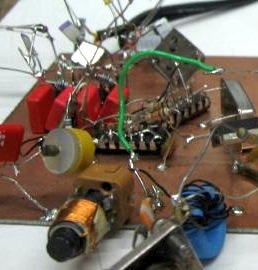
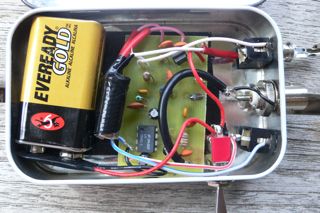
As with all of my home brew, they look pretty messy when you open the case - but that's where the beauty is for me.

It's amazing how valuable it is to actually watch someone winding and measuring small tuned circuits, but after watching John at work I gained the confidence that these things do actually follow the laws of physics and now feel I'm on my way again.

Thankyou VK2ASU and VK3XU.

Update: It looks like I can measure from about 1uH to 10uH on this device. I went out this morning and purchased a collection of 10% inductors. There's something funny about the colour codes on inductors, the colour seems rather different to those on resistors for some reason.

Monday, May 12, 2008

A Chat podcast 23

Get the podcast in iTunes, or here.

  • Neil Young and the Java?

  • Alternative firmware for Canon point and shoot cameras

  • OLPC in Australia

  • Home broadband upgrade


Thanks Ben for production. Sorry my earlier quick show notes post looked bad.

Sunday, May 11, 2008

Controlling an AD9851 with an Atmel AtTiny85 (or other)

avrdds.jpgFollowing on from my last post, I got something similar working with an ATTiny85. This sample code does a slow sweep from 10Mhz up a bit. It's just a demo, the bit I've been looking for myself and couldn't find was how to just say sendFrequency().

I have lots of ideas for applications of these things, including:


  • General purpose VFO with keypad and knob

  • Sweep test generator, paired with a digital rf signal measurer for computer plotting filters etc

  • Automated antenna analyser with a digital SWR measuring thingy


This code is written in C and uses avrlibc. I'm working on a Mac but it will work the same on Linux or that other OS that was quite popular.


/*
Control an AD9851 DDS with an ATMega85
*/

#include <avr/io.h>
// Sets up the default speed for delay.h
#define F_CPU 800000UL
#include <util/delay.h>
#include <math.h> // for pow()

// Pins used to talk to the DDS chip
#define LOAD 4
#define CLOCK 3
#define DATA 0
#define LED 1

#define DDS_CLOCK 180000000UL

#define OUTPORT PORTB
#define OUTPORTDIRECTION DDRB

void sendFrequency(unsigned long frequency);
void byte_out(unsigned char byte);
void outOne();
void outZero();
void bitSetHi(volatile uint8_t *port, int bit);
void bitSetLo(volatile uint8_t *port, int bit);

int main (void)
{
OUTPORTDIRECTION = _BV(LOAD) | _BV(CLOCK) | _BV(DATA) | _BV(LED);
unsigned long freq;

// flash an led to show we're alive
int i;
for(i = 0; i < 10; i++)
{
bitSetHi(&OUTPORT, LED);
_delay_ms(100);
bitSetLo(&OUTPORT, LED);
_delay_ms(100);
}
while (1)
{
// Do a frequency sweep in Hz
for(freq = 10000000; freq < 10001000; freq++)
{
sendFrequency(freq);
_delay_ms(1);
}
}
return 0;
}

void bitSetHi(volatile uint8_t *port, int bit)
{
*port |= ( 1<<bit );
}

void bitSetLo(volatile uint8_t *port, int bit)
{
*port &= ~( 1<<bit );
}

void sendFrequency(unsigned long frequency)
{
unsigned long tuning_word = (frequency * pow(2, 32)) / DDS_CLOCK;
bitSetLo(&OUTPORT, LOAD); // take load pin low
int i;

for(i = 0; i < 32; i++)
{
if ((tuning_word & 1) == 1)
outOne();
else
outZero();
tuning_word = tuning_word >> 1;
}
byte_out(0x09);

bitSetHi(&OUTPORT, LOAD); // Take load pin high again
}

void byte_out(unsigned char byte)
{
int i;

for (i = 0; i < 8; i++)
{
if ((byte & 1) == 1)
outOne();
else
outZero();
byte = byte >> 1;
}
}

void outOne()
{
bitSetLo(&OUTPORT, CLOCK);
_delay_ms(1);
bitSetHi(&OUTPORT, DATA);
_delay_ms(1);
bitSetHi(&OUTPORT, CLOCK);
_delay_ms(1);
bitSetLo(&OUTPORT, DATA);
_delay_ms(1);
}

void outZero()
{
bitSetLo(&OUTPORT, CLOCK);
_delay_ms(1);
bitSetLo(&OUTPORT, DATA);
_delay_ms(1);
bitSetHi(&OUTPORT, CLOCK);
_delay_ms(1);
}


The AMQRP board has it's own regulator and has a 5V output so I'm powering the ATTiny85 from that power rather than a separate input. Here's a nifty spot reference. Simple enough even for me to build.

spotGen.jpg

Saturday, May 10, 2008

Controlling an AD9851 DDS with an Arduino

ad9851.jpgBeen playing with the AD9851 DDS for a while now using other people's software mostly written in assembly language that I find rather hard to get my head around. Finally tonight, with the help of several others who have published their work on the internet I have got some simple code to drive this chip the way I want.

This can tell it the frequency the generate in Hz and it just works.

This minimal example does a small sweep from 10Mhz so it's easy to listen to on a radio.

While I prefer to use the atmel chips "naked" I do find the Arduino board a very convenient way to muck around and get things going in an interactive environment. This code doesn't rely on any magic Arduino libraries so it should be easy to port, I'll post a straight ATMEGA version soon.

The code presented here shows some things I've struggled to figure out: how to calculate the tuning word from the frequency and how to send the serial commands to the chip. I hope this helps someone else.


// Control a AD9851 DDS based on the good work of others including:
// Mike Bowthorpe, http://www.ladyada.net/rant/2007/02/cotw-ltc6903/ and
// http://www.geocities.com/leon_heller/dds.html
// This code by Peter Marks http://marxy.org

#define DDS_CLOCK 180000000

byte LOAD = 8;
byte CLOCK = 9;
byte DATA = 10;
byte LED = 13;

void setup()
{
pinMode (DATA, OUTPUT); // sets pin 10 as OUPUT
pinMode (CLOCK, OUTPUT); // sets pin 9 as OUTPUT
pinMode (LOAD, OUTPUT); // sets pin 8 as OUTPUT
pinMode (LED, OUTPUT);
}

void loop()
{
// Do a frequency sweep in Hz
for(unsigned long freq = 10000000; freq < 10001000; freq++)
{
sendFrequency(freq);
delay(2);
}
}

void sendFrequency(unsigned long frequency)
{
unsigned long tuning_word = (frequency * pow(2, 32)) / DDS_CLOCK;
digitalWrite (LOAD, LOW); // take load pin low

for(int i = 0; i < 32; i++)
{
if ((tuning_word & 1) == 1)
outOne();
else
outZero();
tuning_word = tuning_word >> 1;
}
byte_out(0x09);

digitalWrite (LOAD, HIGH); // Take load pin high again
}

void byte_out(unsigned char byte)
{
int i;

for (i = 0; i < 8; i++)
{
if ((byte & 1) == 1)
outOne();
else
outZero();
byte = byte >> 1;
}
}

void outOne()
{
digitalWrite(CLOCK, LOW);
digitalWrite(DATA, HIGH);
digitalWrite(CLOCK, HIGH);
digitalWrite(DATA, LOW);
}

void outZero()
{
digitalWrite(CLOCK, LOW);
digitalWrite(DATA, LOW);
digitalWrite(CLOCK, HIGH);
}


The board I'm using is the excellent carrier from AmQRP.

Friday, May 09, 2008

Switched home broadband to Telstra

cableGuy.jpgWe've had Optus cable internet here at the house for many years. It's been a reliable service but over time annoyances build up in a relationship like this so I decided to upgrade and switch to Telstra Bigpond on a service they claim can deliver up to 30Mbps down and 1Mbps up.

Optus gave me 8Mbps down and 256kbps up. The slow upload did cause me some grief sending mail and uploading.

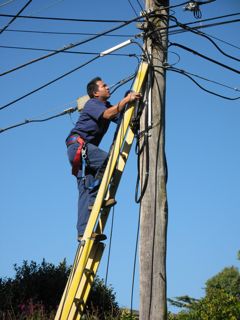
These days Telstra sends out contractors to do any "hard" work and in this case it was Silcar Communications. The guys did a great job and didn't mind me taking a few pictures as the job progressed.

They had to run another cable from the pole as I refused to let them cut over the Optus cable.

I'm pretty happy with the performance so far, of course it will be interested to see how it degrades in busy times. Here's my test results from ozspeedtest.

Broadband Speed Test Results

Test run on 09/05/2008 @ 02:38 PM

Mirror: Telstra Bigpond
Data: 9 MB
Test Time: 3.28 secs

Your line speed is 23.02 Mbps (23024 kbps).
Your download speed is 2.81 MB/s (2878 KB/s).

I'm seeing some pings under 10ms to Australian sites and I really do get 1Mbps upload which is great.

I refused the netgear wireless router they offered and just took a motorola cable modem and I chose to use my Airport Extreme which seems to be working nicely.

It's always amusing to see how these folks respond to a house without windows. They are drilled in the art of telling windows users to reboot to make things work. I said, this is a Mac, you don't need to reboot.

So, why did I switch from Optus:


  • They decided to charge me $2 per month because I wouldn't agree to direct debit. I always pay promptly by bpay and I'd be happy to have electronic invoicing, but no dice.

  • A sales person came to the door trying to sell me a worse deal than I was currently on, much less data, a little more speed and more money.

  • When my modem died in a storm, I purchased a replacement on ebay (from another optus customer), despite this they insisted on sending out a tech to read them the Mac address - something I can certainly do, and charged me the same amount as a replacement modem.


Oh and don't try writing to them about anything, when I did I just got back a form letter FAQ. I don't think they even read letters from customers. Oh well, bye bye Optus. Let me know when you're rolling out fiber.

Update: Cancelling Optus was a good experience. When you ring to cancel you get the 'A' team, the retention people. He said, "you should have rung us first, we could have given you $30 a month for 6 months". I explained that I had rung, and written, and had not been satisfied.

Anyhow he was able to cancel me right away and refund my latest payment. "Speed isn't everything" he said. You're right there, I thought...

Update 2: We are now without a home phone. The plan was also to churn our home phone over to Telstra today as well. The tech was due to come in "the morning", at 2pm they rang to say that they couldn't come and needed to re-shedule. I suggested next week.

Our home phone has been disconnected by Optus, not sure if it's related to the internet switch-over or the churn of the line to Telstra. Very annoying. Currently talking to Optus via Skype.

Ok, Optus has turned it back on. Strange that a churning phone can be disconnected before being connected to the new carrier. I guess I'm being punished for being pesky.

Sunday, May 04, 2008

Rough guide to surface mount soldering

smd.jpgI share an interest in good quality headphone audio with many including Alastair who purchased the board and parts for the Alien DAC. Not being too confident with the soldering iron he made a deal, he bought two sets, one for him and one for me, if I'd help him construct his one.

Surface mount components are either tiny themselves, like the resistors and capacitors, or if large, they have pins that are very close together and hard to avoid having the solder bridge between them. The move to computer manufacturing with surface mount components is unfortunate for us home constructors. Some parts are only available in surface mount packaging and I fear for the future of this fine past time.

I got both boards going and thought I'd share my tips on construction, which you can see from the image are not too good, but serviceable.

For the chips with many pins, hold down the chip with the point of angle ended needle nosed pliers (the weight of the tool will hold it in place - hands shake too much), tack solder one corner pin and one on the opposite corner, then remove the pliers. Just flow solder across all the pins on each side, then go back with fine solder wick and suck back all the excess solder.

For resistors and capacitors again use the point of angle ended needle nosed pliers to hold them in place while soldering one end.

I think I'll put my new audio output device in a nice box along side a powered amplifier as covered in the past. Thanks Alastiar for the bag of bits!

Tuesday, April 29, 2008

Text to speech: making a book on tape on a mac for free

Picture 2.pngI love Bill M0HBR's regular podcast SolderSmoke, the ongoing story of a home brewing ham radio enthusiast who is currently on the air from a flat in Italy using an end fed long wire antenna.

In SolderSmoke82 Bill mentioned a book by Henry David Thoreau called Walden that is about his observations while living as simply for more than two years in a crude cabin in the woods. I wanted to read the book, which is freely available as text at Project Gutenberg here.

As I mostly listen to stuff on an iPod to ease the noisy bus and train trip I endure, I wanted to try turning it in to a book on tape. Turns out it's easy and free on a mac, and it sounds reasonably good.

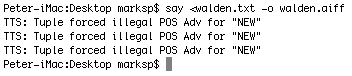
Download the text file, open a terminal and do this:


$ say <walden.txt -o walden.aiff


It's pretty quick, then drag the .aiff file into iTunes and right click to choose "Convert Selection to AAC".

I don't know what those warnings it spits out, but the file seems fine.

Update: Incidentally, I found a really great use for the "Speech - Start Speaking Text" item in the Services menu. Often when making a payment I have to transcribe a long series of digits from the bill to a payment web form. After entering the digits, select the text and choose "start speaking text" to have the system read back the digits for easy checking.

Sunday, April 27, 2008

Clothesline style antenna hoist for experiments

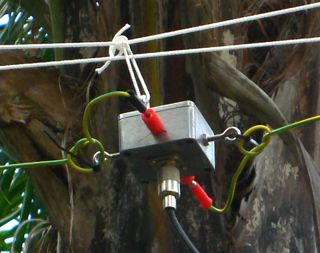
AntennaHoist.jpgI'm experimenting with antennas again and wanted a way to string up a dipole so that I could easily pull it down and make adjustments.

My best antenna is a dipole tuned for PSK31 on 14.070Mhz that is over the roof of the house but while playing with a simple wire dipole between some trees next to the house I noticed it it appeared to pick up less electrical hash and it got me wondering if I should try suspending the dipole out beside the house where I currently have an end fed long wire (that picks up tons of noise).

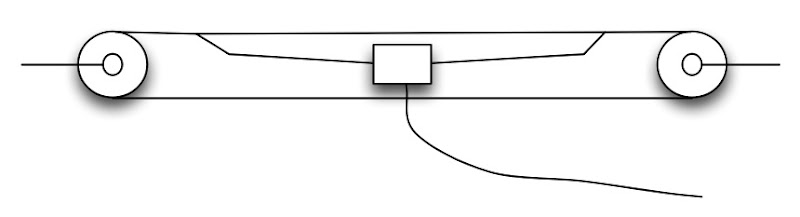
This is a very simple idea, I'm positive others have used it too. I bought 30m of 3mm venetian blind cord and two little pulleys. (I already have a pulley up a tree from previous squid pole activities that was used to hold up the far end).

antenna hoist diagram.jpg
It's too early to tell if having the dipole away from the house is better than having it up higher but over the house but it's great to be able to drag it out and back in again for tuning. (I've got this dipole perfectly tuned on my second clipping).

Yes, I will need some weather proofing before leaving the balun out too long.

Friday, April 25, 2008

Chinese torch relay tactics in Canberra

chinese crowd.jpgAs a family, we decided to travel to Canberra to watch the torch relay and join the crowd in support of the Tibetan community. I headed out early for a commitment with the ABC and was surprised to see young Chinese people starting to mass along Northbourne avenue quite a long way from the city centre.

It was about 7:40am and 5 degrees C, so it was pretty chilly to be standing out there. I had a chat with the young Chinese people who seemed nice and had taken on "ozzie" nationalistic behaviours such as being wrapped in flags and with flag temporary tattoos on their cheeks. At that time all seemed pretty well, except for the stream of busses arriving with more while I watched.

Later we walked to the lawn in front of parliament house. Here we had to get past a large crowd of Chinese nationalists who were chanting "One China", so we could join the Tibet crowd. It was a nice group although some people had rather gruesome images of dead Tibetans out for display. There were speeches from Bob Brown and K.D. Lang as well as others.

BobBrown.jpgBob's a real trooper, he gave a great speech and freely mingled with the crowd. He's pictured here talking with a reporter from Deutsche Welle.

The pro-Tibetans and pro-Chinese groups stayed pretty separate until after the torch went by and we started to move over the river to try to catch up with it again.

As we walked the groups started to interact and it was not pretty. The Tibetans were basically saying that they are not anti-china, but just want basic human rights for Tibet and would like China to at least talk with the Dali Lama. The Chinese crowd were quite intimidating, both in their numbers, their organised uniformity and what they were shouting at us. There were people driving by in cars aggressively giving us "the finger" through the window, their faces hidden behind red flags.

The Chinese would shout "One China" and if someone asked about human rights, they'd shout back "you know NOTHING", which really didn't help as it wasn't clear what they know that we are yet to be informed about.

We all walked down from parliament house, past a rather ominous blood bank bus with "don't ignore the need for blood" painted on it, and over the bridge to a park on the other side. Here we were getting stuck and the intermingled crowd was getting agitated. The huge police numbers in Canberra were clearly focussed on the torch and were not much use where we were or even in directing traffic. The mood was turning and I suggested we exit. My wife felt it best to stay as her presence as a witness might prevent violence.

troops.jpg
As I left the scene the riot police turned up and ran in to settle things down.

baloon.jpgAll in all, it was a good day for democracy in Australia, as Bob Brown pointed out, if we'd done this in China we'd all have been arrested and I'd add that there would be no trace of it in the news or on the internet.

We watched the evening TV news versions and the local ABC TV had by far the most accurate version of events.

I like and respect the Chinese people but I'm puzzled about what the government is so fearful of that they must violently put down any opposition and censor the news and internet. Are they so brittle that words will harm them?

Monday, April 21, 2008

Web based software defined radio

Picture 1.pngJust stumbled upon an amazing remote controlled receiver available on the internet called WebSDR.

Unlike other radios available on the internet this one uses software to decode the spectrum coming in from the radio in such a way that multiple people can be listening to different frequencies simultaneously.

This system is hanging out the back of a PC at the Faculty for Electrical Engineering Mathematics and Computer Science at the University of Twente Enschede - The Netherlands. It looks wonderfully home brew.

Click and drag in the black area under the "waterfall" and you can tune. The great thing is that many users can be doing the same and streaming audio at the same time.

Great stuff!receiver.jpg

A Chat podcast - episode 22

Google App Engine and more.

  • Google App Engine experiences

  • YUI

  • Home brew electronics

  • Amazon Web services action

  • Amazon MP3

  • SafariAdBlock

  • Trying Twitter

  • iPhone Australia gossip

  • Open Source Corporations


Subscribe in iTunes here, or for everything else here.

Saturday, April 19, 2008

Sun buys MySQL, what does it mean when open source is bought?

logo_mysql_sun.gifMySQL has been a hugely popular database and is unambiguously the M in LAMP. (Whereas the P could be Perl, Python or PHP). That must annoy the Postgres folks.

Certainly I've had good success with MySQL over the years, for me, it just works, easy to install, easy to use and seems really fast. Sure it used to miss some of the SQL that others had but frankly I rarely ran in to anything I couldn't do or find a way to get around.

So on January 16 it was announced that Sun has purchased "the developer" of MySQL. But MySQL is open source, so anyone can get the source and work on it. What does it mean when a company buys an open source project?

There are some other examples of companies buying open source developers:


  • Apple bought CUPS printing

  • RedHat bought JBoss

  • RedHat was open source but they bought themselves I guess

  • Oracle bought Sleepycat which commercialised Berkeley DB (probably mostly legacy due to sqlite)

  • Citrix bought XenSource

  • Sun bought VitualBox


So what will it mean for MySQL? I had a look at what's happened to VirtualBox since Sun aquired Innotek and the first thing you notice is that they announced on February 12, 2008 they announced it for OpenSolaris. There are only a few posts in the forum so I guess there's not a lot of interest so far.

I'm just speculating here, but I have worked for a major web company that switched many hundreds of servers from Solaris to Linux (a stripped down RedHat distro) and reportedly was happy and saved a significant amount of money. Sun must have been devastated by the success and acceptance of Linux as a server operating system. If I want to run up a web server then Linux/Apache is the way to go today.

What could they do? RedHat split into the free Fedora and the commercially supported RedHat Enterprise with great success and I assume that Sun copied that strategy with Solaris and OpenSolaris.

Presumably the MySQL developers will be tasked with making MySQL run best on Solaris, so in a few years if you want a robust, supported MySQL database you'll choose Solaris/MySQL. That's the theory, but there's a big community of folks who like MySQL on Linux and they'll be looking closely to bring any improvements over to Linux and FreeBSD.

I'm starting to wonder if the days of the SQL databases is coming to an end. With Google's BigTable and Amazon's Simple Storage Service (S3) plus the fact that these days we always talk to the backend via some sort of Object Relational Mapper service, perhaps we won't care so much about the SQL capabilities any more.

Wednesday, April 16, 2008

I miss HyperCard


My thanks go out to Geoff Balemans for pointing me to a wonderful video by Douglas Adams, narrated by Tom Baker, called Hyperland.

This show illustrates all sorts of good stuff that was coming before the Internet was implemented as we know it today.

One of the highlights is all the technology demos done with HyperCard. I loved HyperCard as soon as I saw it. At first it was black and white, in fact 2 bit, they added colour through extensions but it just got worse. In the end, Apple dropped the project, but perhaps it was already perfect.

There are some alternatives but nothing comes close to the seamless environment created by the great Bill Atkinson.


Created in 1990, predicting life in 2005, it's well worth a look.

Sunday, April 13, 2008

Built an over-boxed QRP Power Meter

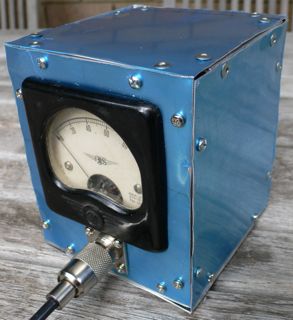
QRP Power Meter.jpgIn preparation for the next NSW Home Brew group meeting at Dural where we will be having a power meter calibrate-athon, I've built a crazy box for my simple QRP power meter. Haven't tried to calibrate it but the output of a Pixie 2 (at 200-300mW) bashes the needle full over.

The box was constructed with 12mm angle aluminium at the edges and 0.5mm aluminium plate. That aluminium plate is probably a bit too thin but it's very easy to work with using simple tin snips. I was even able to cut the round hole for the meter with the snips.

All boxed up, it feels pretty sturdy and looks rather steam-punk.

The blue is a plastic protective layer that came on the sheet metal from Bunnings, I'll peel it off when it gets a bit scruffy.

I look forward to calibrating it in a few weeks.

Saturday, April 12, 2008

Tiny morse beacon keyer in an ATTiny85

morsebeacon.jpgUsing some code based on the excellent example here I built a morse beacon keyer using an ATMega8 but it seemed like a massive waste of pins so I ordered a bunch of the 8 pin ATTiny85 chips from Digi-key. (Great service by the way)

With just 8 pins, if you use the internal oscillator, you get 6 available pins for input and output which is really quite a lot for many simple tasks like this.

In the code below, pin 5 is the keyer output, pin 6 is an inverted version and pin 7 is an audio side tone output.

My code is a simplification and an extension (to include the full alphabet and make a side tone) of the code that is "© 1997-2006 by AWC, 310 Ivy Glen, League City, TX 77573" so I hope it's ok to present it here:


/*
Morse ident, based on code from:
http://www.awce.com/cbasic.htm
*/

#include
#include
#define F_CPU 800000UL // Sets up the default speed for delay.h
#include
#include

/* dit delay for morse code */
#define DITDELAY 50 /* mS */
#define OUTPORT PORTB
#define OUTPORTDIRECTION DDRB

// the normal output bit
#define OUTBIT 0

// inverted version out bit
#define INVERTED_OUTBIT 1

// tone output bit
#define TONE_OUTBIT 2

void sendchar(int c);
void tone(int length);

int main (void)
{
// Put beacon message in program memory
PGM_P *message=PSTR("cq cq cq cq de vk2tpm ");
OUTPORTDIRECTION = _BV(OUTBIT) | _BV(INVERTED_OUTBIT) | _BV(TONE_OUTBIT);

while (1)
{
int c;
// Send each character in message
PGM_P ptr=message;
for (c=pgm_read_byte(ptr); c; c=pgm_read_byte(++ptr))
{
sendchar(c);
}
_delay_ms(30000); // wait 30 seconds
}
return 0;
}

/* Send a Morse code element (.- or space) */
void send(char c)
{
switch (c)
{
case '-':
OUTPORT = _BV(OUTBIT);
tone(3*DITDELAY);
OUTPORT = _BV(INVERTED_OUTBIT);
break;
case '.':
OUTPORT = _BV(OUTBIT);
tone(DITDELAY);
OUTPORT = _BV(INVERTED_OUTBIT);
break;
case ' ':
_delay_ms(4*DITDELAY);
break;
}
_delay_ms(DITDELAY); /* inter element space */
}

// play a tone for the given length
void tone(int length)
{
int i;
for(i = 0; i < length; i++)
{
// leave the other bits in place
OUTPORT ^= _BV(TONE_OUTBIT);
_delay_ms(2);
}
}
// Send a character (made from dots/dashes) from program memory
void sendc(PGM_P s)
{
int c;
for (c=pgm_read_byte(s);c;c=pgm_read_byte(++s))
{
send(c);
}
}
// Send an ASCII character
void sendchar(int c)
{
switch (toupper(c))
{
case ' ': sendc(PSTR(" ")); break;
case 'A': sendc(PSTR(".-")); break;
case 'B': sendc(PSTR("-...")); break;
case 'C': sendc(PSTR("-.-.")); break;
case 'D': sendc(PSTR("-..")); break;
case 'E': sendc(PSTR(".")); break;
case 'F': sendc(PSTR("..-.")); break;
case 'G': sendc(PSTR("--.")); break;
case 'H': sendc(PSTR("....")); break;
case 'I': sendc(PSTR("..")); break;
case 'J': sendc(PSTR(".---")); break;
case 'K': sendc(PSTR("-.-")); break;
case 'L': sendc(PSTR(".-..")); break;
case 'M': sendc(PSTR("--")); break;
case 'N': sendc(PSTR("-.")); break;
case 'O': sendc(PSTR("---")); break;
case 'P': sendc(PSTR(".--.")); break;
case 'Q': sendc(PSTR("--.-")); break;
case 'R': sendc(PSTR(".-.")); break;
case 'S': sendc(PSTR("...")); break;
case 'T': sendc(PSTR("-")); break;
case 'U': sendc(PSTR("..-")); break;
case 'V': sendc(PSTR("...-")); break;
case 'W': sendc(PSTR(".--")); break;
case 'X': sendc(PSTR("-..-")); break;
case 'Y': sendc(PSTR("-.--")); break;
case 'Z': sendc(PSTR("--..")); break;
case '1': sendc(PSTR(".----")); break;
case '2': sendc(PSTR("..---")); break;
case '3': sendc(PSTR("...--")); break;
case '4': sendc(PSTR("....-")); break;
case '5': sendc(PSTR(".....")); break;
case '6': sendc(PSTR("-....")); break;
case '7': sendc(PSTR("--...")); break;
case '8': sendc(PSTR("---..")); break;
case '9': sendc(PSTR("----.")); break;
case '0': sendc(PSTR("-----")); break;
}
send(' ');
}


When I burn it with the fabulous AVRDUDE I get:


Writing | ################################################## | 100% 34.10s

avrdude: 1026 bytes of flash written

avrdude: safemode: lfuse reads as 62
avrdude: safemode: hfuse reads as DF
avrdude: safemode: efuse reads as FF
avrdude: safemode: Fuses OK

avrdude done. Thank you.


So the code uses just 1026 bytes out of the available 8k which means a lot more can be done on one of these chips.

Thursday, April 10, 2008

Google's App Engine

In a brave move that I'm sure had the producer at least a little sceptical, I attempted to explain Google's new App Engine on ABC Radio National this morning. You can hear it here.

I've started playing with it and so far it's a good experience. Very happy to have python as the language they've chosen to start with, and I love the adoption of parts of django.

Sunday, April 06, 2008

Visualising WSDL with GraphViz and python

sample.jpgI'm working with SOAP and WSDL at the moment and golly that xml can be hard to read.

In the past I've used GraphViz to draw pictures of data structures, once I did an IVR call flow diagram that helped to define what the client wanted and then the source was used to write the dialplan directly.

This is only roughly working, but it's starting to be useful. The python program takes a wsdl file on the command line, and outputs a "dot" file that can be rendered with GraphViz. Note that on the Mac OmniGraffle can also render this format really nicely.

Please let me know if a better tool exists, for the Mac or Unix in general - surely it must, and any improvements would be gratefully accepted. (I am aware of XMLSpy, which looks great but there is no version for the Mac and it looks like it costs "Starting at €399" whatever that means).

#!/usr/bin/env python
"""
A little utility to visualise wsdl using Graphviz.
(http://www.graphviz.org/)
OmniGraffle does an excellent job too.
by Peter B Marks
http://marxy.org

License: You are free to use this for any purpose.

History:
6-April-2008 1 Roughly working for comment.
6-April-2008 2 Skip duplicate arcs.
6-April-2008 3 Add verbose command line switch.
6-April-2008 4 Add levels and outfile options.
"""
import sys
import string
from optparse import OptionParser
import logging
import xml.etree.ElementTree as ET

# global list of nodes we've already outout
# so we don't overwrite them
ALREADY_DONE_NODES = []
ALREADY_DONE_ARCS = []

RECURSE_LEVELS = 50
CURRENT_LEVEL = 0

def main():
global RECURSE_LEVELS
parser = OptionParser()
parser.usage = "%prog [options] infile"
parser.add_option("-v", "--verbose", dest="verbose",
action="store_true", help="print lots of info")
parser.add_option("-o", "--outfile",
dest="outfile", help="Output file to write to")
parser.add_option("-l", "--levels",
dest="levels",
help="Number of levels to recurse or %d" % RECURSE_LEVELS)
(options, args) = parser.parse_args()

if len(args) > 0:
fileName = args[0]
else:
parser.print_help()
return

if options.verbose:
logging.basicConfig(level=logging.DEBUG)
else:
logging.basicConfig(level=logging.ERROR)

if options.levels:
RECURSE_LEVELS = int(options.levels)

if options.outfile:
outfile = options.outfile
else:
outfile = fileName + ".dot"

logging.debug("Reading file %s" % fileName)
infile = open(fileName, "r")
xmldata = infile.read()
infile.close()

logging.debug("Writing to file: %s" % outfile)

of = open(outfile, "w")
of.write('digraph g {graph [rankdir = "LR"];\n')
tree = ET.parse(fileName)
root = tree.getroot()

outputLevel(of, root, root.tag)

of.write('}')
of.close()
logging.debug("Done.")

def removeNamespace(fullString):
where = string.rindex(fullString, "}")
return fullString[where + 1:]

def outputLevel(of, itemList, itemListName):
"""Recursive function for outputting a level"""
global ALREADY_DONE_NODES, ALREADY_DONE_ARCS, RECURSE_LEVELS, CURRENT_LEVEL

itemListLabel = "%s" % (removeNamespace(itemList.tag))
logging.debug("Processing: %s" % itemList.tag)
itemCounter = 0
for item in itemList:
itemName = "%s-%d" % (item.tag, itemCounter)
itemCounter += 1
itemLabel = "%s" % (removeNamespace(item.tag))
for attribute in item.attrib.keys():
itemLabel += "|%s:%s" % (attribute, item.attrib[attribute])

if item.text:
itemText = item.text.strip()
if len(itemText) > 0:
itemLabel += "|%s" % item.text

if itemListName not in ALREADY_DONE_NODES:
ALREADY_DONE_NODES.append(itemListName)
of.write('"%s" [ label = "%s", shape="record" ];\n' % (itemListName, itemListLabel))
else:
logging.debug("Skipping duplicate node:%s" % itemListName)

if itemName not in ALREADY_DONE_NODES:
ALREADY_DONE_NODES.append(itemName)
of.write('"%s" [ label = "%s", shape="record" ];\n' % (itemName, itemLabel))
else:
logging.debug("Skipping duplicate node:%s" % itemName)

arc = '"%s" -> "%s";\n' % (itemListName, itemName)
if arc not in ALREADY_DONE_ARCS:
ALREADY_DONE_ARCS.append(arc)
of.write(arc) # the arc
else:
logging.debug("Skipping duplicate arc:%s" % arc)

CURRENT_LEVEL += 1
logging.debug("Recursed to level %d" % CURRENT_LEVEL)
if CURRENT_LEVEL >= RECURSE_LEVELS:
logging.debug("Hit maximum recursion level %d" % RECURSE_LEVELS)
else:
outputLevel(of, item, itemName) # recurse

if __name__ == "__main__":
main()


The diagram above is a clipping from the output generated from some annotated WSDL.

While I'm here can I mention how useful the techniques shown in this example make python for making little command line utilities. See how OptionParser makes it simple to handle short and long style command line options. Marvel at how you can use the logging module to write output if chosen by the --verbose switch.

It's sometimes a bit hard to find simple examples like this.

Friday, April 04, 2008

A visit to the Sydney Horological Centre

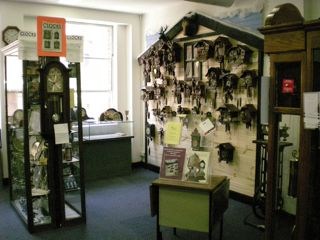
Horological1.jpgActing on a tip from a work colleague, I dropped in to "Smith & Smith" Pty Ltd, also known as The Sydney Horological Centre at Level 5, 193 Clarence Street, Sydney.

A rare pleasure indeed. Not since shopping at The Test Tube Factory in Ultimo have I enjoyed a shop so much.

The shop has a fantastic display of watch and clock parts, tools and servicing do-dads. They also stock an amusing array of cuckoo clocks and some impressive grandfather clocks. There are electronic movements you can put into an existing clock - you can choose between ticking and smooth too.

Horological2.jpgI came away with an "OptiVisor" head magnifier that I need for my recent forays into surface mount soldering, really I wanted the steampunk style that the guy I spoke with was wearing (left) but he told me that regrettably, they are no longer available.

If I ever need a small battery, this is certainly the place to get it - a huge range.

Wednesday, April 02, 2008

Apple's weakness is Microsoft's strength

MiniMouse.jpgMicrosoft makes really great mice. Apple just can't seem to get it right.

I've bought four "mighty" mice since the launch, assuming that the bad one I got was a one-off. They are all bad. The little ball thing that lets me scroll sideways works pretty well for about a week and then it starts to get intermittent.

All the tips about cleaning say to use a wet, lint free, cloth and hold the mouse upside down. It works a bit but doesn't fix the problem.

After much frustration I paid just AU$19 for a basic optical Microsoft "comfort 3000" mouse from Microsoft and it seems excellent. Thinking back, all the Microsoft mice have been very good.

Apple has produced some real lemons in the mouse "space": remember the puck that came with the original iMacs? The subtle second button has always annoyed me and when I see others trying to use it with less care than me they just can't get the second button to work reliably.

The mouse is so important to the use of a graphical computer, it's time to make one that really works.

I wonder if Vista will become popular due to the Microsoft mouse "halo" effect?

Friday, March 28, 2008

80m Transceiver in an Altoids tin: Pixie 2

pixie2.jpgJust built a nifty little kit, the Pixie 2 from KennComm, a company that sells some very interesting bits and pieces..

A nice little kit, ideal for a beginner like me who keeps trying to learn Morse code (which of course is required to actually use this thing. I have it on 80m (3.58Mhz) but it can operate on any band up to 10m with some minor part substitutions.

US$29.95 plus some shipping if you are outside the US.

A nice little project for a cold afternoon. I do love these little things that people build into Altoids tins. Such a great form factor and so well shielded.

Wednesday, March 26, 2008

Harvesting parts from an inkjet printer

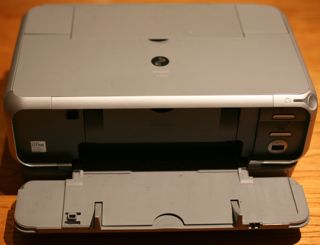
external.jpgEver since I attended a workshop on stepper motors at Dural conducted by Peter VK2EMU I've been watching for the site of an inkjet printer by the side of the road and this morning there was a rather wet Canon calling me...

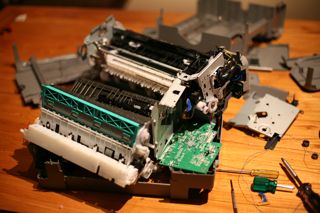
After about half an hour of messing about the device was a wreck but these printers sure are a treasure trove of useful parts for the home robot maker: cogs, rollers, pulleys, switches, sensors and motors. Regrettably, this model doesn't use stepper motors but rather they seem to be DC motors with a rotary encoder linked to each one.wreck.jpg

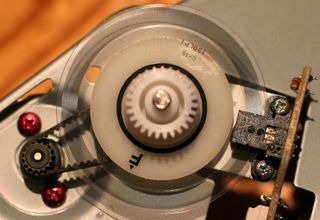
The encoder disk is amazingly fine and it passes through an optical reader which I guess is rather like the encoder in a mouse. The markings are 7120 G516 but so far I haven't found a data sheet for them. The board has 4 wires coming from it so there's not too many options.encoder.jpg

Anyhow, despite my disappointment about the lack of steppers, I did score four very nice DC motors that seem to run well on about 3 volts and will be suitable for computer control or making little robots like this.parts.jpg

It's truly amazing the amount of perfectly good electronics that are available for free at council junk collection times.

Monday, March 24, 2008

A Chat with Ben and Pete - Episode 20

In this episode we chat about:
  • Ben's Time Capsule experience
  • OmniFocus 1.0.1 review
  • Safari 3.1
  • Bicycle news from Ben (he didn't get the African Hair Sheep gloves)
  • Ham Radio News from Pete
Subscribe in:

Saturday, March 22, 2008

Atmega8 audio oscillator

adcro.jpgHere's a simple sine wave audio generator. It generates a nice looking, and sounding sine wave by using a resistor A/D converter connected to 8 pins on port D. To the right is the waveform as displayed on a CRO. Running at 8Mhz (internal oscillator) it puts out a 400Hz tone.

adaudioboard.jpgI generate the 256 constants for the samples of the sine wave with a little python program - the output is pasted into the C source code. The board you see here is a nifty little target board from Evil Mad Scientist.

The resistor ladder is an R-2R design using 10k and 20k resistors. Here's the circuit I used.

The python code is shown here.


from math import sin, radians

for i in range(256):
degrees = i * 360 / 255
value = (sin(radians(degrees)) + 1) * (255 / 2)
print "0x%02x," % int(value),
if ((i + 1) % 16) == 0:
print


And here is the actual code for the chip:


#include // Defines pins, ports, etc to make programs easier to read
#define F_CPU 800000UL // Sets up the default speed for delay.h
#include

#define DELAY_MS 0

const int sinevalues[] = //256 values
{
0x7f, 0x81, 0x83, 0x87, 0x8a, 0x8e, 0x90, 0x92, 0x97, 0x99, 0x9d, 0x9f, 0xa2, 0xa6, 0xa8, 0xac,
0xae, 0xb2, 0xb4, 0xb6, 0xba, 0xbc, 0xc0, 0xc2, 0xc4, 0xc7, 0xc9, 0xcd, 0xce, 0xd0, 0xd3, 0xd5,
0xd8, 0xda, 0xdd, 0xde, 0xe0, 0xe3, 0xe4, 0xe7, 0xe8, 0xe9, 0xeb, 0xec, 0xef, 0xf0, 0xf1, 0xf3,
0xf3, 0xf5, 0xf6, 0xf7, 0xf8, 0xf9, 0xfa, 0xfa, 0xfb, 0xfc, 0xfc, 0xfd, 0xfd, 0xfd, 0xfd, 0xfd,
0xfe, 0xfd, 0xfd, 0xfd, 0xfd, 0xfd, 0xfc, 0xfc, 0xfb, 0xfa, 0xfa, 0xf9, 0xf8, 0xf7, 0xf6, 0xf5,
0xf4, 0xf3, 0xf2, 0xf0, 0xef, 0xec, 0xeb, 0xea, 0xe8, 0xe7, 0xe4, 0xe3, 0xe1, 0xde, 0xdd, 0xda,
0xd8, 0xd7, 0xd3, 0xd2, 0xce, 0xcd, 0xc9, 0xc7, 0xc6, 0xc2, 0xc0, 0xbc, 0xba, 0xb8, 0xb4, 0xb2,
0xae, 0xac, 0xaa, 0xa6, 0xa4, 0x9f, 0x9d, 0x99, 0x97, 0x95, 0x90, 0x8e, 0x8a, 0x87, 0x85, 0x81,
0x7f, 0x7a, 0x78, 0x76, 0x71, 0x6f, 0x6b, 0x68, 0x64, 0x62, 0x60, 0x5b, 0x59, 0x55, 0x53, 0x51,
0x4d, 0x4b, 0x47, 0x45, 0x43, 0x3f, 0x3d, 0x39, 0x37, 0x34, 0x32, 0x30, 0x2d, 0x2b, 0x28, 0x26,
0x25, 0x22, 0x20, 0x1d, 0x1c, 0x1a, 0x18, 0x16, 0x14, 0x13, 0x11, 0x0f, 0x0e, 0x0c, 0x0b, 0x0a,
0x09, 0x08, 0x06, 0x06, 0x04, 0x04, 0x03, 0x02, 0x02, 0x01, 0x01, 0x00, 0x00, 0x00, 0x00, 0x00,
0x00, 0x00, 0x00, 0x00, 0x00, 0x01, 0x01, 0x01, 0x02, 0x03, 0x04, 0x04, 0x06, 0x06, 0x07, 0x09,
0x0a, 0x0b, 0x0c, 0x0d, 0x0f, 0x11, 0x13, 0x14, 0x15, 0x18, 0x19, 0x1c, 0x1d, 0x20, 0x22, 0x23,
0x26, 0x28, 0x2b, 0x2d, 0x2f, 0x32, 0x34, 0x37, 0x39, 0x3b, 0x3f, 0x41, 0x45, 0x47, 0x4b, 0x4d,
0x4f, 0x53, 0x55, 0x59, 0x5b, 0x5e, 0x62, 0x64, 0x68, 0x6b, 0x6d, 0x71, 0x73, 0x78, 0x7a, 0x7e
};

int main()
{
DDRD = 0xff; // port D all output
while(1)
{
short int i;
for(i = 0; i < 0xff; i++)
{
PORTD = sinevalues[i];
//_delay_ms(DELAY_MS);
}
}
return(0);
}

Thursday, March 20, 2008

Got AD9851 Direct Digital Synthesiser working.

There's a lot of interest in ham radio circles around the new DDS chips which can act as a high stability VFO over a wide range with very fine control.

DDS CRO.jpgAfter hearing about them at a NSW Home Brew meeting, I purchased an AD9851 on eBay and have had about a week of frustration trying to program the thing. You need to send them a clocked 40 bit sequence to set the frequency.

I have been playing with a variety of Atmel AVR processors on various boards and in the end I found some wonderful software for the AVR Butterfly board by Stephen Weber, KD1JV, which has several versions including one for a transceiver and another for a straight VFO. (I'm using the VFO version). Programming was via an AVR ISP MkII rather than the serial protocol, I'm sure either would be fine.

The AVR Butterfly board includes a display and a 4 way rocker switch (plus push) that is used to control the frequency.

DDS Display.jpgNext steps are to put this in a nice box with more robust buttons, output filtering and amplifier. In summary, this gives the builder a very flexible oscillator for not many dollars. It's certain to become a core part of many future radios coming out of the Marxy lab in the future.
So, thanks so much to KD1JV for his excellent software, supplied with source, that has got me started and thanks to members of the NSW Home Brew group including John VK2ASU for his encouragement and offer of a chip in case I'd "smoked" mine.

An AVR Butterfly is about US$20 (a bargain) and I paid AU$50 for the AD9851 plus 30Mhz oscillator and a carrier board, which I consider pretty good all up.

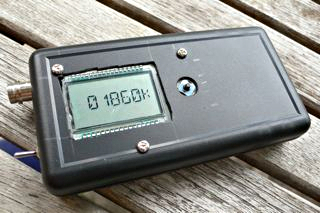
DDS in box.jpgI've put this prototype in a little box to serve as a portable digital signal generator. Tried to run it off two AA batteries but the voltage was a little low for the 30Mhz oscillator to work reliably. (The AVR Butterfly is perfectly happy at low voltage though).
Saturday, March 15, 2008

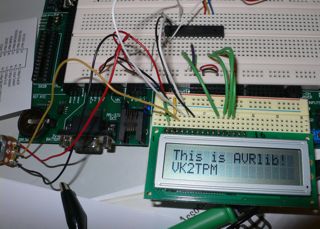
ATMega8 driving HD44780 LCD

AVRLibLCD.jpgBaby steps here folks. I've just got my Atmel ATMega8 to drive an HD44780 LCD using the 4 bit parallel interface. (Previously I've been using a serial interface which is much simpler).

All the heavy lifting is done by AVRlib, a great library with lots of helpful libraries for driving external hardware.

Beware, there is a very similarly named library AVR-Libc, which also looks good.

I'm driving the LCD in "Port interface" mode and using the 4 bit data mode. As speed isn't important for my application I've chosen to save the extra 4 dataport pins.

Here's my config from lcdconf.h:


#define LCD_PORT_INTERFACE

// Enter the parameters for your chosen interface'
// if you chose the LCD_PORT_INTERFACE:
#ifdef LCD_PORT_INTERFACE
#ifndef LCD_CTRL_PORT
// port and pins you will use for control lines
#define LCD_CTRL_PORT PORTD
#define LCD_CTRL_DDR DDRD
#define LCD_CTRL_RS 2
#define LCD_CTRL_RW 3
#define LCD_CTRL_E 4
#endif
#ifndef LCD_DATA_POUT
// port you will use for data lines
#define LCD_DATA_POUT PORTD
#define LCD_DATA_PIN PIND
#define LCD_DATA_DDR DDRD
// access mode you will use (default is 8bit unless 4bit is selected)
#define LCD_DATA_4BIT
#endif
#endif


My wiring for the pins on the LCD circuit board is as follows:


  1. Vss 0V

  2. Vdd 5V

  3. Contrast Pot 10K wiper

  4. RS - C2

  5. R/W - C3

  6. Enable - C4

  7. D0 No Connection

  8. D1 No Connection

  9. D2 No Connection

  10. D3 No Connection

  11. D4 - D4

  12. D5 - D5

  13. D6 - D6

  14. D7 - D7

  15. No Connection

  16. No Connection


Many thanks Pascal Stang!

Monday, March 10, 2008

A Chat with Ben and Pete - eposide 19

iPhone 2.0
This week we talk about:
  • About the podcast
    • Change of name?
    • Suggestions and Feedback? Perhaps we should talk in more depth about topics?
  • iPhone 2.0 software launch and SDK
    • Ben hasn't been able to get the SDK yet:
      • Friday signed up to get the SDK and all day the email link didn't work
      • Saturday email link worked, logged in to find a page without functionality
      • Hit a link to download SDK and got back to the register to download page again.
    • Engadget posts an excellent SDK comparison chart
  • Internet Explorer 8 beta
    • Supports CSS 2.1 and they have open sourced their CSS test suite
    • Mashups built in:
      • Activities. You can do things like select an address, right click and go straight to maps (or see a preview in the menu)
      • Web Slices. A good example is eBay where you can follow an item and place a bid directly from the toolbar
    • They're not going all out. SVG is still unsupported
    • It has a javascript debugger!
  • Google Sites
    • You need to have your own domain with a email account at that domain to get started
    • Features:
      • It uses a wiki style of editing of pages
      • Very simple “list” feature that can be used for simple database tables
      • Built in search
      • Navigation tree
      • Editable nav bar, logos etc
      • Create page: web page, dashboard, announcements, file cabinet, list
        • Dashboards are made up of “gadgets” such as image, calendar, document, picasa web slideshow, presentation, spreadsheet, video, recent items…
    • It certainly is designed to bring together all the Google Apps
  • Silverlight 2
    • We all saw the impressive World Wide telescope demo at Ted, and the intro to the technology at last year's Ted
    • The Hard Rock Cafe launched it's new memorabilia web site at the mix conference with a very impressive demo of Seadragon in Silverlight 2 (it's live here)
    • A good article about data and web services support in Silverlight 2 is on The Register
      • SOAP support by importing WSDL / generic XML support (like YUI?) / JSON support
      • No REST however.
      Download

Sunday, March 09, 2008

PSK31 on 20m is becoming very active

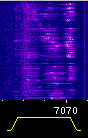
99% of my Ham radio activity is now on PSK-31. This interesting mode is very efficient and lets me chat, keyboard to keyboard, with interesting folks around the place. Kind of like Instant Messenger but with radio for transport instead of the internet.

I was having reasonable success but thanks to the kind assistance of VK2HRE in Geelong, I've now got my RF Feedback issue somewhat under control.

Running just 5W into a simple 20m dipole a little over the roof, I have chatted with Japan, Bourail (near New Caledonia), Bribie Island (off Queensland), New Zealand, NSW, QLD, VIC, SA, and Tasmania.

Picture 2.png

Initially, I tried 80m and 40m but didn't hear much activity, probably mostly due to the interference I suffer here in the suburbs probably from switching power supplies. Now that I've switched to 20m, 14.070Mhz and thereabouts, the band has really come alive.

In case you haven't seen this before, each of those vertical traces is someone talking, none of the signals shown above are very clear but probably 60% readable.

Some of the stations seem to be only interested in collecting contacts, they exchange information and then say good bye. There are some very nice folks out there keen to have a real chat.

Update: had a brief contact with RWØLM who is located in Vladivostok, Russia. This is my furthest contact so far and amazing given that I'm running just 5W here.

Saturday, March 08, 2008

Atmel Atmega8 ICSP on breadboard

icsp.jpgOver the past year, I've given up on the PIC micros and have been getting up to speed with the AVR ATMega processors. My favourite is the ATMega8 and 168 which come in a 28 pin DIL package and have loads of I/O.

I've purchased a few boards, made a reasonable one, but for prototyping I keep coming back to the breadboards.

First off I made a simple PC parallel port programmer which worked but was rather inconvenient for me and would stop the project running after programming. In the end I purchased the AVRISPMKII which is really excellent and works perfectly with my Mac. This device has some smarts which set it apart from the simpler devices out there. The multi-coloured LED tells you if it's seeing the voltage it expects to see for example.

The prototyping board is a really excellent on I bought from Parallax some time back called the "Professional Development Board #28138" it has on board switches, LEDs, audio amp and speaker, potentiometers, seven segment displays, serial port, real time clock etc etc. Of course it can be used with any CPU.

Anyhow, the news here is that I've made up a little adapter board that converts the 6 pin In Circuit Serial Programming into both the 10 pin version, my own in-line version and now a plug with fly leads as shown above that I can plug directly in to a proto board.

The objective of all this madness is to build some ham applications of which there are many.

I'm using:


So far I've got useful things going such as reading a value from an analog to digital input and writing it out via serial to an LCD display.

I notice that the ATMega8s come set to run at 1MHz with the internal RC oscillator, this works just fine but I turn them up to 8MHz internal and find this accurate enough to do serial at 9600 baud.

Friday, March 07, 2008

Flashback to MacOS 9 - we've come a long way

os9desktop.pngA sequence of computer hand-me-downs here left us with an old PowerPC iBook with no owner. Leopard won't run on it and I'm so in to all the Leopard features and multi-touch stuff that it's getting hard to use.
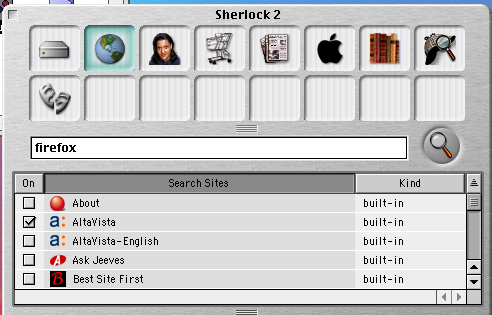
Digging through my disk collection I found the original recovery CDs and thought I might travel back in time and try running MacOS 9 again.

Oh nostalgia!

It wouldn't connect to my WPA2 encrypted network so I shared the ethernet from another Mac and that worked just fine. The old Internet Explorer can't render many popular pages, this blogger page was rather scrambled and ironically, the Low End Mac page was unreadable.

os9sherlock.pngRandom notes: The old launch bar along the bottom of the screen was very functional compared to the dock we have now. Fonts all look rather jagged. Sherlock doesn't work any more, there must be a proxy that no longer exists.

No Google in there at all!

There is an early iTunes and iMovie but really what were we thinking with that brushed metal look?

It certainly shuts down faster than MacOS X but I would have to say that Tiger runs faster on a PowerPC G3 than MacOS 9 does which is certainly to the credit of the OS team who have done amazing optimisations over the past 8 years.

Would I go back? No way. I am totally in to Leopard and totally addicted to having a Unix shell and all those great tools available to me. I can't imagine what we'll be running in 8 years from now.os9About.png

Gosh, plenty of free memory there. I used it for a while, had a poke around some of the old apps just for fun. I wonder if I can install some sort of linux on this thing?

Tuesday, March 04, 2008

A seminar with Michael Reichmann

Reichman.jpgI had the great pleasure of attending a seminar presented by the author of one of my favourite photo web sites, the Luminous-Landscape. Despite a great turnout here in Sydney, Michael circulated around and I was able to have a personal chat, ask a few questions and even snap a picture.
Michael showed a series of images, many were familiar from his web site, and spoke about his view of where we are in photography today.

Basically, it's a very exciting time. Technology is advancing faster than ever. In the film days, Nikon would release a new "F" camera about every 8 years, now it's almost every 8 months. Are they getting better, yes, do we need to buy every new model... no.

The talk ranged over all the hot topics in photography, is digital higher quality than film (yes), is it ok to adjust the scene or clone out powerlines, an interesting debate.

Some interesting insights about the new techniques of selective colour de-saturation, high dynamic range, and focus bracketing, were shared.

Michael is a pragmatic photographer with a straight forward, ethical approach. I am grateful for the effort he puts in to sharing his experiences and promoting this fantastic subject.

Sunday, March 02, 2008

Enjoyed the local Model Railway Exhibition

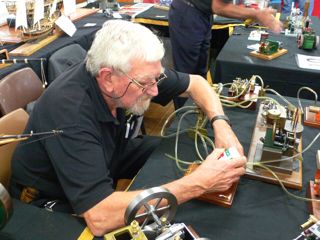
WarringahModelEngineers.jpgThis weekend is the North Shore Railway Modeller's Association 36th Model Railway Exhibition at Forestville. I always enjoy these shows but for some reason my two daughters were too busy to attend this year.
It's a wonderful sub-culture with lots of great craft being done by talented enthusiasts. I particularly like the work of the Warringah Model Engineers. These folks fabricate machines out of metal and are clearly very skilled with the metal lathe. I understand that you can now buy a decent metal lathe for around AU$3,000 which will allow you to work aluminium and brass.

Members build things like petrol motors, steam engines, and stirling engines (including one so efficient it runs on the heat of your hand).

The club meets on the second Thursday of each month at the Urobodalla Hall, Aquatic Drive, Allambie Heights, Sydney.

I mention this fact as they don't have a web site. (I guess they're hanging back to wait and see if this internet thing will last).

Saturday, March 01, 2008

Listening to a satellite on a hand held receiver

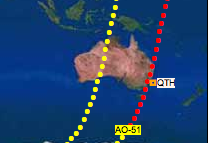
satellitePass.pngI've heard about the amateur satellites for years but never tried to listen in. I guess my assumption was that a directional tracking antenna would be required, but it seems with at least a recent device, AO-51, that's not the case.

It only passes over for a few minutes, when it does, and you find out where it is here. I entered latitude and longitude for Sydney (34 south, 151 east) and clicked predict.

This morning there was a pass that looked perfect so I wandered out into the back yard with a hand-held receiver tuned 435.3Mhz and with the antenna positioned horizontally, I was able to hear snippets of people talking.

Sorry about the poor quality, this was recorded with a little dictation recorder held up to the speaker.

Anyhow, this is very encouraging. I understand it's even possible to talk back through the satellite with a hand held. The uplink is on 145.92Mhz.

Because of doppler shift, you have to tune up as the satellite approaches and down as it runs away.

There's a nice page of suggestions on the Amsat site.

Tuesday, February 26, 2008

A great low power FM transmitter

FMTransmitter.jpgSaw this little FM transmitter for the broadcast band on the Make Blog.

I often want to listen to the Sunday ham radio broadcast but it would be great to not have to sit by the rig for the whole duration so I've used an iPod FM transmitter to relay the audio but they have very short range, even with an antenna added.

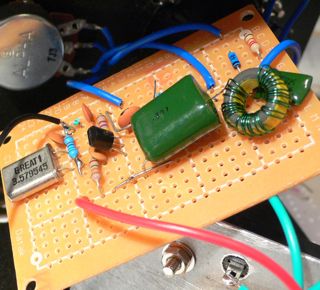
Turned out I had all the required components in my junk box. Built the oscillator first and it just worked right off, then built the buffer stage.

This circuit has an RF buffer stage so touching the antenna won't pull it off frequency. Running on a 9V battery it puts out enough power to cover the house. It's getting hard to find a spare frequency but I put it down near 88Mhz and it works very nicely.

I really love the aesthetic of "ugly" construction and it's so quick to throw together these little projects. I did release the smoke on the buffer transistor by accidentally using a 1K bias resistor in place of the 100K but after a small explosion that was fixed.

This design is to be recommended, it worked without any problems (except those of my own making) for me other than a bit of stretching of the oscillator coil to get it on band and it seems exceptionally stable given the construction.

If you tap the board it transmits a lovely metallic "clang" sound from the coil but that's to be expected.

I remember many years ago building JostyKit transmitters which had the coil etched onto the circuit board.

Monday, February 25, 2008

A Chat with Ben and Pete - Episode 18

WiFi Balloons!
This week we talk about:
  • Microsoft opening up?
  • Google news for video?
  • GSM encryption broken
    • Researchers at a Black Hat conference in Washington claim to be able to listen in to GSM phone conversations with $1000 worth of equipment
  • Balloon WiFi
  • Document collaboration with SubEthaEditDocument collaboration with SubEthaEdit
Subscribe in:Full shownotes at http://tinyurl.com/23qk6e

Saturday, February 23, 2008

PSK-20 kit completed.. finally

psk-20.jpgI ordered the PSK-20 kit, a PSK31 crystal locked transceiver for 14.070Mhz (the most active spot for PSK31) from SmallWonderLabs back in October 2007. Three months later it arrived.

It's a great radio. Plugs directly into your line in and out on a computer, I'm using a USB audio adapter as shown above and a Mac with the excellent CocoaModem software. Transmit comes on when you start sending, an inbuilt vox, which is great as my other arrangement involves an external vox box I put together to drive my Yeasu radio.

Construction wasn't completely smooth for me. One part, a surface mount 1uH inductor was missing and a bit difficult to source locally. Once complete the receiver worked right away but I had no output on transmit.

I traced RF through to U8, an MAR-3 surface mount rf amplifier that came already soldered on to the board. Mini-Kits were able to send me a couple within days. Still no rf out, it seemed like the output power transistor Q11 an MRF261 was dead. And it seems I'm not alone in this, at least back in 2001.

Found it difficult to find a substitute until VK2ZAY kindly offered me a 2SC1969. The leads are BCE instead of BEC so there's a bit of air sculpture going on but it works and I'm certain it's putting out at least 5W.

I did write to SmallWonderLabs about my problems but he hasn't replied so far.

I would certainly recommend this rig, it would go really well in a travel kit with a laptop, a wire to hang out the window and a small end fed tuner.

The box is excellent, definitely order it. All metal and the board is mounted by sliding into a rail.

Yes, I had a few challenges getting it going but the benefit is that I'm familiar with how it works and improved my skills somewhat. Perhaps all kits should have some bugs?

Update: I did get a reply from smallwonderlabs and today 14-Mar-200 the missing inductor and a replacement MAR-3 have just arrived.

Tuesday, February 19, 2008

Turned professional blogger

google_sm.gifAn exciting day!

I've just received my first ever payment from Google for AdSense revenue from my blog. Oh sure, it's only $12 but it's a milestone.

I don't blog for money, obviously, I really just blog as a way to keep notes on what I've been up to and thinking about. It is spooky sometimes to look back at your own blog posts, presumably people who write a diary have the same sensation.

Blogging is maturing, the proportion of search hits that come from blogs rather than other types of sites is going up and the material is useful and often very well thought out.

It seems amazing that not only do I not have to pay to have this blog, on my own domain even, but that they actually send me money.

For other bloggers, you might be interested that I currently get just over 100 viewers per day and my top story was about the VNC Viewer built in to Leopard, presumably because it was dugg on Digg.

Thank you for reading, I hope there's something here that's interesting.