Showing posts with label apple. Show all posts

Thursday, August 14, 2008

iTunes movie rentals in Australia - at last!

So happy to finally see iTunes movie rentals in Australia. I immediately jumped in and rented a movie through iTunes for AU$3.99.

Picture 1.png


It took 65 minutes to download, then I had to transfer it to the Apple TV.

On Apple TV I chose the movie and pressed play, it went away and authorised, then... a black screen and no sound. The movie was playing, I could pause and play and see chapters. Hmm.

In the end I did a reset settings and it played.

Quality is ok, not HD but no annoying artefacts in the one I'm watching now. $4 is a reasonable deal (plus my internet bandwidth of course). The main problem is the small range (700 by some reports), compared to my current provider QuickFlix with 32,000.

Some movies are only available for sale which seems weird.

Once a movie is downloaded you have 30 days to start watching, once you start watching you have 24 hours to view it (which didn't impress me when I had a blank screen).

Sunday, August 10, 2008

Back on 20m, doing PSK31 and Bitx20

Picture 2.pngMy primary antenna for the past few months has been an 80m dipole. It works pretty well and I hear lots of regular groups chatting but I really miss my PSK31 contacts.

There is a digital mode range on 80m (3.620 - 3.640) and I've been calling CQ there for some time but have only had one PSK31 contact on 80m and that was a conversation I stumbled across on 3.66Mhz.

The other reason to abandon 80m for now is that I've just constructed a bitx20 transceiver and am trying to get it going.

As you can see from the waterfall on the right, there's lots of PSK31 activity on 20m and I'm seeing US stations pretty well here at 3 in the afternoon.

Saturday, August 09, 2008

Apple store opens at Chatswood

GeniusBar.jpgDropped in to the new Apple store at Chatswood Chase this afternoon and ran in to well known blogger Ben and his wife (trying to get his hair cut).

On the way there I walked passed the excellent Maccentric store that has taken care of us so well in Chatswood for many years. Maccentric has a 10% off store wide sale but I must report that it was looking pretty empty.

The new Apple store, even at 3pm in the afternoon was extremely busy. Several of the staff have been imported from the US, presumably to kick things off on the right foot.

It must be tough for an existing store when your supplier opens up within a block of you. I hope they got plenty of notice and perhaps some help in moving if they so choose.

The guy that served me had a badge saying "Ask me about MobileMe" so I did.. he apologised and said that while there were still some bugs, the major outages hopefully are over. I asked about my problems with the backup phase of my iPhone sync and he wasn't able to help.

The store looks great, I'm sure they'll do well, and it seemed like a good size for the number of products.

Friday, July 11, 2008

Got a 3G iPhone pretty easily in Sydney

iPhoneQ.jpgI've been hanging out for an iPhone for a long time. Rather than going to the city I decided to head for Warringah Mall north of Sydney.

I got to the Vodafone store at about 8 for a 9am opening. There were 8 people in the queue and security guards hanging around. (The store said they were mostly worried about a robbery over night as the phones were hidden out the back).

Doing the paper work and using the Vodafone systems was an incredibly poor and slow experience. Part of the process involved ringing up and we waited 55 minutes in the phone queue. In the end I brought the phone home to "unbrick" (as they call it).

This little Vodafone store had 60 in stock. Everyone I spoke to in the queue wanted the 16Gb black version, while we were waiting a sales person from Crazy Johns was trying to offload some 8Gb models but no one seemed interested.

My home has poor signal from Vodafone and if the bars on the display are anything to go by reception is better than my past phones. In a call (to Ben) it seems like the audio is good but I do still need to find a good spot at home.

Oh the security guard you can see in the shot rushed over to tell me that I'm not allowed to take pictures after the shot above. Strange days..

Updates

So far I've bought the iPhone version of OmniFocus but the syncing update for the mac is due on the 10th (US time) so hasn't turned up yet.

NetNewswire is free so I got that but they want me to sign up on newsgator so I haven't done that yet.

The GPS seems very fast to get a fix, I walked outside and took a picture and the lat long is in the photo's exif.

I wonder why they don't allow a "turn by turn" navigator? I would definitely buy that...

The iTunes remote is kind of cute.

No glitches so far, very smooth user experience.

Update 2

Mobile Me seems to be working now and yes it pushed an email to the phone, it took about 20 seconds. Now, I understand that a single connection exists from the phone to Apple to do the pushing, I wonder if I get charged for that data?

Apps so far

The Apple Remote Control app is really great. I remember they had a patent on this and I'd have to say it blows away any other remote control, at least for talking to iTunes. This feature prompted us to set up some living room speakers connected to a mac and do some music listening.

Truphone does voice over the wifi network. I already have credit on Skype so really that's what I want but until they release I'll use Truphone. Voice quality is fine but the delay seems very long.

Sunday, April 27, 2008

Clothesline style antenna hoist for experiments

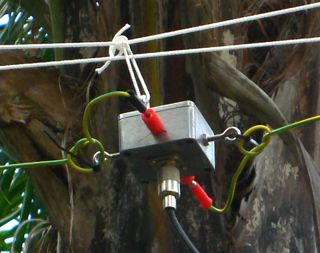
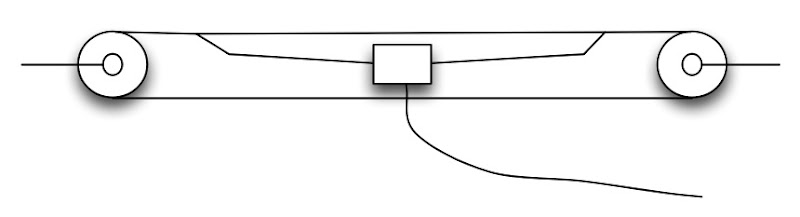
AntennaHoist.jpgI'm experimenting with antennas again and wanted a way to string up a dipole so that I could easily pull it down and make adjustments.
My best antenna is a dipole tuned for PSK31 on 14.070Mhz that is over the roof of the house but while playing with a simple wire dipole between some trees next to the house I noticed it it appeared to pick up less electrical hash and it got me wondering if I should try suspending the dipole out beside the house where I currently have an end fed long wire (that picks up tons of noise).

This is a very simple idea, I'm positive others have used it too. I bought 30m of 3mm venetian blind cord and two little pulleys. (I already have a pulley up a tree from previous squid pole activities that was used to hold up the far end).

antenna hoist diagram.jpg
It's too early to tell if having the dipole away from the house is better than having it up higher but over the house but it's great to be able to drag it out and back in again for tuning. (I've got this dipole perfectly tuned on my second clipping).

Yes, I will need some weather proofing before leaving the balun out too long.

Friday, March 07, 2008

Flashback to MacOS 9 - we've come a long way

os9desktop.pngA sequence of computer hand-me-downs here left us with an old PowerPC iBook with no owner. Leopard won't run on it and I'm so in to all the Leopard features and multi-touch stuff that it's getting hard to use.
Digging through my disk collection I found the original recovery CDs and thought I might travel back in time and try running MacOS 9 again.

Oh nostalgia!

It wouldn't connect to my WPA2 encrypted network so I shared the ethernet from another Mac and that worked just fine. The old Internet Explorer can't render many popular pages, this blogger page was rather scrambled and ironically, the Low End Mac page was unreadable.

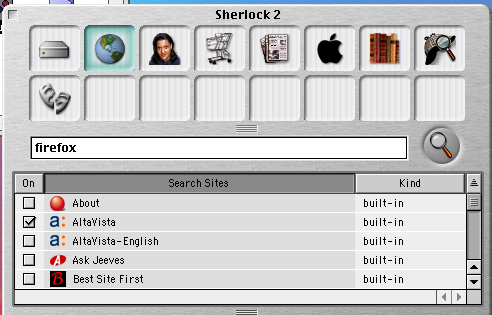
os9sherlock.pngRandom notes: The old launch bar along the bottom of the screen was very functional compared to the dock we have now. Fonts all look rather jagged. Sherlock doesn't work any more, there must be a proxy that no longer exists.

No Google in there at all!

There is an early iTunes and iMovie but really what were we thinking with that brushed metal look?

It certainly shuts down faster than MacOS X but I would have to say that Tiger runs faster on a PowerPC G3 than MacOS 9 does which is certainly to the credit of the OS team who have done amazing optimisations over the past 8 years.

Would I go back? No way. I am totally in to Leopard and totally addicted to having a Unix shell and all those great tools available to me. I can't imagine what we'll be running in 8 years from now.os9About.png

Gosh, plenty of free memory there. I used it for a while, had a poke around some of the old apps just for fun. I wonder if I can install some sort of linux on this thing?

Thursday, February 07, 2008

MacBook Air in Australia

My MacBook Air arrived this morning. Shipped direct from Shanghai. I do love it - light enough to carry around every day but with a lovely full sized keyboard and screen.

The remote DVD/CD software, which you install on other machines from the first install DVD works nicely. I didn't think I'd need it until I tried to install from a shared iWork 08 disk and it told me that it wouldn't let me do that.

Random thoughts so far:

The screen is really bright. The keyboard has FKeys for keyboard illumination brightness (I've never had a laptop with illuminated keys so maybe this isn't new). It has a disk eject key but it doesn't eject the remote disk. 2Gb of RAM is a good thing of course. The magnetic property of the magsafe power plug are a good thing in that they make it easy to plug in - it jumps to the right spot.

Part of the "thin" effect is an optical illusion. For me, being light weight is more important than being thin.

The big trackpad seems good, haven't fully tried all the features but two finger scrolling works very nicely thank you.

Great that it came with video adapters for both VGA and DVI, I'm sick of buying those. I think I'll have to buy the ethernet USB device to fit in with some workplaces.

At the office where I'm working at the moment I've hit a terrible networking bug that crashes anything that uses WebKit when I try to use a Microsoft authenticated proxy (even Dashboard crashes) so I've held off installing the 2007 security update in the hope that the problem started there - will report back with an answer in a few days. Update: Yes I can confirm that the crash bug when using an MS Authenticated proxy is not present before you apply "Security Update 2007-009, version 1.1". So, if you must use one of these proxys DO NOT apply this security update.

I'm being frugal about space but really 80Gb is quite sufficient. I won't be using this for my music or photo collections. I've installed my favourite apps and I still have 50Gb free.

Hey, it's missing the little Apple remote! Well, we have plenty of them so no problem here, and yes it does respond to a remote and Front Row is all there as you'd expect.

Too early to tell about battery life but right now it's showing 3:42 remaining.

These things will sell very well in my opinion.

Update: The single USB port is really high power, and that's handy. I have a serial ATA case that I've always had to plug in to two USB ports or a plug pack to power, turns out that the USB port on the Air is rated to 500mA and powers it without any problem.

Tuesday, December 25, 2007

A call for cheaper public wifi

We're staying at a nice hotel for xmas. The kids and I can't live without our internet fix for even 24 hours - is that addiction?

The internet is available here (Sydney) but only via an ethernet socket and it's AU$30 per day!

While I'm away, it's the Asus EEE PC for me, while my daughter in the next room has a PowerPC iBook running Tiger.

Obvious solution: plug the iBook into the wall ethernet, system preferences, sharing, internet tab, share internet connection over Airport - works really well. (Don't forget to adjust power management to avoid sleeping while plugged in).

While I'm on this topic, why don't cafes have free wifi? I've seen it in one cafe using an Unwired connection. This is presumably a very easy to deploy solution, an unwired (pre-WiMax I think) modem and a wireless router to share it in the cafe. Surely whatever the cost of this to the business would be outweighed by the extra sales to people staying longer to use the internet.

Finally, if we must use a commercial Wifi connection, provided by the same people that provide our home connections (Optus, Telstra) then why can't we log in with the account we already have at home?

Anyway, enough moaning from me, merry Xmas.

Saturday, December 15, 2007

80m loop antenna experiment failure

Just a brief post about some experimentation that has failed.

I've been trying to build a loop antenna for 80m (3.5Mhz) to reduce local electrical noise.

The idea was a 2m diameter square loop built from 1m lengths of electrical conduit. First I built with 1 turn and a 300pF polyvaricon capacitor and it resonated nicely at about 20Mhz. Next went to 3 turns and it seemed to resonate around 9Mhz, then 4 turns and I can't get this thing to resonate at all.

No idea what I'm doing wrong or why this won't work. The family is a little bemused about the structure in the back yard - I tried to pass it off as my version of a Xmas decoration.

I did learn a bit about conduit - there are two main kinds around, electrical and water. Water pipe is designed to carry water under mains pressure so it's much stronger.

Update: Check out Alan's excellent response. I will get back to this project soon.

Saturday, November 10, 2007

ITunes feature creep getting out of control

iTunes started out as a fantastic tool for organising, searching, browsing and playing digital media files. The ability to browse by genre, album, date added and so on, was a revelation to me - and it was really fast too.

But now, iTunes has changed so much the name doesn't even suit it any more. 

Here's my list of features that have ended up in what used to be iTunes:
  • Update firmware in telephones
  • Purchase electronic books
  • Synchronise calendars
  • Monitor RSS feeds
  • Share music on the local network
  • Burn CDs
  • Enforce parental controls on content
  • Backup phones and one model of iPod
  • Movie rentals soon too?
Does this sound like feature creep to anyone else?

When Apple created iSync and the whole Sync Services concept, it sounded like we would get a single place for doing that hard task of synchronising our computers with our portable devices.

Of course it's more extreme on Windows where an install of iTunes also installs QuickTime, I think they should extend this software beach head and also install Safari 3 (weird how it's still a beta even though Leopard has shipped).

It's easy to be a critic, so here's what I'd suggest:
  • Split up the iTunes functionality, give us back that simple media player with fantastic slicing and dicing features
  • Create a "device manager" that is responsible for talking to devices, including media players, Apple TVs, phones, cameras, tablets, and doing the syncing that needs to be done.
  • Put the iTunes store on a web site and just make it part of the general excellent Apple online store experience, sure you can link from tracks but don't make me shop inside that little box.
iTunes must be well overdue for a re-write, I still see the old watch cursor from classic days so my guess is that it's still a carbon app - that must be a nightmare code base to work on!

There's no doubt that the iTunes team has been the first to show us new user interface features that have ended up in the OS: smart folders, live search, and now coverflow. That must be a hot team, but I think it's time to split up and focus.

Thursday, November 08, 2007

VNC client built right in to Leopard

After installing Leopard I've been gradually re-installing the apps I need only as required. Just now I wanted to connect to a server via VNC and was about to re-install ChickenVNC but instead thought I'd try something...

We know that Leopard supports screen sharing and that it's built on top of VNC. It turns out that you can do a Command-K in the finder, connect to server, and use a url like this: vnc://hostname to connect. If it's not running on the default VNC port of 5900 you can add the port in the usual way as shown in the picture.

As dreena is a a linux box, I get a warning dialog box as shown. The client seems very snappy and works nicely.

When I connect to an old Panther MacOS X Server it works just fine and obviously doesn't give the warning about keystroke encryption. Digg this.


Update
I've noticed that the built-in VNC doesn't interoperate too well with the RealVNC server for windows. In this case Chicken Of the VNC seems to start up the session much faster for some reason.

Sunday, October 28, 2007

An AppleScript studio application

AppleScript studio is kind of the Visual Basic of MacOS X. (I'm sure some people will correct me firmly on that statement).

In order to try it out under Leopard I picked a simple project to give me something to shoot for.

I have a little Yaesu FT-817 that supports a remote control serial protocol they call CAT. It's 4800 baud, 8 bit, 2 stop bits. Each packet is 5 bytes, the last byte being the command and the other bytes are the data to go with it.

My objective is the program shown above, it periodically retrieves the current frequency and mode from the transceiver and shows it.

To interface with a common PL-2303 USB serial device, I installed the excellent (and free) Serialport X scripting addition. Thanks Art Coughlin!

To install you create a folder called ~/Library/Scripting Additions/ and stick it in there.

Prototyping was done in straight AppleScript until I was able to read and display the frequency. Next to XCode where I created an "Applescript Application". It reminds me a bit of HyperCard, you open the .nib file and in the Applescript properties tab you can set a handler for a button to call an "on clicked theObject" method in your script for example.

After some frustrating messing about, I've achieved my objective. Once you've chosen the serial device an idle handler refreshes the frequency. 

To make the built application run on a machine without the Serialport X applescript already installed you need to bundle it in the application. Thanks to the instructions here I was able to automate this. Note that I needed a -r after CpMac to copy recursively.

I find the AppleScript language frustrating for reasons I can't fully fathom, this "Applescript for python programmers" table was a great help to me as I'm very comfortable with python.

For what it's worth, I've put my xcode project here, hope it helps someone.

Friday, October 26, 2007

Leopard, great, but not totally without problems

Ben and I were first in line at MacCentric at Chatswood in Sydney to buy MacOS X10.5 Leopard today.

I rushed home and installed it as an upgrade on my Intel iMac. An upgrade takes quite a long time.

When done, Spotlight didn't seem to be doing anything. For some reason it had excluded my internal drive, a preferences change was required to fix this.

After removing my internal drive from the exclude list it seems to be taking hours to index. After an hour it's only 3% done.

So far, all my applications work just fine. Safari seems clearly faster than before, Mail is good. I showed my daughter some of the new features in iChat and she collapsed in laughter when seeing fish swimming behind Ben - this OS is going to be a hit for all the wrong reasons I think.

Tried to get started with Time Machine backups but I need a really big drive by the looks of things. Fair enough.

I ran in to some problems with .Mac syncing. I kind of got stuck in a loop resolving conflicts.

It's a pity that a new install these days involves indexing a large drive which takes time and kills the CPU for some time (hours). This gives an impression that things are going slowly - perhaps this phase should be deferred until the user has played with all the new toys for a while.

Anyhow, lots of new things to play with: Spaces looks great, I do like the new Dock, Mail seems more capable, and I can't wait to learn about Cocoa 2.0. A fun weekend lies ahead...

Updates

I've done a few installs now and here's my notes on an updated machine:
  • Installs are much faster than an update
  • I've had some minor problems with PPTP VPNs (for one thing the connect/disconnect menu item gets a bit confused) I've also had traffic stop and attempting to ping then gives me some error about being out of space.
  • iTunes has hung on me
  • Previously I built my own python but this causes problems for xcode
  • I can't build python 2.5.1 at the moment - compile error
  • All my apps just work
Due to the messing I've done under the hood, such as building my own python in the past, I'm now backing up and preparing to do a fresh install.

Sunday, October 21, 2007

Dxpedition with OziPole at Sydney's North Head

Alan VK2ZAY and I went bush this morning in search of a low noise HF location where we could play with antennas, balans, tuners and annoying flies.

I recently built the excellent Ozipole kit and this was a good opportunity to try it out, primarily on 7Mhz.

I've been searching for a location close to Sydney but as far as possible from power lines and houses and Fairfax Walk at North Head seems perfect.


View Larger Map

As expected, this was a superbly low noise location, and as it was the Scout Jamboree of the Air today there were tons of stations about. Unfortunately VK2WI was on low power on 40m and pretty hard to hear.

We played with several antennas and generally had a pleasant time. Notes for the next outing:
  • Take a table of some sort
  • Shade if possible
  • Find a way to carry the gear, (the battery is rather heavy)
  • Something to repel flies
It was wonderful to hear stations perfectly clearly at less than S1, at my home they need to be overwhelmingly strong to be heard. I'll go back to this location - any other suggestions around Sydney would be most welcome.

Thanks Alan for the fine company. He has blogged about this outing here, which refers back to this post so I hope the internet doesn't get runaway feedback and explode.

Update: Turned on 80m this morning at home at 6am and there is no noise. Here's a sample. So the band noise at my QTH must be from an appliance or power supply or something. I need to go hunting for it and I'm also reading up on receiving loop antennas that might let me null out the signal.

Friday, October 05, 2007

HF QRP pleasure with an FT-817

I've just spent a few very pleasant days south of Sydney at Gerroa.

We hired a house on a hill looking out over the beach and I took a Yaesu FT-817 and a slightly modified MFJ random wire tuner along for fun (all I did was add banana sockets for attaching a wire to it).

I strung out about 20m of wire from the balcony to a piece of wood in the yard and it tuned up nicely on 80m, 40m, and 20m. Had a few contacts running just 2.5W (on the in-built rechargeable batteries).

80m is blotted with interference at home. At this location it was magnificently quiet until about 5:30pm when bad televisions get turned on. I really want to find a location with no noisy power lines or TV sets to disturb by HF listening.

Only a few contacts, mostly listening. Just before we packed up I tuned around on 2m and found a very active local community.

Spent the time reading the ARRL Handbook, 2007 and a book by Melvyn Bragg, both really dense and fascinating.

On our last morning, went for a walk with my wife who slipped on a ramp and broke her leg. So quick, so easy. My thanks go out to the good folks of Gerroa who helped us to a car, a doctor and a hospital.

It's amazing how easily we can be injured. Such fragile creatures.

Friday, August 17, 2007

Solution to Keychain update hang on MacOS X

MacOS X has fewer weird problems than Windows but it's not totally without issues. For the past month I've had a terrible problem where anything that needed to update the keychain would kill the machine to the point of needing a reboot.

Normally, I don't need to do much maintenance but I tried the following:
  • Booted from my install DVD and ran disk utility (that did fix some problems including a file I couldn't previously delete)
  • Running Utilities/Keychain Access and getting it to repair my keychain (it found nothing wrong)
  • Deleted keys with Keychain Access that were used by apps that gave me trouble.
In the end I found a pointer on an Apple mailing list to this article. In the end all I did was:
  • sudo mv /var/db/CodeEquivalenceDatabase /var/db/CodeEquivalenceDatabase.old
  • reboot
And all is well.

Reading around, it seems this is a rare but repeated problem.

Saturday, August 11, 2007

iLife & iWork 08 in use

We're making a DVD at the moment and I've just purchased iLife and & iWork 08.

This DVD has a video component that is being edited together using iMovie and a slide show that we're preparing in Keynote.

Anyhow, iLife and iWork came out this week so I jumped in and bought them. Here's my rundown after giving them a hammering for a day.

The stand-out is iMovie, they seem to have massively re-designed the program around the concept of "event" organised film strips that show you the video as if a film strip that has been unravelled along a light table. You can "scrub" the mouse over the clip and see it animate as if you were spooling a tape over a tape head. It's incredibly fast and smooth to use and a great way to find the best bits in a sequence of video.

iMovie has a sort of all grey look and makes excellent use of the big wide screens we all have now. My impression is that iMovie is pretty much professional grade, with a simple to use user interface. It's rock solid and if it's possible the DV video looks better than it did before for some reason. Update: a feature I rely on, splitting the audio from the video, is actually missing. It turns out others have noticed missing features too. I had assumed it was there but I hadn't found it yet.

The actual video is now stored in Event folders inside your Movies folder in your home directory. The thumbnails for the fast video scrubbing are built and stored there too. I like the way the actual storage is now more transparent - I know what to back up and what to transport to another machine.

Keynote looks pretty much the same but has some features I was wanting such as the ability to crop images inside it. There's an amazing "magic alpha" feature that I have ended up using in this production - this lets you punch out an image from it's background by making the background transparent.

I'm disappointed at the quality of the exported movie from Keynote, given how fantastic it looks on screen. An 800x600 DV export shows jaggies on the text for some reason. I'll try exporting at higher resolution and letting iDVD do the downrendering. Update: I exported as full resolution H264 and it does look much better.

Pages just gets better all the time, advanced features like change logging, and a formatting tool bar make it more familiar. I really love it but it has always seemed a bit sluggish to use. At the office we've pretty much standardised on NeoOffice/OpenOffice, they do a particularly good job of exporting to PDF which is the standard way to publish now. In particular, OpenOffice's export to PDF generates the table of contents that is displayed down the side in PDF readers, Pages doesn't do that for some reason.

Only played with Numbers a bit. Looks good and they've taken a page layout view of a spreadsheet where bits of spreadsheet can float between images and superb charts. I'm a bit puzzled why they don't just merge it in to Pages and make it like Works used to be.

All up, these programs handle large graphics embedded in documents far better than Microsoft's products ever do, and that's increasingly the way we work today. Combined with OmniGraffle for drawing (there's no need for Apple to compete with such a great product), this is all I need to work.

Sunday, July 08, 2007

Antenna hoist installed

It's great to be back home after a few weeks away. Apart from cleaning up the pool (which had gone green), doing my washing, and trying to sync up with local time, I've been trying as always to improve my HF antennas.

Hanging an 80m dipole on a suburban house is no easy task, my goal is an inverted V from the tree at the front of the house to the tree at the back of the block with the feed point above the roof of the (two story) house. 

Shown here is a vertical pole with a pulley at the top that raises up the balun feed point. This arrangement is still not idea, it doesn't clear the peak of the roof and those palm trees you can see in the image are a real problem on our block - they invariably grow and catch on wires I string up.

Just before I went away, "Experimental Methods in RF Design" by Wes Hayward and others, arrived. What a fantastic book! For anyone interested in designing and building RF projects, this is a must get book, clearly it has influenced many other designers.

Saturday, June 23, 2007

Giant iPhone demo screens at Apple stores

These giant iPhones are in the window of the local Apple store here. They play a full demo movie that looks great. 
I commented to the guy watching that the phones are much bigger than I'd hoped. 

He laughed and said he was trying to figure out how to get out of his existing contract. 

Interestingly he said he was keen to see what third party applications would be available for the device.

The Cingular (AT&T) outlet in the same shopping centre just had a small board saying iPhone coming June 29. Interesting that the Apple store gets the flashy display but you have to go around the corner to actually get one.

Saturday, June 16, 2007

WWDC over for 2007

The Apple conference was huge this year. A record of more than 5,000 attendees. Fantastically organised but it's so big that there were queues for everything. 

When Leopard ships later this year it's going to be great. I can't wait to see what developers build on top of it.

As always with conferences, I got snippets of valuable information from the sessions, but the greatest insights came from conversations with other developers during breaks. Met a bloke today who builds highly scaleable apps in python which are deployed on Linux for telcos - he explained to me how they manipulate the global interpreter lock so that their heavy lifting threads make use of additional cores.

People came from all over the world, such as Mr Xin above, who assured me that his organisation looked fine on the web form. (From a distance I first thought it was that famous AACS key again).

I've had a hard time with jet lag this year. I seem to be in some unknown third time zone, not San Francisco, and not Sydney. Wide awake at 4am local time.

Incidentally, this is being created using the Safari 3 public beta which seems excellent to me.