Thursday, January 04, 2018

Vanlife begins - a new toy, a Toyota Hiace LWB van to camp in

Very excited with my purchase of a rather beaten up 2000 Toyota Hiace LWB van with some basic camper van facilities built in.

The back is rather filled with a full size double bed mattress but underneath there is lots of storage space.

It came with a 100W solar panel on the roof and two batteries making up 200Ahr. There is pretty nice LED light bars and oddly little twinkly lights that I'll probably remove.

Already I've made a few improvements to the electrical system by upgrading the charge controller to one with a digital readout of battery voltage and larger capacity. Before:


After:


I plan to run more 12V equipment, obviously ham radio gear, so I've added a distribution board:


The van drives well (I drove it back from Wollongong to Sydney this morning) and the most amazing discovery is that the radio has shortwave!


Surely it was meant for someone like me. Table for outdoor cooking and battery box.


The mattress rather fills the space:


Lots of storage underneath. Here's the drinking water (with pump) and gas.


Battery box has been done pretty well although I fear dropping a spanner in there.


Looking pretty comfortable now.


Wednesday, January 03, 2018

Podcast recording with distributed guests

In the past, when recording a podcast where the guests are in different locations, I've used Skype and a utility that lets each guest record their audio locally. While you can just have the host record the whole Skype call, network issues can reduce the quality of the remote guests. Since Microsoft purchased Skype they've messed with it and prevented the old recorder software from working.

Recently I had the pleasure of being a guest on the Vertical Hold tech podcast with prolific tech journalists Adam Turner and Alex Kidman. The show was a kind of wrap of 2017 and look ahead to 2018, you can hear it here or subscribe wherever good podcasts are offered.

I mention this because we recorded the podcast using a web site called Zencastr. Each party joins the conference using just their web browser (Chrome is recommended) and it works like a group call. The real magic is that each person's audio is recorded locally in the browser and uploaded to the server in full quality as you go. You wouldn't know this was going on except that at the end of the recording we had to keep the browser window open for a little while for the upload to complete.

The upshot is that the podcast sounds very good. At my end I'm using a Rode USB mic which I think sounds excellent. I did have one problem at the start, I had a Chrome extension installed that prevents HTML5 video from auto-playing and this prevented me hearing the others until I disabled it.

Zencastr has a straight forward interface, you see a list of people in the call and interestingly the type of microphone they have selected - I imagine this is useful to make sure people aren't using the built-in laptop mic by mistake. There's a "hand" button where you can raise your hand so the host can throw to you. They have reasonable pricing and a free tier with up to two guests and 8 hours recording a month.

Thanks again to Adam and Alex.


Thursday, December 28, 2017

Benjie S5 music player (and language setting)

I noticed recently that Sony is pitching their music players by arguing that it's annoying to listen to music on a phone that's constantly distracting you with messages. There's something in that and I recently purchased a single purpose AU$52 Benjie S5 music player from Banggood.

"BENJIE S5 Metal HiFi Lossless 8GB OLED Touch Screen Mini MP3 Music Player with FM Support APE/FLAC/WAV" is how they describe it.


For anyone else interested in these I thought I'd share a few observations that might help.

Switching to English

My unit arrived in Chinese language mode. To change it press the “back” icon (bottom left) until you’re at the top level menu which has square icons in the middle. Roll through the top menu items until you see one with a torso of a person in a square.


Press the round physical button at the bottom to enter settings then go down until you see “Language” (happily in English). Scroll down the large list of languages until you see English and press the round button to select it.

Controls

The device is a little slow to respond to button touches or presses so tap and wait a bit before trying again.

On the left side are the volume up and down physical buttons. Mine arrives set at full volume, which is quite loud. Below is a micro SD socket. The card goes in with the front of the card facing the back. I found it a little hard to get it to lock inside the socket but it did after a few attempts.


On the right side is a hold switch that suppresses all buttons when in the up position. Power button tap turns off the screen, long press to power off (it counts to 3). Long press the power to turn the unit on again. The small hole on the lower right side is to reset the CPU if required.
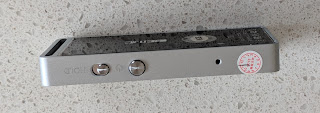


On the bottom is the 3.5mm headphone socket and micro USB socket for charging and file transfer.

Front panel touch area has up, down, left and right. Below is back and menu.

The round physical button on the front is play / pause and is also used for selecting items in menus.


Transferring music

Plugging the USB into a computer shows a menu on the device defaulting to “charge and transfer” or just “charge and play”. If you let it default of choose the first option the device mounts on your computer as a USB storage drive. If you have a micro SD card plugged in it also mounts. When I ejected one, the other was unceremoniously ejected as well.

After adding files either by USB copy or via micro SD card the unit offers to index the files and creates a database of Songs, Artists & Albums. I simply dragged a large collection of music folders from my iTunes library over and so far everything seems to play.

Navigating music

I am using a 32GB micro SD card for music. When you go into the Music menu the first time after inserting a card the first items show you the music stored on the device, to get to your card scroll down and go into “Cardfolder”. It will ask to “create list”, say Yes. It takes a while but when done lets you navigate by Song, Artist or Album from the top of the menu.

Note that the device comes with three tracks with Chinese names that sort to the top.

FM Radio

In the RM Radio menu, press the menu button (bottom right) and get it to auto-tune.

Audio recording

They say it does this. I haven't tried it.

Comments

Build quality is good, the unit has a very solid metal frame and presumably could be tethered to a bag by the metal slot at the top. The OLED screen is clear but a little short for many artist and track names. The touch buttons work well but do respond slowly.

Sound seems crisp and clear to me. The supplied in ear headphones are not as bad as expected and it drives my Sony MDR-7506 phones very well. Bass is more pleasing when using Sennheiser HD 212Pros. There is various equalisation settings available but I prefer to run without.


With 3,600 tracks on board it's time consuming to get around, there's no search. Takes me back to the players that were around pre-iPod. It's a pity that the touch controls on the front don't have some sort of scroll bar capability.

Weirdly, mine arrived with an international to Australian mains power plug adapter. No need for this as it charges from USB (came with a cable) and no mains power pack.

Wednesday, December 27, 2017

Decoding WSPR from an SDR on Windows

Really a note to future me. I'm using an SDRPlay with the excellent SDRuno software on Windows. (Why isn't there comparable software available on Linux?). The trick to getting the audio out of one piece of software and in to another is to use a Virtual Audio Cable (VAC). I paid money for one some years back but it's not as good as VB-Audio Virtual Cable from the excellent folks at VB-Audio.

The deal is that you get one virtual audio device for free and can pay money for additional devices.

Here's how the output is set in the program that produces the audio we want to decode:


Here's how the audio input is set in WSJT-X:


Note that although I've set an output it's not used with a receive-only SDR.

And here's the full configuration with WSJT-X decoding WSPR on 20m. (Click any images here to enlarge).


Third party Windows time synchronization software no longer needed.

I don't know when this changed but it used to be that to decode WSPR on any version of Windows you needed to install third party software to sync the clock well enough. This appears to no longer be the case at least for me running Windows 10 Pro, Version 1709.

Tuesday, December 26, 2017

Useful directory of short wave broadcasters "hfcc"

Just stumbled across hfcc.org while hunting for DRM stations. It seems like quite a good database of what's on shortwave right now.


Xmas movie, Die Hard, an archetypal analysis

Prompted by a mention of “Die Hard” as a classic Christmas movie, we watched it again on Christmas night. The 1988 action movie it holds up really well and I recognise many of the action sequences that have been replicated in later movies. Jumping off a ledge held by a fire hose turns up in both The Matrix and again in Atomic Blond.

Action hero John McClane is troubled by his poor relationship with his wife due to the fact that she’s pursued a successful career as an executive on the West coast, while John works as a New York police officer with some issues with authority.

Our hero fights multiple “terrorists” led by unemotional Hans Gruber while running up and down in the building. John is progressively broken down through this battle, leading up to a scene where is is pulling glass from his bare feet while talking on a walkie talkie to a friendly local police officer who he asks to pass on is, previously unexpressed, love for his wife.

The building represents McClane’s mind. After the initial attack he goes up a few floors to think about how he should handle the emergency. He even carries out a dialog with himself, as might a consciousness, trying to rationalise the situation.

The various terrorists are archetypes in his mind. They speak another language, and are therefore not clearly understood by John, who must fight them. The leader is Hans Gruber, an unemotional, super rational, archetype who in a penultimate scene continues to hold on to McClane’s wife until he falls to his death. He holds her by the “hands” (Hans).

The terrorists are not really terrorists, they are simply sophisticated robbers, driven by money, and I think in defeating them John has overcome his focus on what financial success he or his wife has achieved and finally been able to express his emotions.

The building, as indeed any skyscraper, might also represent McClane’s penis and the additional clue of two FBI agents both called Johnson (a common penis nickname) is a rather curious joke but suggests that someone is thinking along these lines. McClane’s marital estrangement might have been triggered by impotence due to his inner turmoil over his wife’s financial success exceeding his own.

McClane is often seen running up and down floors in the building. The top is presumably consciousness which is linked to the outside world where, in theory, helicopters and rescue him and the hostages.

The tables are turned in John’s favour when he drops explosives down a lift shaft and blows up deep in the unconscious.

There is inner turmoil in our hero’s mind but attempts at external help, perhaps from therapists, are ham fisted and either turned away or just make matters worse as they refuse to take John’s calls for help seriously. The only person to get through to him is the local, west coast, cop who takes him seriously and does little except be there for him. There are references to “typical California” where things are a bit hipper than they are in the east and perhaps finding this sole mate is John’s bridge to defeating his inner demons.

It’s possible that the whole story is actually a dream experienced during the flight back to the family where McClane’s unconscious is trying to help him to heal his trauma and get back with his family.

Tuesday, December 19, 2017

Multi-band uBitx arrived and boxed

The brand new uBitx from HFSignals is sure to be a major success. Following on from the terrific Bitx single band transceivers, this new design covers multiple bands from 3-30MHz and offers 10W output.

For US$109 you get a fully built and tested board and the sockets and controls. There are plug-able connectors so when you wire it up the board can be removed if required.

I managed to fit mine in a standard 184 x 70 x 160mm case from Jaycar catalog number HB5446. It's a bit of a tight fit but works well. The regulator on the display/CPU board needed to be bent a bit but all works nicely.

Here's how it arrives in the postal box.


Twin IRF510 finals.


Tuning around 40m shows that it receives down to band noise as well as a commercial rig. Transmit audio sounds pretty good but I'll get some more comments after some contacts hopefully later today.

I'm getting only about 4W out on peaks but that might be due to low audio from the microphone I'm using.

The accelerating tuning action works really well and it's great to have a proper rotational encoder rather than the pot scheme that was used on the BitX.


Tonight I was able to participate in the ARNSW home brew group net using the uBitx. Here's a clip.


This radio is clearly great for modification and the Bitx hacks site is the place to share ideas.

Update

I've been struggling a bit with low RF output on SSB due to low mic audio. It seems that the supplied electret mic has excellent output even compared to other identical looking ones. In the end I swapped out the insert in a hand mic for the supplied one. The hand mic didn't have a hole for me to talk through so a drill has been used to help audio in that was as well.

It's paid off and I've just had a VK2 to VK7 contact with VK7DIK who reported me as readable 5 but not strong.

Sunday, December 03, 2017

It should be easier to report internet outages

Since switching to the NBN via Telstra I've had a good experience in terms of speed. So far I've noticed two outages. (Presumably there may have been other outages that I didn't notice).

Yesterday our connection went down. I checked the cable modem and the lights were flashing. I rebooted the modem and it continued to flash. I visited Telstra's new outage site and at the time it said there was no known outage in my area even though my connection had been down for at least an hour.

My neighbours on both sides had also lost their internet connection.

The annoying thing is that the outage site has no link to let us report an outage. The only way to do this is to go to the troubleshooting page and then start a "24x7 chat" session.

I can understand that it must be frustrating for Telstra to deal with customers who's problem is in their own home network but many of us are equipped to diagnose problems but we must go through this time consuming process.

Info: Thank you for choosing Telstra 24x7 Live Chat. A representative will be with you shortly. At the conclusion of your chat please take a few moments to give us some feedback on your experience today.
Info: You are now chatting with Shah.
Peter: telstra cable NBN internet down at XXX, Killarney Heights. Neighbours on both sides also down.
Shah: 
Hi, you are chatting with Shah. How may I help you?

Peter: Have restarted modem. Light still flashing.
Peter: outage.telstra.com says no known outage.
Peter: what's the best way to report an outage?
Shah: 
Sorry for the inconvenience caused to you. Don’t worry I will be more than glad to assist you with the fault today. 

Shah: 
For NBN? 

Peter: yes
Shah: 
I will now need to transfer our chat to our specialist team who can help resolve your issue

Peter: telstra cable NBN internet down at XXX, Killarney Heights. Neighbours on both sides also down.
Info: Please wait while your chat is transferred to the appropriate group.
Info: All agents are currently assisting others. Thank you for your patience.
Info: You are now chatting with Aijaz.
Peter: telstra cable NBN internet down at XXX, Killarney Heights. Neighbours on both sides also down.
Peter: what is the best way to report this?
Aijaz: 
Hi, you are chatting with Aijaz, I am checking with the previous conversations.

Peter: telstra cable NBN internet down at XXX Killarney Heights. Neighbours on both sides also down.
Aijaz: 
Yes, Peter I am checking with that and forward the issue to the specialist team on high priority.

Aijaz: 
My apologies for the inconvenience caused.

Aijaz: 
Before we proceed, I will have to authenticate your account for security purposes. Could you please help with your full name, date of birth and home phone number with the area code?

Peter: I thought you were the specialist
Peter: why do you need all that?
Aijaz: 
I am from the technical team. I will forward to the specialist team. Because to raise a complaint and forward it. 

Peter: don't worry, I'll report it on twitter. Thanks for your time. Have a nice day.
Aijaz: 
Thank you for choosing Telstra. Have a good day.

Peter: ha!

I guess these operators are handling multiple simultaneous conversations at the same time. Given that I've come via the customer web site (using mobile data) it seems bizarre that I need to prove my identity "for security purposes". Next I went to twitter, which seems to be the best way to interact with many organisations.

On Twitter I asked why the outages site doesn't have a button for reporting outages. They replied:


I also asked why they don't monitor the network so they know when there are outages without customers having to fight their way through to report them. Cas said they do monitor some things.

By now, outages now showed an outage at my address but I find this process very user hostile and if Telstra ever gives statistics on the low numbers of outage reports I would treat these numbers with scepticism.

Monday, November 27, 2017

Akihabara, Tokyo, Japan - ham radio heaven

Japan has the world's highest number of ham radio licensees per capita, 0.343% of the population. This means that there are a good number of radio and electronics shops catering to home builders and the place to go is Akihabara in Tokyo.

I walked but there is a station at the heart of the place. (Click photos to enlarge them by the way)/.


There are literal department stores full of independent electronics shops. Some are multi-story.


Inside you'll find all the components you could desire plus boxes and boards.


There's a well stocked valve store.


There's some interesting home kit gear on show too. Here's a crystal set with a spider coil.


A 40m SSB transceiver I haven't heard of before.


Lots and lots of shops selling commercial gear with VHF/UHF handhelds in huge quantities.


All the big black boxes are on show and I notice, looking at the FT-817 price index, that prices vary significantly. 


A big store, Rocket Radio, also has a good collection of antenna parts. Interestingly they have a surprising number of loop antennas available.


Great to see that they are well stocked with morse keys.


Not a lot of English is spoken and unfortunately the shop keepers seem rather embarrassed about this. I did a bit of pointing and tried to be friendly.

Anyhow, I'm very lucky to be here this week. If you do get to Tokyo don't forget to check it out.

Friday, November 24, 2017

Archive of early technical magazines

American Radio History is a fantastic archive of early electronics, technology, sound recording and broadcast magazines. Mostly UK and US. It includes some classics including Byte, Popular Electronics, Modern Electronics, Wireless World, and some educational titles.

I saw this on Roger G3XBM's excellent blog that is (mostly) about ham radio but I find the occasional diversions most entertaining. Roger wants an IC-7300 for Xmas I see.

Wednesday, November 22, 2017

Tuning 40m at a low noise location near Dorrigo

What a pleasure it is to tune the 40m band at a location where the only noise is the occasional "tick tick" of electric fences. Here's a bit of a tune around this week.


We need some remote receivers at places like this. Unfortunately there is no mobile reception at this property.

Tuesday, November 21, 2017

Low RF noise location - near Dorrigo

This week I'm spending a few days at a very low noise location in northern New South Wales near Dorrigo.


Yesterday I tuned around 40m and experienced S0 noise. There were some stations in Victoria and Tasmania coming through well. Tonight I will try to join the Home Brew Group's net. Here is my squid pole hanging off a stake. (I'm told there are much better stakes, normally used for electric fence supports, available for about $4 - will investigate).


The local paper, the Don Dorrigo Gazette, here is printed with the old letterpress system and looks amazing.


Internet here is pretty slow so I won't be posting much.

These posts, seen below with the orange loop at the top, are widely used to hold up electric fences. They have a convenient foot hook for pushing them in to the ground.


It's lovely here, audio and electrically quiet. The only sound on radio is the clicking of electric fences - how ironic.


Sunday, November 12, 2017

Blog hits a million page views

A milestone today, the page views on this little blog has just hit one million. This blog is really a personal notebook where I write little posts that I can find again later to remind me how to do various things.

The first post was on October 12, 2006 back in the days when email spam was still a problem. Before this blog I had another, rather too serious blog. I found that I'd set the bar too high. Posts were essays and I couldn't keep it up. I was foolishly thinking too much about the audience. Giving that up and just posting notes to myself has done the trick.

The blog is never a chore and many times I've searched for how to do something and found my own blog post from the past. I fear that social platforms like Facebook are becoming the owners of our writing and much like GeoCities will some day disappear with all of that content. Arguably a blog on Google's Blogger suffers the same drawback but I hope that Google is more likely to keep it up.

Thanks everyone for visiting, for comments and for getting in touch.

73

Peter
VK2TPM