Sunday, May 30, 2010

Amateur Radio NSW Home Brew meeting at Dural

Another great meeting out at the WIA shed at Dural today. Stephen VK2BLK has been busy mixing integrated circuits and valves:

Stephen.jpg

His shortwave radio is really beautiful and has enough dial lighting for the whole room:

Receiver.jpg

At first I thought Brian VK2TOX had built a home brew pacemaker but it turns out to be an electrical treatment for back pain:

Brian.jpg

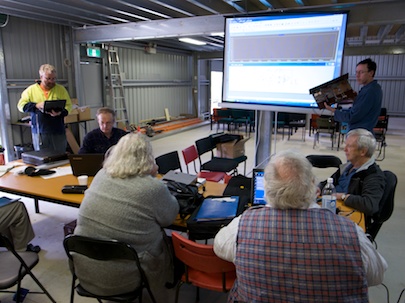
We had "show and tell" where I showed my "Retro-75" AM transceiver, but the main presentation was by Mark VK2XOF on circuit simulation with LTspice.

spice.jpg

Watching the demo was a great help and I look forward to playing around with this software in the future. The day was well attended.

viewers.jpg

Despite some worries about the weather turning bad.

viewers2.jpg

The new shed makes it all much more comfortable than the old days. Thanks to everyone who organised this, the hot dogs were great and there was even a home brew electric car on display.

I came away with a Wagner 1729 HF radio at a very good price ($10).

Update: An excellent video by dx2hunt who left a comment:


Here he is shooting part of it:

video guy.jpg

Saturday, May 29, 2010

Big screen VNC from a small netbook

Netbooks are great, but sometimes 600 vertical pixels isn't enough.

Ubuntu includes screen sharing but it's just a mirror of the small screen, so here's a tip to serve up a vnc desktop for use on a larger screen client computer (I use MacOS X's built in VNC client).

Here's how it looks:

Screen shot 2010-05-29 at 1.28.37 PM.png

To do this, at least on Ubuntu 10.04, but probably the same on earlier versions:

  • aptitude install tightvncserver
  • run vncserver once so it creates a .vnc directory in your home
  • edit ~/.vnc/xstartup like this:

  • #!/bin/sh
    export XKL_XMODMAP_DISABLE=1
    xsetroot -solid black
    gnome-session &
    • Start the server like this:

    vncserver -geometry 1500x1100 -depth 16
    • Connect with your VNC client, on my mac it's vnc://10.0.1.198:5901
    • Stop the server like this

    vncserver -kill :1

    Obviously adjust the geometry XxY pixels above according to the size of your client screen.

    All credit to this thread on the Ubuntu forums.

    I think it would be a great feature if Ubuntu had a headless mode that would share a vnc screen without the need to run a gnome session on the physical laptop. One issue is that there is no wireless connection until you log in.

    Friday, May 28, 2010

    Australian iPad Launch - what content is available?

    Regrettably the iBook store still only appears to have free books this morning. It's great for project Gutenberg as it will draw many new users to that content.

    Other content, such as magazines, are available via an app created for each title. This seems a weird platform but does lead to creativity by each publisher.

    APC (Australian Personal Computer) have a free app that is a store for buying the magazine and reading it.

    APC Magazine.jpg

    APC offers little more than a PDF version of the magazine, you can't even click on the articles on the front page to go to them you must page through sideways.

    Tapping in the middle of the page brings up four icons, a wheelbarrow of logs, two house-bricks, a HyperCard home and a calculator. One of them "flip view" lets you spin through page images to jump to them. Very mysterious.

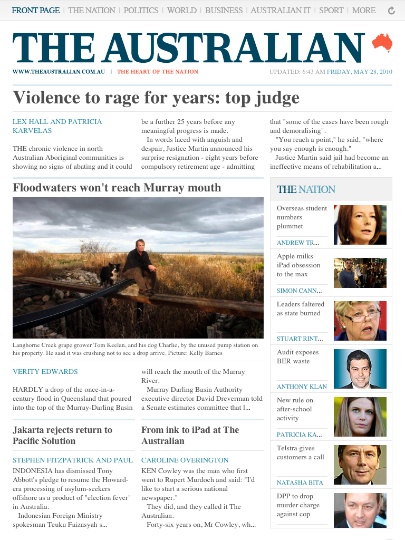
    The Australian (newspaper) has done a great job on the iPad.

    TheAustralian.jpg

    The news updates when you open it and the front page articles click through to the stories. Across the top is a finger touch version of a menu bar that lets the user navigate the section. Ads pop up full screen and you must close them to go on. Fair enough I guess.

    I subscribed for a month at a fair price.

    It's no surprise that the masters of this new media form are Wired Magazine who've been working on this for some time.

    Wired.jpg

    Great choice putting a Pixar still on the cover (notice how Pixar movies are often used in TV stores to show off television sets?). It looks fantastic on the iPad screen.

    Everything is clickable and the magazine is navigable in all sorts of interesting ways.

    While I guess it's no problem having each publication distribute via its own app, it might be good if someone came up with a common platform and created iMagazine that could be used by smaller titles without the budget to pay for their own developer. I know this has happened in the comic book reader area to some extent.

    Tuesday, May 25, 2010

    Minor musings

    Phones

    Played with a neighbour's HTC Desire, running Android 2.1 on Telstra, over the weekend: a very nice phone!

    Certainly up there with the iPhone although Telstra have added some junk which is a pity.

    It sounds like the next iPhone will be announced at WWDC on June 8 but until then it looks like there's stiff competition at last.


    Ubuntu

    .Ubuntu 10.04 is totally awesome. I'm running it on two netbooks and the server edition on my linode server.

    They've really thought things out well. It's fast and careful on the server side.

    Homophily

    .Antony Funnell from the excellent "Future Tense" program rang this week and we had a chat about Homophily. I have a small contribution but it's an interesting idea and the show goes to air on Thursday morning from 8:30 on ABC Radio National.

    The question is: does the internet lead us to mingle with people who share our views or does it help us expand our horizons?

    Never heard the word? Neither had I, read this.

    Google I/O

    Watched the keynotes on Youtube. The most interesting bit for me was the Google Apps for corporate stuff. I'm using virtual machine hosting, Amazon, and Google at the moment. It's a buyer's market. I can't see any reason to have a data centre.

    The question is, could I build a data centre with the power, network, aircon, and backup that Google or Amazon could at a similar price - not likely.

    Google is really aggressive at the moment, several speakers were honest enough to say that they are an advertising company, which I'm sure is not how the person in the street perceives them.

    iPad in Australia

    Finally it's here, well, on Friday at the opening of the Bondi store. I really like the iPad and it will sell well here for sure.

    Summary

    Super busy, having fun, but the greatest pleasure is from the retro-75 80m AM transceiver kit which has gone together nicely.

    Thursday, May 20, 2010

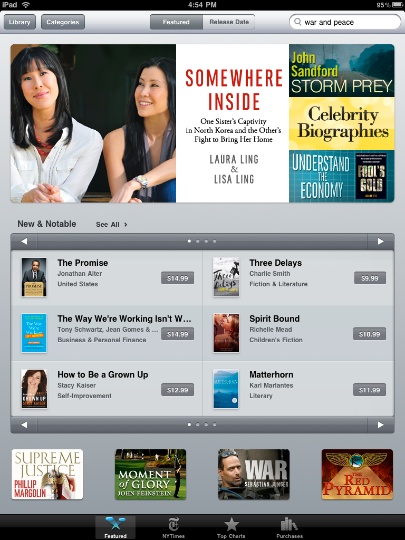
    iPad App and Books stores are active in Australia

    Just noticed that the App and Book stores now work on an iPad in Australia.

    iBook store.jpg

    Last time I tried there were just error messages saying they aren't available in Australia.

    Nothing by Emma Daniels that I could find just yet. It doesn't have any sort of Australian "feel" to the collection, I guess it's just books that are permitted to be distributed here.

    One more week folks!

    Update

    I spoke too soon. What we were seeing above was the US store. Shortly after that, the store emptied out:

    empty store.jpg

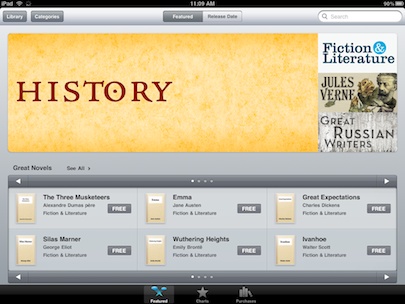
    And later it filled up with free books:

    free store.jpg

    Actually I like the prominence of the free books, in the US store there is no category for free books so you are constantly being shown commercial texts.

    Saturday, May 15, 2010

    National Manufacturing Week in Sydney

    This week I took a day off and visited National Manufacturing week which was in Sydney at the Olympic Park Show grounds.

    overview.jpg

    Last time I went it was at Darling Harbour. My guess is that it's bigger this year. The exhibitors clearly go to a lot of trouble and expense to put on a good display.

    robot row.jpg

    Even the largest robots have an accuracy of 0.5mm and this is put to good use pouring drinks and stacking CDs. The crowd is a mix, lots of students, lots of blokes in fluro gear:

    blokes.jpg

    There's "factory porn" everywhere to be appreciated.

    pipes.jpg

    The huge plasma cutters, stampers, benders and welders are great fun.

    This year, the thing that struck me was the large number of Chinese manufacturers with stands. There were about 30 booths and these guys will cheerfully turn your drawing into physical products in a few short weeks. They regard Australia as too small for decent quantities but they're happy to help.

    china.jpg

    While Australian manufacturing has continued to grow in dollar terms it is shrinking as a proportion of the total economy. It was pointed out to me that Asian manufacturers are more competitive not because of lower wages but because of great business processes.

    Sunday, May 09, 2010

    Building an AM transceiver kit for 80m

    I'm having a lovely weekend building the "Retro-75" kit from Small Wonder Labs.

    It's an AM transceiver ostensibly for the US 75m band but easily moved to our 80m band. I'm running it on a 3.58MHz computer crystal.

    Step one was to clear the bench in my "shack":

    1 clear bench.jpg

    I started construction with the smaller components, resistors first then capacitors:

    2 fit components.jpg

    The board is excellent quality.

    3 capacitors.jpg

    I didn't rush but it came together over two days without much trouble save my own sloppiness.

    4 coming together.jpg

    For me the shack is a real haven away from domestic life. I must spend more time there.

    5 the shack.jpg

    The kit is missing a few parts on the receive side which Small Wonder Labs will post when they have them in stock - they are T1 & T2 inductors used for the front end and near the detector, I should be able to rig something up until they arrive.

    At this point it's transmitting and putting out a solid 2W. I called up local ham Rob, VK2ZNZ and had a first contact.

    6 First contact.jpg

    Initial reports are rather distorted audio, my guess is RF feedback, so I'll start looking for a suitable metal enclosure and see if that improves things.

    A great kit, thanks Dave K1SWL. There is a Yahoo group where constructors discuss the project and Dave has announced that he has the missing components.

    Anyone interested in an AM net on 3.58MHz?

    Update

    The modulated audio is very distorted. Tracing from the mic input with a tone connected I see clean audio after the pre-amp (pin 1 of U5). I've clipped the collector of Q10 which disables the audio AGC and now things look much better. Not sure what's going on there..

    Update 2

    Peter, VK2EMU, very kindly sent me a crystal for 3.6864MHz so I can participate in the AM net. Although this crystal is a common computer frequency, Jaycar no longer stock them, they do stock some nice boxes so the rig is now in a case:

    boxed retro.jpgUpdate 3

    The missing IF transformers arrived and I'm now receiving. Had to remove 3 turns from L2 to get the receiver centred on my target frequency of 3.6864. Tuned up very nicely and now I'm hearing sideband stations and static crashes - not super sensitive but probably quite enough for contacts who can hear my 2W.

    It's been a really fun kit, very easy to put together and get going.

    Wednesday, May 05, 2010

    Splurging on MacOS software

    I write software for a living so I know how much work is involved and as a result of that I'm more than happy to spend money buying software.

    Here's a few things I've purchased in recent weeks which make me happy.

    EyeTV 3Upgrade to Elgato EyeTV 3 (well 3.3.3 by the time I got to it).

    I use it to record TV programs so that I can avoid the curse of "FreeView", the interminable ad breaks. The great show "The Pacific" is almost ruined by them.

    V3 has a very cool ability to stream live and recorded shows to an iPhone app not only around the house but out over the internet. You can also view the TV guide and set it to record remotely.

    I'm using an old Firewire Elgato box that has run for years and serves me well just on rabbit ears.


    1Password Maybe it's just me but my world of passwords had turned into a bit of a shambles and it was time to sort this out. 1Password will generate and securely store all your passwords. It has a neat browser plugin that pops up when you log in to something and offers to store the password.

    When you do come to a login page you can right click and it will select the likely username and password for you and then fill in the form. There's even an iPhone version that does a similar cute hack.

    MarsEdit 3I'm writing this in MarsEdit 3, another upgrade. It's just more pleasant to create blog posts on a local app than in the web page.

    This version add a styled editor that I'm not sure I'm in love with but it's been a solid product for many years and I'm a loyal upgrader.

    Free stuff

    Evernote

    Evernote is certainly a great thing. Store random notes and they are synced between your computers phones and pads.

    When I say free, it has unobtrusive ads and I don't use it enough to get into commercial territory. It has the ability to take a scan of a page and OCR it for searching but I'm yet to get in to all this paperless living.

    As an aside, increasingly I'm getting invoices and pay slips electronically rather than in the post. While they claim it's to save paper, really it just transfers the printing from them to me. (My accountant isn't quite ready to not get a pile of paper from me). It saves them postage I guess.


    Dropbox

    Dropbox syncs a folder on one machine to a folder on your other machines. You get 2GB free and then you pay beyond that.

    It works amazingly well, astonishingly well, so well, I wanted to understand how. Today I dragged the disk image of the new Google Chrome beta into my dropbox sync'd folder (26Mb) and it was synced in a second.

    The trick is that they look across everyone's files (securely) and if you try to sync a file that matches one they already have somewhere they just point to the one they have. Beyond that I guess they do something like rsync because it's all very smooth and fast.

    This works so much better than the Apple Mobile Me iDisk that gave me all sorts of grief, I've decided to let go of Mobile Me when my subscription comes up. Very disappointed with Apple on this - it all looks lovely but apart from the calendar and contacts sync it's overpriced and under powered.

    Notational

    Notational Velocity is a little notepad with search as you type that works as well as a wonderful notes app I used to use in the old days of System 7. I think it came from the folks that made Omnis 3 but I can't remember what it's called.

    Evernote could learn from this product's search as you type.

    Old Favourites

    While I'm here, other things I use on a regular basis include: Almost everything from the Omni group : OmniFocus, OmniGraffle, OmniOutliner, and OmniPlan. Parallels, Coda, Sequel Pro, BBEdit, TextMate, iWork, CocoaModem, Eclipse and PyDev.

    Now I'm buying apps for the iPad which continues to make me happy.

    Monday, April 26, 2010

    Ubuntu 10.04 server on 10.04 desktop on netbook

    Maybe I'm getting old but it seems amazing that you can play around with Ubuntu server running in a virtual machine running on a $400 netbook.

    vmshot.png

    To tell the truth, I did add another GB of RAM to the netbook to take it up to 2GB.

    Recently I've been playing with virtual machines and trying to standardise on a platform for quickly deploying software. Ubuntu server 10.04 is a "long term support" release and it looks good for my purposes (typically apache2, mod_wsgi, django, mysql).

    Debian, which seems to have failed to move on from python 2.5, is no longer an option. Ubuntu is looking to the clouds and that's the right direction as far as I'm concerned.

    10.04 desktop is looking really good too.

    The rest of the long weekend here has been spent reading epub books on the iPad and going for walks in the autumn sun.

    Wednesday, April 21, 2010

    iPad review on ABC Radio National


    A piece of tripod was missing this morning so Roi went all "Hill Street Blues" with the camera. For a change you get to look around and see Fran and the team.

    Great fun.

    Sunday, April 18, 2010

    iPad vs Kindle

    The neighbours just came over for lunch outside and brought their Kindle.

    kindle vs iPad.jpg

    The eInk display technology will definitely persist. In this image I'm cheating and shielding the reflection of the sky from the iPad screen. The Kindle looks better the more light there is.

    Indoors, the iPad is far far superior in every respect. If your use-case is reading on the beach then yes, get a Kindle.

    iPad in Australia - Cygnet Lavish case review

    Even though the iPad is another month away, accessories are available right now.

    At Maccentric I picked up a Cygnet "Lavish" case for my new toy:

    closed case.jpg

    It's a beautiful soft padded leather case with a soft interior and a magnetic clasp. The iPad slides in sideways from the left so there's no way it can slip out when closed. There are openings for the dock connector and speaker at the bottom and the headphone and power button at the top.

    Unfortunately there is no opening for the volume and the screen rotation lock switch. (You can push the volume control through the leather without too much trouble).

    open case.jpg

    The wide margin around the screen means that the iPad is securely held. As you can see above there's a hole to access the "home" button.

    The opening for the screen is a tiny bit too narrow and can block the view of pixels at the edge. It's a little bit hard to extract the iPad but I think with wear this will improve.

    Overall it's a lovely case and makes reading a book on the iPad as much of a tactile pleasure as a well bound book. $69.

    Saturday, April 17, 2010

    Accessories for an iPad in Australia

    The iPad eco-system is going to support a very profitable business in luxury cases. You very quickly realise that you definitely need a case. On a trip to Melbourne yesterday I slipped the iPad into a netbook case, which worked pretty well but was larger than it needed to be.

    This morning, I took some vinyl and made a rough slip case that will protect the device until I see something nicer.

    Home made case.jpg

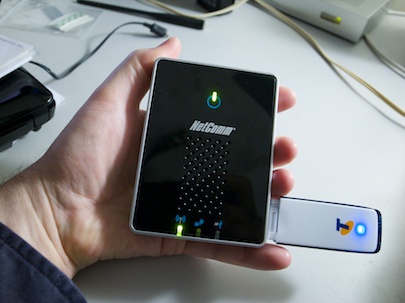
    I'm not keen on having multiple wireless broadband accounts so I've been on the lookout for the equivalent of the US MiFi, it turns out that local maker Netcomm has just the thing:

    3G router in hand.jpg

    It's a capable little travel router with the ability to use most of the wireless USB data modems on the Australian market as the internet connection that it shares over Wifi. The Netcomm 3G Travel Router t1 - 3GT1WN (clumsy name) supports all 3G/Next G TM/UMTS/ HSPA/ EV-DO/ USB modems from leading vendors. I have a pre-paid Telstra modem which, while it takes several minutes to get started, works fine in the end.

    The router can also share internet from an ethernet port and has many more features than you really need for just creating a Wifi cloud from a USB broadband dongle. Here it is in use at Melbourne airport.

    Netcomm 3G hotspot.jpg

    The rechargeable battery is said to last up to five hours. My only complaint is that I can't see a way to talk to the SMS service that is how you determine your balance on the pre-paid model (I just top mine up when I travel and let it go off in between). More features than I need but the perfect iPad accessory for Australian road warriors.

    Using an iPad in Australia - in search of books

    I couldn't wait. My rationalisation is that I have a couple of iPad reviews to write and while normally Apple Asia are kind enough to get me "hands on" time, in this case they've completely vagued out.

    So I got on eBay browsed through all the iPads on offer to Australians and picked a vendor hoping it wasn't a scam. In the end I paid AU$780 for a US$500 iPad, which seems a lot but given shipping and service and in the context of some of the crazy prices being asked (over AU$1,000) I'm prepared to wear it.

    I can vouch for flint316, he shipped the iPad quickly from Texas via USPS and I watched as it made it's way here.
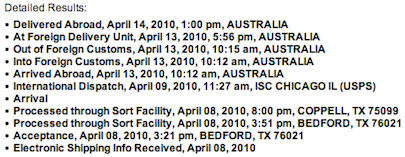
    Screen shot 2010-04-17 at 8.03.05 AM.png

    It was in perfect condition on arrival. (That was my big fear really).

    ipad unboxing.jpg

    The way they pack the iPad, with the screen right at the top of the box, does seem to leave little margin for intrusions into the front during rough shipping. Anyhow, it was fine.
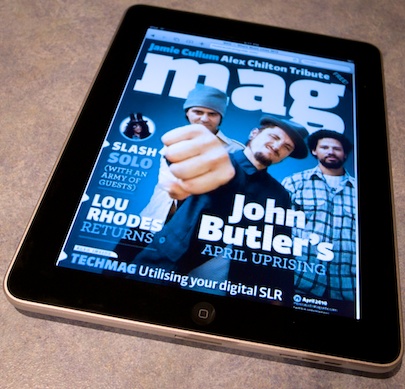
    ipad mag.jpg

    What, no books?

    I really wanted an iPad so I could buy and read books rather than stuffing the house with more paper. When you activate an iPad with an iTunes account outside the US the iBooks application isn't there.

    The trick is to open a US iTunes account... but I don't have a US credit card. Turns out all you need is a valid US postal address.

    • Quit iTunes

    • Hold down the Option key, and launch iTunes

    • Create a new library, I called mine iTunes iPad

    • Go to "iTunes Store" in iTunes

    • If it shows you signed in, mine did, click down the menu triangle and "Sign Out"

    • Now find something that's free, like a free app and purchase it

    • You'll be asked to log in or create an account

    • Click the link that says "If the billing address is not in Australia, click here"

    • Create an account. Although it asks for credit card details, because your purchase is free there's a no payment option, take it

    • I used a friend's postal address

    • Download the iBooks app


    I recommend making a separate iTunes library for the US iPad or you end up with problems of apps that are not authorised etc.

    While there is the free Gutenberg collection there, I was looking for something a little more contemporary, so the next trick is to top up your US iTunes account. To do that you purchase an iTunes voucher from a US reseller. I went to iTunes Express which charges a 20% markup, isn't super fast, but did the job.

    After a little while, 20 minutes I think, the US iTunes voucher code arrives in your email. In your US iTunes account, click "Redeem" in the Quick Links area and top up the account.

    Sync and you can buy Books and Apps from the US store.
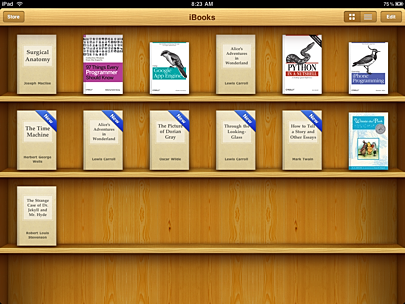
    iBooks.PNG

    Getting eBooks

    Apple's store is very nice but it's not the only game in town.

    Probably half my computer books are from O'Reilly Media (the animal books). O'Reilly have done a wonderful job transitioning to electronic media.

    You create an account and buy the electronic version of a book. The books are generally available for Android, Mobi, PDF and ePub.

    Download the ebup version and drag it to the "Library" area in iTunes, enable "Sync Books" and the books will be transferred over to iBooks on the iPad.

    These books remain available to you and you can download them again for other devices (no consumer hating DRM). I found that using the ePub reader Stanza on iPhone let me re-download my purchases direct from O'Reilly too.

    Stanza is great by the way and while I'd like to see an iPhone/Touch version of iBooks, Stanza is an excellent alternative.

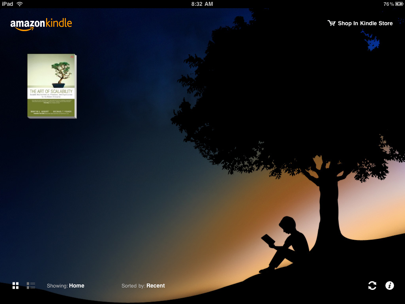
    The other source of books is the Amazon Kindle app for iPad. It's messy having multiple book readers and worse, multiple libraries of books, but the Amazon book inventory is great and having the Kindle reader on multiple platforms is a good feature that I hope Apple with emulate.
    kindle.PNG

    I've lived with an iPad now for just three days and it's very much a part of my life. Apple has bowed to the anti-globalisation forces but the internet is a wonderful source of information on how to get around these artificial barriers. Hope this helps too.

    Sunday, April 04, 2010

    Bigpond cable outage at my house

    Screen shot 2010-04-04 at 10.23.19 AM.pngOnce again our Bigpond cable is down. Although the service status page mentions a few known issues they are all planned outages and say nothing of the issues they really know about.
    The bill does not have the number to ring for technical support on it (even though it says "turn over for other enquiries"). The number to ring is 133 933.

    When ringing up, I've learned that you don't need to go through the long IVR sequence, you can cut it a bit shorter by saying "operator".

    The operator confirmed a known outage in our area and said that it won't be fixed until Tuesday, 2-3 days. They did offer to SMS me when it's fixed.

    Why can't Telstra make it easy to get help? Why can't Telstra be honest about known outages? I can only assume there are so many outages that to have them public would be bad for business.

    It's amazing how addicted we are here to the internet.

    Happily these days I have some other alternative ways to get to the net, a pre-paid USB dongle and iPhone tethering.

    Friday, April 02, 2010

    Eclipse Pydev support for Django coming

    I'm a big fan of aptana's free Pydev IDE for Eclipse. It does all the stuff a Python developer could wish for: code completion, hover explanations, click to show declaration, debugging and much more.

    If you set the source in Eclipse to http://pydev.org/nightly you'll get a peek at what's coming, especially for Django developers. You will be able to make a Django project without needing the command line tools:

    Screen shot 2010-04-02 at 1.15.31 PM.png


    You get to choose basic settings such as the database from a nice GUI:

    Screen shot 2010-04-02 at 1.15.55 PM.png


    There's menu items for common tasks such as creating an app within a project and syncdb:

    Screen shot 2010-04-02 at 1.16.39 PM.png


    Great stuff Fabio!

    Screen shot 2010-04-02 at 1.17.41 PM.pngYou end up with a useful start point without any typing.

    I often run up a little Django project just to try something out, and I find myself copying and pasting the same old settings stuff to make the project portable.

    Eclipse and Pydev is a big part of my daily life, this week I visited a friend working in Python in straight BBEdit (a fine editor), the other great hope is that TextMate 2 ever comes out and can have smarts like real code completion added in somehow. (Maybe Alan's busy on the port to iPad?)

    Update

    No sooner than I posted this, than the Django support in Pydev has been released so you don't need to use nightly.

    Free anti-virus for Microsoft Windows 7

    Screen shot 2010-04-02 at 10.01.08 AM.pngI've been assisting with and working with Windows 7 a bit lately. It's pretty good, they're really working to catch up with Ubuntu although there's a way to go yet.

    On my little dual boot $400 netbook:

    Windows 7
    • boot to login prompt in 34 seconds

    • login to desktop ready 11 seconds (a bit hard to say)

    • Cold launch of Chrome 5 seconds

    • Shutdown is 16 seconds


    Ubuntu 10.04 (pre-release)
    • boot to login prompt in 25 seconds

    • login to desktop ready 12 seconds

    • Cold launch of Chrome 5 seconds

    • Shutdown is 5 seconds


    Here's a chart I carved out of marble tablets to illustrate that (for real carving work, I use a Mac).

    graph.png


    Smaller is better.

    Installing Windows is scary, it warns the user about things a lot, presumably with good reason. Right out of the gate it warns you that you need virus protection and directs you to a web page with lots of options.

    When I ask long-time Windows users about what anti-virus software they use the answers are either that their employer pays for a commercial solution or that they use AVG-Free.

    It turns out that there is a free solution from Microsoft that does the job. Microsoft Security Essentials seems to be good.

    Presumably to avoid accusations of anti-competitive behaviour, Microsoft rather down plays their own product and lets the other vendors have a good go at selling their products.

    My view is that we shouldn't have to pay extra for something the operating system should take care of.

    Has anyone noticed how many Macs you see at conferences these days? Here's a shot from a PyCon 2010 conference video:

    Screen shot 2010-04-02 at 9.56.47 AM.png


    I doubt any of them are running a virus scanner, let alone a free one.