Friday, October 31, 2008

Ubuntu 8.10 as a desktop OS

Grabbed the new Ubuntu 8.10 desktop edition and gave it a whirl this morning.

The install is very easy, somewhere between Vista and MacOS. It would benefit from Apple's approach of firstly just showing the top ten countries or languages rather than showing every one in the world - but I'm sure others would disagree.

The install was completely smooth except for when it stopped at 83% saying "Configuring apt" was "Scanning the mirror". While it was hung I searched around and found that I'm not alone with this problem. After, I guess five to ten minutes, it continued but I read that unplugging your network during install makes this time out faster.

Presumably it's due to the software servers being overloaded today.

Notes:
  • It mounts my external HFS+ drive just fine
  • Found our HP LaserJet printer on the network
  • Found an injet printer shared on a mac
  • Couldn't detect my monitor which was connected through a Belken switcher, connecting directly fixed this. (Funny as I had assumed all the wires go straight through).
  • Firefox prompted to install Flash, very smooth, and it's great to see that Linux is now a fully supported Flash player environment.
  • A pity this release missed out on OpenOffice 3, hopefully it will be in an update.
  • Evolution (mail) had a few imap troubles talking to MobileMe but re-starting it sorted it out.
  • The Gnome file manager (like Finder) now has little eject icons next to removable things. (8.04 didn't, which rather puzzled me)
  • It's funny how there's two (or three if you know the command line) ways to install software: Applications, Add/Remove... and System, Administration, Synaptic. Might be nice to combine them.
I could totally do all my work in this environment, there's a ton of decent software available.

Visually, there's something strange about Gnome, everything just seems a bit big and spindly to me. The fonts are not quite right - now I'm coming from a Mac so that perverts my view a bit.

The "Normal" visual effects are cute but I don't like the way new windows start huge and zoom down to their place on the screen as they appear. Is this supposed to represent them coming from behind me? The "Extra" level effects make windows behave like you're holding the corners of a wet face washer as you drag. Dragging down gives the impression that the window is made of rubber and squashes a bit. Hmm.

There is still a lack of consistency of keyboard commands in Linux. Not all applications quit with Control-Q for example, and when using the terminal I miss the genius of having a Command key in MacOS that doesn't get sent up the line.

Sound device management still seems a bit of a battle ground on linux, there are two sound systems OSS and Alsa and the automatic detection sends system sounds out to my external USB radio modem, which is a bit of a pity..

Aside from the unfortunate glitch during install, the Canonical Ubuntu folks deserve high praise.

Ubuntu is particularly ham radio friendly, there is a great collection of software available in the Synaptics package manager. I always grab the excellent fldigi for my psk31 activity, I am happy to report that wsjt installs and runs without issue.

This sort of competition is going to keep both Microsoft and Apple innovating, for example check out this eye candy:

Wednesday, October 29, 2008

Find and link to Grid Squares/Grid Locators

All this WSPR propagation beacon stuff has woken me up to maidenhead grid squares or grid locators. I wanted to be able to link to a square to show that my station is here and Ross is here.

Picture 1.png


It's a very simple app hosted on Google App Engine. At this point I don't think I have the locations quite right but it's pretty close.

You can either put the grid locator in the path or if not a form is shown.

Please give it a try, perhaps look up some of the WSPR spots, and let me know if it's broken. It would be great is wsprnet.org had links on the Grid items to something like this.

Monday, October 27, 2008

WSPR Beacon on 30m (10Mhz)

There was no activity on WSPR on 40m today so I decided to bite the bullet and put up a simple dipole for 30m (10Mhz) which is where the majority of activity seems to be.

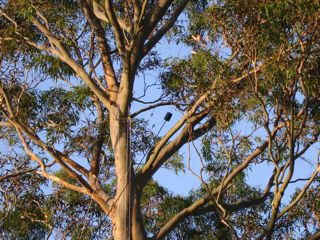
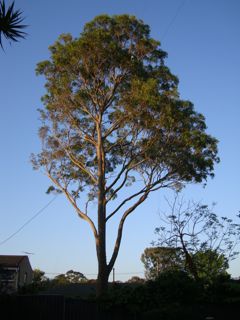
It's a very simple thin wire dipole, 7.034m (minus a bit) per leg, from the trusty gum tree to the house. No balun at this point just direct to the co-ax.

DSC01166.jpg


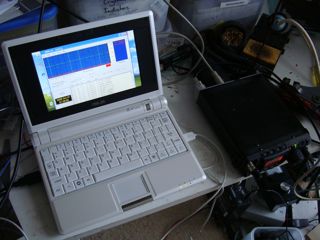
I couldn't get the co-ax into the main shack so I've run it through a window to my little work bench area. The software is running on an EEE PC running XP.

DSC01172.jpg


The rig is an FT-817 running 5W and it was immediately picked up, or "spotted" as they say, by stations in Europe and America.

I don't seem to be receiving too well so far, lots of bad packets, not sure what's going in but I'll leave it over night and see if it picks up as night falls.

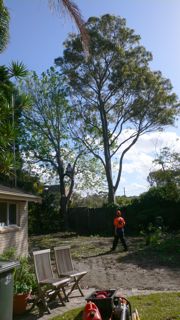
DSC01170.jpgI'm very lucky to have this wonderful gum tree in the neighbour's yard right next to the fence.
Today I re-ran the 40/80m dipole support through a pulley with the eventual aim of keeping it taught with a weight so that it moves with the wind rather than snapping. A second loop of cord was taken over the branch today as I'm worried that I'll let go of the wrong cord one day and lose my fantastic high anchor point.

All credit to Joe Taylor, K1JT, for creating WSPR and WSJT, I told my neighbour, a maths wizard (BSc BE PhD, MIEEE), that I was running some software written in Fortran and he was somewhat surprised.

Update

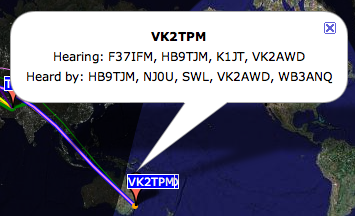
Looks like 5W on 30m is working just fine, here's how my station looks first thing this morning:

Picture 1.png


Must track down VK2AWD who is just 10km away. Searching the WSPR Spot Database I can see that my 37dBm (5W) signal was spotted up to 16,758 km away and I spotted a 37dBm (5W) signal up to 16,737 km away.

Update

Just stumbled across the bozo's guide to jt65a. Great stuff! (The author Andy K3UK clearly isn't).

Sunday, October 26, 2008

Alternatives to filtering Australia's Internet

It's sad to see that the headlines about Australia around the world at the moment are things like "Australia Joins China In Censoring The Internet".

The policy dates back to the previous Howard government but has been carried over to the current administration. The Australian Communications and Media Authority (ACMA) prepared an excellent report on digital filtering developments which outlines the pros and cons of filtering as an approach.

My reading of that report was that we should not go down this track, but that's not how the government apparently reads it.

The objective of all this, quoting then Minister Helen Coonan, is to "protect consumers, including minors, who access content on the Internet".

From the body of the report, we consumers are to be protected from:


  • Illegal material

  • Inappropriate material

  • Viruses

  • Spam

  • Online fraud

  • Illegal contact

  • Cyber-bullying


The report finds that aside from "Illegal material", and "Inappropriate material", filtering technologies have "no substantial effect" on any of the other areas.

As I see it, the drawbacks of mandatory internet filtering are:


  • It doesn't work well enough

  • Good material is inadvertently blocked

  • It will cost us all money

  • It will slow down the internet in Australia

  • It infringes my right to view things that others might see as inappropriate

  • It could easily be used for censorship

  • It will give parents and guardians a false sense of security


I would add that while filtering isn't perfect now, it will get less effective over time as purveyors of this material will learn how to get around the filters much as spammers have constantly evolved their techniques to evade mail filters.

Alternatives


  • Require operating systems to be more secure

  • Require content to be labelled honestly

  • Education

  • Get over it


Let me expand on those:

Require operating systems to be more secure

People who run windows have often reported to me that the thing they find most distressing about using the internet is when their computer starts displaying unwanted pop-up windows displaying pornography.

This is not the fault of "the internet" but rather that their computer operating system has been infected with a virus that lurks in the background and then displays these windows presumably in an attempt to pervert the user.

Let's address the problem here, older versions of Windows and Internet Explorer were insecure. The maker should takes responsibility for this.

Require content to be labelled honestly

Create a top level domain .sex or something that clearly labels what the content is. We do this for films and now games. I understand that it actually helped game sales allowing consumers to more easily find what they want.

While this won't prevent publishers who purvey their material by stealth (a good example is the viruses my kids used to get while searching for "free games"), at least it will reduce the amount of inappropriate material purely in the .com domain.

Alastair disagrees with this approach, and I take the point that a top level domain is just a simplistic content classification system however I feel that there should be some standard way to label content.

Education

It doesn't matter what we do, our kids will eventually see material we would rather they didn't. When I was very young someone handed me "the little red school book".

Children need to know that the world has some dark places in it and just because they see something weird it doesn't mean that all adults are perverse.

There's some pretty whacky stuff in the local library too.

Get over it

It's a new world. We have unprecedented access to information, for good and bad. I would argue that the good effects massively outweigh the bad.

Filtering just creates an environment where material is presented by stealth rather than in a straight forward way.

Finally


I just wish we could be seen as a country leading in broadband speed, wireless access, and innovation.

Update

The ABC Radio National "Media Report" program covered this story very informatively. Here's the transcript.

Monday, October 20, 2008

Better DC connections: PowerPole

Generally for connecting 12V devices I've been using banana plugs but while they're great on the bench, they tend to fall out rather easily and expose live voltage which can lead to some nasty surprises...

WICEN NSW have standardised on Anderson Powerpole connectors and I grabbed a few at the local Jaycar (Product code PT4405).

Here's my little adapter from forks for the screw terminals to PowerPole:


They are a clever design, very easy to solder and construct and feel very sturdy.

They don't stop you from doing bad things in that they aren't keyed in any way, but the colours are clear enough.


The connections are sprung so they press together for a solid electrical contact.


Once plugged in they won't vibrate out. On the sides there are little matching slots so they slide in and lock together to make a pair, which is handy for keeping the wires together too.

Here's my adapter for the bench supply:


Next I plan to add one to the car, probably just from the cigarette lighter socket for now.

Here's a little distribution bus, it's great how the connectors slide together to make a rigid block.


I ordered a commerical board, the RigRunner 4005 just arrived and it looks excellent.


The only bad thing about this system is the choice of Red and Black as the colours. Didn't we switch away from those because of the high proportion of males who are colour blind?

Blogger for podcasting

I've been helping to create a new podcast that teaches basic Tibetan and was looking around for the easiest way to achieve this. The combination of some good performance file hosting (MobileMe) and Blogger seems to the way, but there are a couple of things to note.

After setting up the blog, go into Settings, Formatting, scroll down and set "Show Link Fields" to Yes.


Upload the audio file somewhere (I used MobileMe) and note the full URL to that file.

Make a blog post, you'll see the link field (I just pasted a link to the file for people to click to manually download it), click the "Show enclosure links" link and then add an enclosure link again to the audio file.


The podcast feed is the Atom feed of the posts (at the bottom when viewing the blog). To create a link that iTunes and compatible players like Rythmbox can auto-subscribe with, publish a link with itpc in place of http, like this.

Friday, October 17, 2008

Playing with WSPR on 40m

Picture 1.pngRoss, (ham call T61AA), has prodded me to try the low power radio mode called WSPR.

The software, for Windows, alternately listens and transmits a slow pattern with lots of error correction.

You can see where you've been heard here, and a pretty map.

(For some reason, my Grid Square is wrong and I've ended up in Siberia for the moment). Fixed now.

Picture 1.pngThe software, which is partially written in Fortran, is available at the WSJT Home Page.

The protocol is described here.

I'm running 20W (+43dBm) on 40m at 7.0386Mhz and have been heard 14,763km, 13,435km, and 12,991km away. Awesome!

Anyone know of a Mac port of this?

Update

It's after 1am, I've been trying to install or build wsjt on Ubuntu Hardy but it turns out that it doesn't work.

Update 2

Thanks to G4ILO (a great site by the way), I'm now running with wspr on ubuntu 8.04. At this point I'm experiencing some crashes with the USB audio to a Signalink USB device.

Update 3

In an effort to solve the USB audio problems, I've now moved to Ubuntu 8.10 beta. I'm talking to the USB audio interface as /dev/dsp1. It works for a while in applications such as fldigi but the incoming audio (as shown on the waterfall) pauses and errors such as "PortAudio error device unavailable" or "PortAudio unanticipated host error" are displayed. After a short pause, audio continues.

The good news is that wsjt is available via apt-get and does seem to work for a while:


Having said that, it seems flaky and sometimes needs to be re-launched to get it started.

Update 4 - the solution!

The dodgy audio problems seem to have gone away now that I have plugged the USB audio device directly into the PC rather than going via a USB Hub.

Update 5 - We make contact!

Ross T61AA and I both left our beacons running last night and both I heard him

2008-10-21 14:48 T61AA 7.040111 -17 0 MM21eo +50 100.000
VK2TPM QF56of 11636 7230

and he heard me

eg:
2008-10-21 13:42 VK2TPM 7.040107 -26 0 QF56of +43 19.953
T61AA MM21eo 11636 7230

It looks like from 12:14Z to 13:42Z there is some sort of path between us.

I'm running 20W and he's on 100W.

Great stuff!

My best reception of you was -9 sig to noise, his best reception of
me was -22 but I could run a bit more power.

Wednesday, October 15, 2008

Hands on with the new brick MacBook

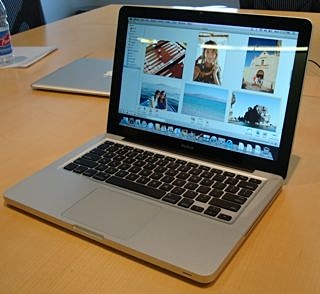
MacBook.jpgToday I was fortunate enough to get some quality hands-on time with the new Apple laptops.

On the right is the 13" MacBook. The top plate, carved out of a block of aluminium is of course similar to the Air and the backlit keyboard is the same. It does feel very rigid and the whole top part is the same block of aluminium with just a plate screwed on underneath.

You need to remove that plate with a very small Philips screwdriver to install RAM.

The battery cover runs the full width and when it's removed the hard or solid state disk is fully exposed and can be removed with one screw.

A neat feature for public places is that when a Kensington lock is in place, the battery cover (and therefore disk cover) locks too.

The black surround on the shiny glass screen does look good as it does on the iMacs and iPhone, bring on the day when the range is consistent.

I have the Air with the shiny screen and don't have a problem with glare from it but I know some people do. The coating is polarised and absorbs some light, further the LED backlit screen goes brighter so I think this is more of a personal preference.

The trackpad is said to be glass but it has none of the characteristics of that material. It's matt, like before. The main difference is that Steve has removed one more button and the whole pad is hinged from the top edge so you click by pushing along the bottom, pretty much like you do now even though there's no separate button.

There is a preference where you can get a right click by tapping in the bottom right region (as well as the old two-finger tap).

To click and drag, it's best to continue to use a thumb to hold down the button and a finger to drag. Possible to use one finger for both but difficult.

The gestures, such as four fingers sweeping up to "clear the desktop" using expose work really well although I didn't like the four to the right app switching so much - it puts up the row of running app icons and then you have to point at the one you want.

Display Port

I'm tired of all the different variations of Apple video connectors over the years so I was dismayed to see yet another one. Surely DVI was the standard to go with?

It turns out that the DVI spec hasn't adopted a small version suitable for laptops so Apple's version isn't used on anything else. DVI also doesn't have enough bandwidth for very large screens so Apple was forced to use two DVI ports.

Display Port is now a standard managed by VESA and the mini plug has been submitted for standardisation. Let's hope some others pick it up.

Interestingly Display Port can change the signals sent over it's pins so if you plug in a DVI adapter it actually sends DVI signals rather than doing any conversion.

No Blu-ray

This was a surprise as Apple was a member of the Blu-ray Disk Association. When I asked about this the explanation ran: you wouldn't want to watch a movie as it would be wasted on the small screen, and no one backs up that way anyhow - they all use Time Machine.

Maybe blu-ray has come too late and we'll all just download 50Gb movies from shops on the internet, no wait, we can't do that in Australia as our data runs out at 25Gb...

Conclusion

These new laptops are beautifully engineered, let's hope the graphics chipsets aren't buggy.

Oh, and isn't designer Jonny Ive presenting well. If El Jobso's blood pressure starts to fail he's my pick as a product unveiler.

Sunday, October 12, 2008

Raised the 80m dipole a bit more

antenna.jpgStand by for a report of this all crashing down on the roof, but for now at least, I've managed to raise the centre of my 40/80m dipole another metre up over the roof of the (2 story) house.
I bolted a long pool scooping pole to the top of a metal pole bolted to the top of a netball hoop stand resting on a balcony on the second floor. (It's tied to a coach bolt at roof line too).

The aluminium is a bit flexible up the top and I think I'm going to need some guy wires to keep this standing in a high wind.

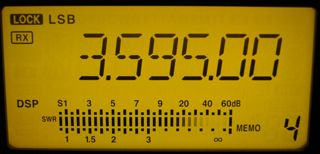
There's a lot of band noise on 80m tonight but I listened in to the VK2WI broadcast this evening and was amazed at the signal strength peak being reported on the IC-718 dial (see below).

In the call-back I received a good report and comment that the antenna "is working", which is good to know.

smeter.jpg


Hmm peaking at 60dB over S9... seems a bit generous that's the sort of thing you get with a local signal generator.

Saturday, October 11, 2008

BCD Switch direct entry DDS Oscillator

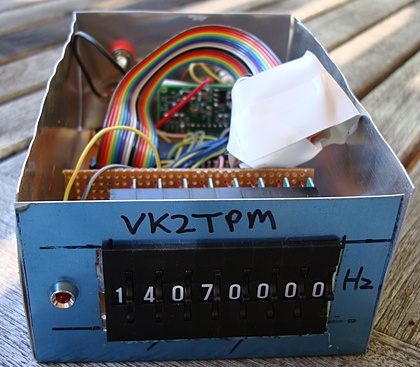
Wishing to free myself from using crystals in small transmitters, the DDS-60 board (with a AD9851 chip) seemed like the way to go, but how to do the frequency entry?

I've played with the excellent AVR Butterfly DDS controller, but it's a little fiddly for regular use.

BCD thumb switches seem like a nice approach as they remove the need for a display. Here's how it looks:

DSC01118.JPG


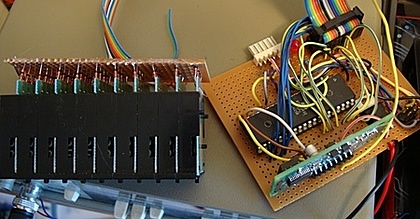
And here's my rather messy prototype board with the BCD switch wiring.

DSC01120.JPG


I wanted lots of I/O pins for scanning the BCD switch array (12 wires) and talking to the AD9851 DDS chip (3 wires) so I chose an Atmel ATmega32.

As frequency in the CPU isn't important, my design just uses the internal 8Mhz oscillator.

The code is written with avr-gcc, uses avr-libc and burnt with avrdude, all on a Mac. (Installed with Darwin ports).

I scan the BCD switches and if the value has changed I write to the DDS. There's a single LED that I flash when I write. (It's fun debugging code when you only have a single LED to let you know what's going on).

Note that there is a bug in MacPorts which won't build avr-libc. The tip about how to get past this is here.

The hard bit is driving the DDS chip and that code is here.

Update

Figured out a problem that might bite others, I was trying to use port c pins which were set for JTAG mode in the CPU fuse bytes, thanks to AVRFuse this was easily fixed.

I also realised that I have too many digits, so next step is to remove excess and put all this in a box. Done:

boxed vfo.JPG


Here's the code:


/* Scan 8 BCD switches and set a DDS to the frequency
Peter Marks VK2TPM
http://marxy.org
*/

#include <avr/interrupt.h>
#define F_CPU 800000UL
#include <util/delay.h>
#include <math.h> // for pow()

#define LED_BLINK_MS 500
#define SCAN_DELAY_MS 20

#define SCAN_LOW_PORT PORTA // low 8 digits scan output
#define READ_BCD_PORT PORTC // read BCD bits 0-3

#define LEDOFF PORTB &= ~(1<<2)
#define LEDON PORTB |= (1<<2)

// Pins used to talk to the DDS chip
#define DDS_LOAD 6
#define DDS_CLOCK 5
#define DDS_DATA 4

#define DDS_CLOCK_HZ 180000000UL

#define DDS_OUTPORT PORTD
#define DDS_OUTPORTDIRECTION DDRD

void ioInit();
unsigned long scanFrequency();
void blinkLed();
unsigned long tenPower(int decimal);
void sendFrequency(unsigned long frequency);
void byte_out(unsigned char byte);
void outOne();
void outZero();
void bitSetHi(volatile uint8_t *port, int bit);
void bitSetLo(volatile uint8_t *port, int bit);

int main()
{
ioInit();
blinkLed();

unsigned long lastFrequency = 0;
unsigned long newFrequency = 0;

while(1)
{
newFrequency = scanFrequency();
if(newFrequency != lastFrequency)
{
sendFrequency(newFrequency);
blinkLed();
lastFrequency = newFrequency;
}
}

return(0);
}

// Scan the BCD thumbwheels and return the frequency
unsigned long scanFrequency()
{
int i;
unsigned int readBcd = 0;
unsigned long frequency = 0;

for(i = 0; i < 8; i++)
{
SCAN_LOW_PORT = (1 << i);
_delay_ms(SCAN_DELAY_MS);
readBcd = PINC & 0x0f;
_delay_ms(SCAN_DELAY_MS);

if(i == 0)
frequency = readBcd;
else
frequency += (readBcd * tenPower(i));
}
SCAN_LOW_PORT = 0;
return frequency;
}

unsigned long tenPower(int decimal)
{
unsigned long result = 10;
int i;
if(decimal == 0)
return 1;
for(i = 0; i < decimal - 1; i++)
{
result *= 10;
}
return result;
}

void blinkLed()
{
LEDON;
_delay_ms(LED_BLINK_MS);
LEDOFF;
_delay_ms(LED_BLINK_MS);
}

void ioInit()
{
DDRA = 0xff; // enable output
DDRB = 0xff; // enable output
DDRC = 0xf0; // C is input on lower 4 bits
DDRD = 0xff; // D is for DDS control
}

// DDS control code
void bitSetHi(volatile uint8_t *port, int bit)
{
*port |= ( 1<<bit );
}

void bitSetLo(volatile uint8_t *port, int bit)
{
*port &= ~( 1<<bit );
}

void sendFrequency(unsigned long frequency)
{
unsigned long tuning_word = (frequency * pow(2, 32)) / DDS_CLOCK_HZ;
bitSetLo(&DDS_OUTPORT, DDS_LOAD); // take load pin low
int i;

for(i = 0; i < 32; i++)
{
if ((tuning_word & 1) == 1)
outOne();
else
outZero();
tuning_word = tuning_word >> 1;
}
byte_out(0x09);

bitSetHi(&DDS_OUTPORT, DDS_LOAD); // Take load pin high again
}

void byte_out(unsigned char byte)
{
int i;

for (i = 0; i < 8; i++)
{
if ((byte & 1) == 1)
outOne();
else
outZero();
byte = byte >> 1;
}
}

void outOne()
{
bitSetLo(&DDS_OUTPORT, DDS_CLOCK);
_delay_ms(1);
bitSetHi(&DDS_OUTPORT, DDS_DATA);
_delay_ms(1);
bitSetHi(&DDS_OUTPORT, DDS_CLOCK);
_delay_ms(1);
bitSetLo(&DDS_OUTPORT, DDS_DATA);
_delay_ms(1);
}

void outZero()
{
bitSetLo(&DDS_OUTPORT, DDS_CLOCK);
_delay_ms(1);
bitSetLo(&DDS_OUTPORT, DDS_DATA);
_delay_ms(1);
bitSetHi(&DDS_OUTPORT, DDS_CLOCK);
_delay_ms(1);
}


The circuit

BCD DDS.png


The BCD switches have small diodes from each of the outputs 1,2,4,8 to a common bus which goes to a 4k7 pull down resistor and to input pins. (If I built this again, I'd reverse the diodes and use the CPU's internal pull-up resistors to save some wiring).

Output pins directly drive the common on each BCD swich to scan them with a brief +5V.

There's a 7805 3 terminal regulator to regulate 12V down to 5V for the CPU, the 12V line goes direct to the DDS-60. The input has a forward diode to protect against reverse polarity. One pin has an LED with a 1k resistor that flashes on power up and on each frequency change.

I brought out the programming pins on a little header. Also I had a go at a serial interface but haven't got it working yet.

Update

Hey, cheers to NT7S blog and thanks for the encouragement!

Friday, October 10, 2008

Historical perspective on current market downturn

I'm growing tired of the daily hysterical headlines about the share market. It's in the interests of both the media and politicians to create a sense of unprecedented crisis - it sells media output and shores up incumbent politicians.

Here's the Australian "All Ordinaries" index for my lifetime, plotted quarterly with a logarithmic y axis:

Picture 2.png


So far the current downturn really doesn't look too bad in context.

The standard advice given to investors is:

  • Stay in for the long term

  • Have a diverse portfolio


When share prices drop, you only lose if you have to sell right now. Dividends normally keep coming in.

If you only have shares in banks you should be concerned.

Taking an analogy from a recent Qantas flight that dropped 1,000 feet due to an iPod being left on (just kidding), it would be much more serious if the plane was at 2,000 feet than it was with the plane at 37,000 feet.

Likewise, we should look at the market in proportional, historical terms.

Wednesday, October 08, 2008

An excellent shed

While in Melbourne I caught up with the convener of my favourite shed. Ralph, (ex) VK3ZZC, pictured here in front of said shed.

ralph.jpg


In all the years I've known Ralph, he's always had numerous impressive projects on the bench. Increasingly his shed has been filled with highly desirable test equipment from times' past.

ralphinshed.jpg


Ralph has a keen eye for the value in things thrown in the dumpster and has built a fine collection.

shed bench.jpg


I remember having a contact with him via a 2m repeater, I was using a commercial rig, he was using a home built, valve rig. It was very very impressive.

One of his children has Autism Spectrum Disorder, which Ralph has written up in a very straight forward and moving way here. I think this is an example of what blogging is really for.

Thanks for sharing.

Tuesday, October 07, 2008

Ham radio catchup in Melbourne

Aside from family duties during my recent visit to Melbourne, I also caught up with some ham radio identities from near and far.

VK3ASE runs a very professional operation which transmits high quality AM on 160m and 80m often on Saturday nights.

dave.jpg


Dave has a full studio full of ex-ABC equipment including a desk I used to use myself many years ago. His transmitter for 80m includes an exciter he built with a 6V6 driving an 807.

ase.jpgThis feeds into some sort of beacon transmitter. Anyhow, the whole setup works rather well and I know the audio sounds fantastic on air.

We had a great chat and although my first home built HF transmitter puts out just 0.25W, Dave was very encouraging and suggested that a 1940s radio handbook might be all that's required.

Later I caught up for coffee at Cafe Bagatelles with Paul ex VK3BEK and Ross T61AA and VK1UN who operates out of Afghanistan on 2 and 6m moonbounce.

Here's Ross:

ross.jpg


And here's Paul, who currently transmits on big power TV throughout Victoria but really needs to string up an HF antenna of some sort...

bek.jpgAnyhow, we had a nice breakfast, a friendly chat and I learned a bit about WSPR and WSJT.
I've known these guys for a quarter of a century and it's great to see that everyone is going well.

Monday, October 06, 2008

Helping an absolute beginner use the internet

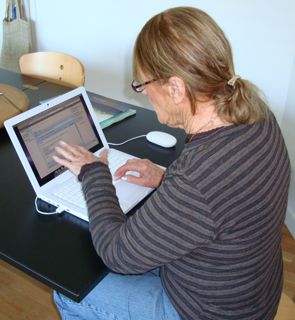
june.jpgI've just spent three and a bit days helping my step-mother to get on to email for the first time in her life.
I thought I'd make a note of the problems she had as it might be useful for others on the same path.

She's a highly motivated user, with a great desire to live in the world of email and be able to look things up on the web, but while she's seen people using computers, she never has herself.

  • Familliar with a typewriter but not the following keys: Return, Tab, Delete, caps-lock (as it works on a computer)

  • No idea about the flashing insertion point in text fields

  • No idea about how text editing works, concepts such as inserting a new line by pressing Return have no meaning

  • When the screen dims and goes off due to power saving, it's a crisis that may well involve calling the manufacturer or store

  • Using the mouse and clicking on something is very difficult, further - clicking, dragging and double clicking (or more) seem to all be equivalent

  • After filling in a form, such as a login form, it's surprising that a button needs to be pushed to make things happen

  • Computers seem oddly picky about the spelling of usernames and passwords, surely near enough is good enough?


Anyhow, after a few days of practice every few hours, I can report that she is reading and sending email.

Some of the secrets of success for me in this case were:

  • I bought her a Mac - no problems with viruses, less mysterious user interface

  • Put her on to webmail, gMail in this case, so she can go to any computer and it will be pretty much the same. Also, if the computer is lost, no past mail or contacts are lost

  • Turned off all extra mouse buttons, no right button, no expose, as she kept triggering these things and getting confused

  • Stripped back the dock and basically focussed on launching Safari

  • During my stay, lots of constant repetition of opening the laptop, logging in, reading mail, archiving mail, sending mail

  • Left a folder with all the key information, not so much for her but for any future computer helpers trying to assist

  • Yes, it's bad, but left a post-it note with her username and password on the laptop


Having been away for a day, she did ring to report that she couldn't log in. Turned out she was using a different username for some reason. Wild clicking had also resulted in filling the screen with web pages.

Good on her for giving it a go, computers and the internet are an amazing way to interact and it's easy for me to forget how much implied knowledge we have absorbed.

Tuesday, September 30, 2008

80m QRP AM Transmitter - first contact!

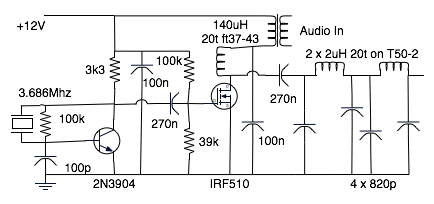
Encouraged by the success of the beacon transmitter, I've built another version that is amplitude modulated using a 600 ohm telephone transformer.

The transmitter is just 2 transistors, (not counting the mic pre-amp and audio power amplifier), here's how it looks:

AM Transmitter.jpg


Whistling into the microphone looks like this on the cro:

AM Waveform.jpg


I'm certainly not getting 100% modulation.

I've just had a contact with Sam, VK2BVS, who reported that with his pre-amp in I'm 10dB over S9, with excellent quality audio "like the BBC".

Next step is to box all this up and make it a bit easier to switch from receive to transmit. (Currently I have to clip a clip lead on to power it and switch a co-ax switch).

The circuit is closely based on the beacon by Alan VK2ZAY. My construction is huge compared to his.

80m AM transmitter.png


For the audio amplifier to drive this I used a Jaycar "Short Circuits 3" #13 High Power 12V amp which seems to do the trick quite nicely.

Monday, September 29, 2008

80m QRP Beacon on the air

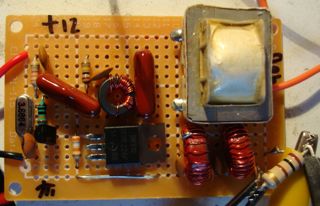
After biting off more than I could chew a few times recently, I've successfully built a QRP (low power) beacon for 80m.

beacon.jpg


It's on air at the moment on 3.686Mhz sending a morse ident with my email address so I'm hoping to get a few signal reports.

I think it's putting out about 250mW.

There are some obvious faults, I can hear chirp, clicks and when it's off carrier from the oscillator leaks out to some extent.

The keyer is an Atmel AVR ATMega816 which is complete overkill in this case.

The circuit is very closely based on Alan VK2ZAY's design except that I didn't have any 2N7000s so I've used a single IRF510 with a bit of bias.

I used perforated board with just a copper spot under each hole and it went together rather well (for me).

beacon board.jpg


I don't speak morse yet, but here's what I'm sending:

morse.png


Anyhow, please tune in to 3.686Mhz and let me know if you can hear my slow morse.

Update

Hi Peter,

Read about your 80m QRP beacon mentioned on hamnews and had a listen.

It’s peaking about S5 in Canberra. I’m using a TS-480SAT with a 40/80m trapped dipole. Here is some of what I decoded using Ham Radio Deluxe DM780 software:

LE EK*E PM VK2TPM VK2TPM PLS EMAIL RPT PETER DOT WARKS AT OBOX COM THIS ISE A QRP BEANION TRANSMISSIOLE VK2TPM VK2TPM VK2TPM PLS EMAIL RPI PETER DOT MARKS AT POBOX COME THIS IS A QRP BEACON TRANSMISSION DE VK2TPM VK2TPM VK2TPM PLS EMAIL LPT PETER DOT MARKS AT POBOX CON THIS IS T *RP DEACON N E IS E UK2TPM VK2TPM VK2TPM PLS EMAIL RPT PETER DOT MARKS AT POBOX COM THIS IS A EQRP BEACON ARANSMISSIXD DE VK2TPM VK2TM VK2TPM PLS EMAIL RPT AIETER DOT MARKS AI POBOX /OM THIS IS A QRP BE P EHANSN ESSIO N DE VK2TPM I ERM VK2TPM PLS EMAI D RP E NETER DOT MARKS AT POB3X COM E I IS A QRP BEAON TRANSMISSION DE VK2TPM

As you can see I’m missing/badly reading some characters and have interference but the message is coming through, probably be better received by a human than a computer…but I’m no morse code expert…

Had QRM from SSB and another CW signal nearby by managed to filter most of it out.

Regards

Ian Sinclair VK1DI

Update 2

I'm taking it off air while.

Sunday, September 28, 2008

Valve technology needed for post nuclear sked

john.jpgThe NSW home brew "trash n treasure" meeting today at Dural was great thanks to the work of John Hale VK2ASU (left) and Stephen Lowing VK2BLQ (below).

Together they presented on the theory and practice of constructing using valve technology.

John handed around common valves including a tiny device and told the story of his first home made valve radio. The theory of how valves work, by using heat to emit electrons and then using charged grids to control their flow in the vacuum chamber is at once, both simple and sophisticated.

stephen.jpgStephen talked about where to pick up common valves even today and showed some of his past projects which are beautifully constructed.

The board he's holding here is a regenerative receiver that is powered by batteries including just 9V for the plate voltage.

It was pointed out the the electromagnetic pulse from a nuclear explosion (or even a devices specifically designed to generate an EMP) will kill most modern technology and if we want to have a chance to participate in the post apocalyptic radio skeds we'd better get on and build some valve equipment.

table.jpg


Luckily, the group that turned up managed to fit into the air-conditioned WIA hut today, but it's great news that the construction of a larger shed on the Dural block is finally going ahead.

DSC00901.jpg


I can still remember valve equipment (aside from that big tube at the front of televisions until recently), but my children have no idea about this technology.

minitiature.jpg


It won't be long until all living memory is gone.

Saturday, September 27, 2008

The best hi fi system

tognetti.jpgLast night we were fortunate to have a wonderful experience - we sat in on a bit of a rehearsal of the Australian Chamber Orchestra.
I was able to sit right in the middle with the orchestra very close and all around. The communication between the players and Richard Tognetti, all done with body language and eyes, is fascinating.

The most impressive thing for me was the quality of the sound. I listen to too much music through small computer speakers and headphones, but it's amazing what poor reproduction even good headphones produce compared to the real thing.

There is a richness of tone from a bow being drawn across a string, I think the cello in particular, that doesn't seem to come across in recordings.

I recall hi fi sales blurb that used to claim that certain systems were "just like having a symphony orchestra in your living room", the reply was always to ask if that was really desirable as they'd drink your house dry.

Wednesday, September 24, 2008

One tree dies, an antenna will live

tree.jpgToday is tree lopping day. We're getting rid of a pesky liquid amber and a pine tree. Both of these shade the garden.

The huge gum tree is staying but I noticed that the tree men climbed the gum to tie ropes to liquid amber branches to control their fall. I had a bright idea and have asked them to run a line for me over a very high branch in the gum tree. "No worries" they said.

This means I'll have a loop of venetian blind cord going right up that very tall gum tree which I can use to raise up awesome long wire antennas or support one end of an 80 dipole.

These tree lopping guys are both smart and fit, here's a time lapse video with one frame taken every sixty seconds.


The job's done and I can definitely recommend Aura Tree Services they were efficient and professional. Great blokes too.

We have a lot more sky now and I'm back on 80m with good reports.

When I mentioned I'd made a stop motion video they were very interested and I gave them a CD with the high quality video on it.

Update

The loop of venetian cord is in place so I can easily hoist things up 10m or so.

I first tried an end fed long wire but the noise on 80m was bad, so I've put up my old 40/80m trap dipole with one end up in the gum tree and the other end over the house to a tree in the street.

The new antenna is working really well. The extra height has further reduced noise, I've had some PSK31 contacts on 40m (7.040) and am hearing some magnificent signals on 80m.

Monday, September 22, 2008

BaristaReview site build

logo160.pngI'm pleased to report that I've built a real application in Django on Google App Engine.

BaristaReview is a site that I've always wanted, specifically to let me find (and review) coffee shops near where I am.

Although it's loaded with Australian cafes to start with, it's not localised except for it being in English.

The great benefit to me of Google App Engine is the low cost of entry and ultimate ability to scale right up to whatever success we might achieve without having to supply any hardware ourselves.

It's been a fascinating little project with lots to learn about:


  • Google App Engine

  • Google Maps and geocoding

  • Django 1.0

  • Serving images from a database

  • memcache(d) for caching images

  • integrating blogger into a sub-domain


There's still lots to do, not to mention the iPhone version people keep asking for, please let me know if you see bugs or unexpected behaviour.

Google App Engine is a little new and I do run into a few issues deploying sometimes, but generally the site seems to perform pretty well.

Please look up your favourite cafes and if they aren't there, go ahead and add them!