Showing posts with label xcode. Show all posts

Sunday, November 04, 2007

A brief review of XCode 3

Spent much of Saturday getting in to XCode 3 which ships with Leopard. My project was to build a Cocoa native version of the AppleScript Studio app I built last week to read and ultimately control a Yaesu FT-817 radio via a serial interface.

Having used Microsoft's developer studio, Borland's C++ Builder and the beloved Metrowerks CodeWarrior, the old XCode seemed like a step backwards in programmer friendliness.

XCode 3 is a major step forward. 

It's taking me a little while to stop fighting it and go with the new work flow. Here's my observations:
  • You don't really need to go to the debugger window, variables are now inspected by rolling over them. The open up so you can inspect structures within objects very nicely.
  • The output console doesn't open automatically and until I found it I used the system-wide console to view my NSLog() printouts. 
  • Interface builder has been completely re-written and the vast array of available NIB objects are available in an easily searchable window.
  • I'm having a bit of trouble with the synchronizing between my XCode project and Interface Builder, I end up putting declarations in my .h file and dragging it to IB each time.
  • There's a handy link at the bottom of the IB window to take you to the XCode project.
  • When there are build errors they appear in red balloons right in between lines of your code. At first I found this a bit annoying but now I think it's pretty clever.
  • Code focus is where you put the mouse in a little left margin and blocks of code are highlighted - it's a bit alarming when you first do this by accident but now I think it's neat.
Still to try out
  • Cocoa 2 with garbage collection and automatic synthesis of getters and setters.
  • Project versioning - although I'm loving having Time Machine taking care of me all by itself (tip, watch the console for a while and see all the clever things it's doing)
Cocoa compared to AppleScript

It took me a lot longer to get this going in Cocoa compared to AppleScript mostly because I had to figure out how to drive the serial port. In AppleScript I found an extension that did it all for me, in Cocoa I found some classes from Andreas Mayer and others that are fantastic.

In AppleScript I used the idle handler, in Cocoa I had to use NSTimer.

I'm really enjoying Cocoa now that I'm up and running. It feels really solid and my only complaint is the sheer richness of the library, it's getting really huge and when you can't remember the method name you have to hunt through a huge list. It would be great if code completion could first show the most commonly used methods rather than the whole list.

We desperately need a new edition of Hillegass.

Sunday, October 28, 2007

An AppleScript studio application

AppleScript studio is kind of the Visual Basic of MacOS X. (I'm sure some people will correct me firmly on that statement).

In order to try it out under Leopard I picked a simple project to give me something to shoot for.

I have a little Yaesu FT-817 that supports a remote control serial protocol they call CAT. It's 4800 baud, 8 bit, 2 stop bits. Each packet is 5 bytes, the last byte being the command and the other bytes are the data to go with it.

My objective is the program shown above, it periodically retrieves the current frequency and mode from the transceiver and shows it.

To interface with a common PL-2303 USB serial device, I installed the excellent (and free) Serialport X scripting addition. Thanks Art Coughlin!

To install you create a folder called ~/Library/Scripting Additions/ and stick it in there.

Prototyping was done in straight AppleScript until I was able to read and display the frequency. Next to XCode where I created an "Applescript Application". It reminds me a bit of HyperCard, you open the .nib file and in the Applescript properties tab you can set a handler for a button to call an "on clicked theObject" method in your script for example.

After some frustrating messing about, I've achieved my objective. Once you've chosen the serial device an idle handler refreshes the frequency. 

To make the built application run on a machine without the Serialport X applescript already installed you need to bundle it in the application. Thanks to the instructions here I was able to automate this. Note that I needed a -r after CpMac to copy recursively.

I find the AppleScript language frustrating for reasons I can't fully fathom, this "Applescript for python programmers" table was a great help to me as I'm very comfortable with python.

For what it's worth, I've put my xcode project here, hope it helps someone.

Saturday, October 14, 2006

Python and Xcode


I've been doing a lot of very productive python work recently and have been looking around for the best programmer's editor but still haven't found it.

If you spend you whole day in an application you do start to think about how it could be made more productive, and of course anyone who programs can't help but customise.
Features I'm after are:
  • Syntax colouring
  • Syntax aware (auto indenting etc)
  • Real code completion (I mean language aware like looking into imported modules for possible completions)
  • Ease of showing documentation on a module and it's methods
  • Code folding might be nice
  • A full gui debugger might be nice
  • Native MacOS X application
  • Handles large projects fast
  • Subversion GUI
TextMate blew me away and was the first editor to get me off a long term addiction to BBedit, but I got a bit dissatisfied with how long it takes to check all the files in a large project when I switch back to it. (I know you can turn this off but that would be a pain too).

XCode

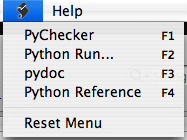
I've used XCode of course for Cocoa development and it has python syntax colouring built in. XCode is particularly good with large numbers of source files, it's fast and searching is really great. There's a little Script menu I hadn't played with before now and I want to share what I've discovered with you.

User scripts for that little menu go in ~/Library/Application Support/Apple/Developer Tools/Scripts/ (insane eh?).

Inside that Scripts directory you should copy the default StartupScript and 10-Users Scripts folder from /Library/Application Support/Apple/Developer Tools/Scripts/

Here are my scripts, mostly adapted from the excellent ones that come with TextMate.

10-PyChecker.sh

#! /bin/bash
#
# -- PB User Script Info --
# %%%{PBXName=PyChecker}%%%
# %%%{PBXKeyEquivalent=}%%%
# %%%{PBXInput=None}%%%
# %%%{PBXOutput=None}%%%
#
PYCHECKER=/opt/local/bin/pychecker
TEMPOUT=/tmp/check.txt

${PYCHECKER} --only %%%{PBXFilePath}%%% > ${TEMPOUT}
open -a /Developer/Applications/Xcode.app ${TEMPOUT}

20-run.sh

#! /bin/bash
#
# -- PB User Script Info --
# %%%{PBXName=Python Run...}%%%
# %%%{PBXKeyEquivalent=}%%%
# %%%{PBXInput=None}%%%
# %%%{PBXOutput=SeparateWindow}%%%
#
#
PYTHON=/opt/local/bin/python
TEMPOUT=/tmp/out.txt

echo "Running %%%{PBXFilePath}%%%..." >${TEMPOUT}
${PYTHON} %%%{PBXFilePath}%%% >> ${TEMPOUT}

open -a /Developer/Applications/Xcode.app ${TEMPOUT}

30-pydoc.sh

#! /bin/bash
#
# -- PB User Script Info --
# %%%{PBXName=pydoc}%%%
# %%%{PBXKeyEquivalent=}%%%
# %%%{PBXInput=Selection}%%%
# %%%{PBXOutput=None}%%%
#
#
pydoc -k %%%{PBXSelectedText}%%%

# This command takes the currently selected word and
# displays the python documentation for the module
# corresponding to said word.
#
# It falls back on the current word.

# change to /tmp to avoid possibly overwriting
# an html file in the working directory.

PYDOC=/opt/local/bin/pydoc

cd /tmp

${PYDOC} -w "%%%{PBXSelectedText}%%%" >/dev/null
if [[ -f "%%%{PBXSelectedText}%%%.html" ]]; then
open "%%%{PBXSelectedText}%%%.html"
#rm -f "%%%{PBXSelectedText}%%%.html"
else
echo "

No documentation found for:

%%%{PBXSelectedText}%%%

This command only looks for Python modules."
fi

40-python reference.sh

#! /bin/bash
#
# -- PB User Script Info --
# %%%{PBXName=Python Reference}%%%
# %%%{PBXKeyEquivalent=}%%%
# %%%{PBXInput=None}%%%
# %%%{PBXOutput=None}%%%
#
#
open http://www.python.org/doc/2.4/modindex.html