Showing posts with label python. Show all posts

Monday, August 11, 2008

Working with Django 1.0 and Google App Engine

logo160.pngI've taken some time off regular work to build BaristaReview.com, a site where you can find and review your local coffee shops.

To build this new site, I decided to use Google App Engine and Django.

Right now, Django is racing towards the version 1.0 release and it's changing fast. Unfortunately, due to some constraints in the runtime and the fact that you have to use Google's Database, it's not all smooth sailing.

Most things are working quite well, and the site is very responsive (certainly to django hosting I've tried elsewhere), but I've run into some roadblocks when I come to upload image files.

On App Engine you can only run pure python code, so using the latest Django I see log entries like this:

Could not import "fcntl": Disallowed C-extension or built-in module


More seriously, there is no local file system, so when I try to upload an image file, it fails with:

NotImplementedError: This class/method is not available.


When django tries to get a temporary file like this:

self._file = tempfile.NamedTemporaryFile(suffix='.upload')


Which is fair enough.

Anyhow, it's early days and there's lots of other people playing with this technology. Certainly it's a great deal from Google and I'm totally excited about the state of Django. I'm in geek heaven.

Sunday, April 06, 2008

Visualising WSDL with GraphViz and python

sample.jpgI'm working with SOAP and WSDL at the moment and golly that xml can be hard to read.

In the past I've used GraphViz to draw pictures of data structures, once I did an IVR call flow diagram that helped to define what the client wanted and then the source was used to write the dialplan directly.

This is only roughly working, but it's starting to be useful. The python program takes a wsdl file on the command line, and outputs a "dot" file that can be rendered with GraphViz. Note that on the Mac OmniGraffle can also render this format really nicely.

Please let me know if a better tool exists, for the Mac or Unix in general - surely it must, and any improvements would be gratefully accepted. (I am aware of XMLSpy, which looks great but there is no version for the Mac and it looks like it costs "Starting at €399" whatever that means).

#!/usr/bin/env python
"""
A little utility to visualise wsdl using Graphviz.
(http://www.graphviz.org/)
OmniGraffle does an excellent job too.
by Peter B Marks
http://marxy.org

License: You are free to use this for any purpose.

History:
6-April-2008 1 Roughly working for comment.
6-April-2008 2 Skip duplicate arcs.
6-April-2008 3 Add verbose command line switch.
6-April-2008 4 Add levels and outfile options.
"""
import sys
import string
from optparse import OptionParser
import logging
import xml.etree.ElementTree as ET

# global list of nodes we've already outout
# so we don't overwrite them
ALREADY_DONE_NODES = []
ALREADY_DONE_ARCS = []

RECURSE_LEVELS = 50
CURRENT_LEVEL = 0

def main():
global RECURSE_LEVELS
parser = OptionParser()
parser.usage = "%prog [options] infile"
parser.add_option("-v", "--verbose", dest="verbose",
action="store_true", help="print lots of info")
parser.add_option("-o", "--outfile",
dest="outfile", help="Output file to write to")
parser.add_option("-l", "--levels",
dest="levels",
help="Number of levels to recurse or %d" % RECURSE_LEVELS)
(options, args) = parser.parse_args()

if len(args) > 0:
fileName = args[0]
else:
parser.print_help()
return

if options.verbose:
logging.basicConfig(level=logging.DEBUG)
else:
logging.basicConfig(level=logging.ERROR)

if options.levels:
RECURSE_LEVELS = int(options.levels)

if options.outfile:
outfile = options.outfile
else:
outfile = fileName + ".dot"

logging.debug("Reading file %s" % fileName)
infile = open(fileName, "r")
xmldata = infile.read()
infile.close()

logging.debug("Writing to file: %s" % outfile)

of = open(outfile, "w")
of.write('digraph g {graph [rankdir = "LR"];\n')
tree = ET.parse(fileName)
root = tree.getroot()

outputLevel(of, root, root.tag)

of.write('}')
of.close()
logging.debug("Done.")

def removeNamespace(fullString):
where = string.rindex(fullString, "}")
return fullString[where + 1:]

def outputLevel(of, itemList, itemListName):
"""Recursive function for outputting a level"""
global ALREADY_DONE_NODES, ALREADY_DONE_ARCS, RECURSE_LEVELS, CURRENT_LEVEL

itemListLabel = "%s" % (removeNamespace(itemList.tag))
logging.debug("Processing: %s" % itemList.tag)
itemCounter = 0
for item in itemList:
itemName = "%s-%d" % (item.tag, itemCounter)
itemCounter += 1
itemLabel = "%s" % (removeNamespace(item.tag))
for attribute in item.attrib.keys():
itemLabel += "|%s:%s" % (attribute, item.attrib[attribute])

if item.text:
itemText = item.text.strip()
if len(itemText) > 0:
itemLabel += "|%s" % item.text

if itemListName not in ALREADY_DONE_NODES:
ALREADY_DONE_NODES.append(itemListName)
of.write('"%s" [ label = "%s", shape="record" ];\n' % (itemListName, itemListLabel))
else:
logging.debug("Skipping duplicate node:%s" % itemListName)

if itemName not in ALREADY_DONE_NODES:
ALREADY_DONE_NODES.append(itemName)
of.write('"%s" [ label = "%s", shape="record" ];\n' % (itemName, itemLabel))
else:
logging.debug("Skipping duplicate node:%s" % itemName)

arc = '"%s" -> "%s";\n' % (itemListName, itemName)
if arc not in ALREADY_DONE_ARCS:
ALREADY_DONE_ARCS.append(arc)
of.write(arc) # the arc
else:
logging.debug("Skipping duplicate arc:%s" % arc)

CURRENT_LEVEL += 1
logging.debug("Recursed to level %d" % CURRENT_LEVEL)
if CURRENT_LEVEL >= RECURSE_LEVELS:
logging.debug("Hit maximum recursion level %d" % RECURSE_LEVELS)
else:
outputLevel(of, item, itemName) # recurse

if __name__ == "__main__":
main()


The diagram above is a clipping from the output generated from some annotated WSDL.

While I'm here can I mention how useful the techniques shown in this example make python for making little command line utilities. See how OptionParser makes it simple to handle short and long style command line options. Marvel at how you can use the logging module to write output if chosen by the --verbose switch.

It's sometimes a bit hard to find simple examples like this.

Saturday, June 16, 2007

WWDC over for 2007

The Apple conference was huge this year. A record of more than 5,000 attendees. Fantastically organised but it's so big that there were queues for everything. 

When Leopard ships later this year it's going to be great. I can't wait to see what developers build on top of it.

As always with conferences, I got snippets of valuable information from the sessions, but the greatest insights came from conversations with other developers during breaks. Met a bloke today who builds highly scaleable apps in python which are deployed on Linux for telcos - he explained to me how they manipulate the global interpreter lock so that their heavy lifting threads make use of additional cores.

People came from all over the world, such as Mr Xin above, who assured me that his organisation looked fine on the web form. (From a distance I first thought it was that famous AACS key again).

I've had a hard time with jet lag this year. I seem to be in some unknown third time zone, not San Francisco, and not Sydney. Wide awake at 4am local time.

Incidentally, this is being created using the Safari 3 public beta which seems excellent to me.

Thursday, May 10, 2007

Python decorators a simple example

Python decorators are a wonderful syntax for wrapping one function in another. I had a bit of trouble understanding the documentation, which often seems to involve talking about the history of how the syntax evolved rather than cutting to the chase and giving a simple example.

Specifically, I wanted to know how to get access to the arguments to the function I'm decorating in the decorator. Here's my example, at the top is the output:


"""
Example decorator that gets function arguments.

>>> decotest.py

>in mydecorator
>Function decorateme has been wrapped
> args = hello this is request
> kwargs = {}
>request = hello this is request
decorateme got request = hello this is request
>finished wrapped function
"""

def mydecorator(f):
print ">in mydecorator"
def wrapper(*args, **kwargs):
print ">Function %s has been wrapped" % f.__name__
print "> args = %s" % args
print "> kwargs = %s" % kwargs
request = args[0]
print ">request = %s" % request
f(*args, **kwargs)
print ">finished wrapped function"
return wrapper


def test():
request = "hello this is request"
decorateme(request)

@mydecorator
def decorateme(request):
print "decorateme got request = %s" % request

if __name__ == "__main__":
test()

Friday, October 27, 2006

django on windows mobile 5


Hey, I just got the web framework django running on a Windows Mobile 5 PDA. I'm running under python 2.5 from here.

There is a bit of messing about which I'll blog about later but mostly it's installing stuff and getting around the lack of the command line shell. The only other tip is to start the development server with --noreload.

As sqlite3 is available it should be possible to build a proper web app but I haven't tried that just yet.

Update: mentioned on the Django blog!

Wow, I am so proud to be mentioned on the django site, thanks very much.

Here's my startup script that lets you use the server over WiFi. To run it you open it in File Explorer:

import sys
import socket

sys.argv.append("runserver")
ipPort = "%s:%d" % (socket.gethostbyname(socket.gethostname()), 8000)

sys.argv.append(ipPort)
sys.argv.append("--noreload")

from django.core.management import execute_manager

import settings # Assumed to be in the same directory.
execute_manager(settings)

# so we can see any error
raw_input()

I installed Python on a compact flash card. Here's the layout from the "Program Files" directory down. I simply copied the django directory over from another machine.

Saturday, October 14, 2006

Python and Xcode


I've been doing a lot of very productive python work recently and have been looking around for the best programmer's editor but still haven't found it.

If you spend you whole day in an application you do start to think about how it could be made more productive, and of course anyone who programs can't help but customise.
Features I'm after are:
  • Syntax colouring
  • Syntax aware (auto indenting etc)
  • Real code completion (I mean language aware like looking into imported modules for possible completions)
  • Ease of showing documentation on a module and it's methods
  • Code folding might be nice
  • A full gui debugger might be nice
  • Native MacOS X application
  • Handles large projects fast
  • Subversion GUI
TextMate blew me away and was the first editor to get me off a long term addiction to BBedit, but I got a bit dissatisfied with how long it takes to check all the files in a large project when I switch back to it. (I know you can turn this off but that would be a pain too).

XCode

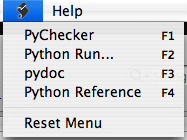
I've used XCode of course for Cocoa development and it has python syntax colouring built in. XCode is particularly good with large numbers of source files, it's fast and searching is really great. There's a little Script menu I hadn't played with before now and I want to share what I've discovered with you.

User scripts for that little menu go in ~/Library/Application Support/Apple/Developer Tools/Scripts/ (insane eh?).

Inside that Scripts directory you should copy the default StartupScript and 10-Users Scripts folder from /Library/Application Support/Apple/Developer Tools/Scripts/

Here are my scripts, mostly adapted from the excellent ones that come with TextMate.

10-PyChecker.sh

#! /bin/bash
#
# -- PB User Script Info --
# %%%{PBXName=PyChecker}%%%
# %%%{PBXKeyEquivalent=}%%%
# %%%{PBXInput=None}%%%
# %%%{PBXOutput=None}%%%
#
PYCHECKER=/opt/local/bin/pychecker
TEMPOUT=/tmp/check.txt

${PYCHECKER} --only %%%{PBXFilePath}%%% > ${TEMPOUT}
open -a /Developer/Applications/Xcode.app ${TEMPOUT}

20-run.sh

#! /bin/bash
#
# -- PB User Script Info --
# %%%{PBXName=Python Run...}%%%
# %%%{PBXKeyEquivalent=}%%%
# %%%{PBXInput=None}%%%
# %%%{PBXOutput=SeparateWindow}%%%
#
#
PYTHON=/opt/local/bin/python
TEMPOUT=/tmp/out.txt

echo "Running %%%{PBXFilePath}%%%..." >${TEMPOUT}
${PYTHON} %%%{PBXFilePath}%%% >> ${TEMPOUT}

open -a /Developer/Applications/Xcode.app ${TEMPOUT}

30-pydoc.sh

#! /bin/bash
#
# -- PB User Script Info --
# %%%{PBXName=pydoc}%%%
# %%%{PBXKeyEquivalent=}%%%
# %%%{PBXInput=Selection}%%%
# %%%{PBXOutput=None}%%%
#
#
pydoc -k %%%{PBXSelectedText}%%%

# This command takes the currently selected word and
# displays the python documentation for the module
# corresponding to said word.
#
# It falls back on the current word.

# change to /tmp to avoid possibly overwriting
# an html file in the working directory.

PYDOC=/opt/local/bin/pydoc

cd /tmp

${PYDOC} -w "%%%{PBXSelectedText}%%%" >/dev/null
if [[ -f "%%%{PBXSelectedText}%%%.html" ]]; then
open "%%%{PBXSelectedText}%%%.html"
#rm -f "%%%{PBXSelectedText}%%%.html"
else
echo "

No documentation found for:

%%%{PBXSelectedText}%%%

This command only looks for Python modules."
fi

40-python reference.sh

#! /bin/bash
#
# -- PB User Script Info --
# %%%{PBXName=Python Reference}%%%
# %%%{PBXKeyEquivalent=}%%%
# %%%{PBXInput=None}%%%
# %%%{PBXOutput=None}%%%
#
#
open http://www.python.org/doc/2.4/modindex.html