Thursday, May 29, 2014

Noise in flats

This appeared in the lift last week.


Most interesting. I'll have to avoid raucous laughter and talking over other people.

Tuesday, May 27, 2014

Apple ARM laptops - not what you think

There have been rumours for years that Apple is working on ARM based computers with keyboards, after all the phones and tablets are already ARM processors. Recent rumours, talk about MacOS X, but Google's success with Chromebooks for education suggests another alternative.

I think Apple might make a low cost laptop running a version of iOS that would be perfect for users who want the simplicity and security of iOS, combined with lower cost and long battery life from an ARM processor. It would be popular with eduction but also the huge audience of users who find full operating systems confusing.

This laptop would have a keyboard and a large trackpad. My guess is that they would not do a touch screen as poking the screen on a laptop is not a good experience.

The whole idea is a reprise of a past product, the eMate, which was a laptop version of the ill fated but much loved Newton. The App eco-system would provide a rich set of applications that would need a little tweaking but port over quickly. Many apps already work well with external keyboards. Without touch presumably a "mouse" cursor would be needed but not much else.

Saturday, May 24, 2014

First look at the Intel Galileo embedded linux board

I've just received an Intel Galileo board and am starting getting to know it. In the past I've used Arduinos for low level hardware "bit bang" style projects, and Raspberry Pi or Beagleboards where a little embedded Linux is needed - both are great for their purpose.

The Intel Galileo is kind of a mash up between the two worlds, underneath it runs Linux and it has software that emulates the Arduino's hardware enough for many sketches to run as they are.


You can see that it includes the standard, weirdly offset, Arduino sockets for taking "shield" boards.

The board is just 7x10cm and pretty capable:

  • USB 2 client and USB 2 host ports.
  • Serial port (wired to a convenient 3.5mm stereo socket)
  • Ethernet socket
  • Standard 5V 2.1mm power socket
  • Mini PCI Express slot with USB 2.0 Host support - this is probably most useful for adding a Wifi card.
  • All of the Arduino's analog and digital I/O ports.
  • It has the normal pin 13 LED that you get on an Arduino.
  • The CPU is an Intel Quark SoC X1000, which is a 32 bit Pentium class processor running at 400Mhz. (Single core).
  • 256MB of RAM
  • 8GB onboard flash which contains the linux boot
  • uSD card slot that can take up to 32GB cards and will boot from this if present.

As an Arduino

First up I wanted to try it as an Arduino emulator. I connected a microUSB cable from my Mac to the USB client port on the board.

The version of the Arduino development tool which has been modified for the Galileo can be downloaded from Intel's download centre. Annoyingly it's also called Arduino, so will collide with the normal Arduino app unless you rename one of them. (I read that spaces in the name are a bad thing by the way).

Choose the virtual serial port and choose "Firmware update" from the Help menu.


The update was faster than the 5 minutes they warned about. After the update I had to quit and re-launch the Arduino environment.

I selected the Blink example from the sample sketches bundled with the environment, clicked compile and then run. 

Now we see a little blinking green LED on the board, just like a real Arduino.

But this seems a waste of a Pentium CPU with a quarter of a Gig of RAM!

Talking to Linux

Sketches can fire off linux commands using a system() function.

I plugged a short ethernet cable from the port on the back of my Mac directly in to the ethernet port on the board. (Macs don't need crossover cables). To bring up the interface on linux you need to write a sketch to configure the interface and start the telnet server.


system("telnetd -l /bin/sh");
system("ifconfig eth0 169.254.1.1 netmask 255.255.0.0 up”);

With ifconfig on my Mac I can see that en0 gave it self 169.254.248.1

I ran the sketch.


And I can telnet to the board:

$ telnet 169.254.1.1
Trying 169.254.1.1...
Connected to 169.254.1.1.
Escape character is '^]'.

Poky 9.0.2 (Yocto Project 1.4 Reference Distro) 1.4.2 clanton

/ # top
Mem: 22704K used, 215448K free, 0K shrd, 0K buff, 12972K cached
CPU:  99% usr   0% sys   0% nic   0% idle   0% io   0% irq   0% sirq
Load average: 0.98 0.56 0.26 2/36 3476
  PID  PPID USER     STAT   VSZ %VSZ %CPU COMMAND
 3468   875 root     R    10100   4%  99% /sketch/sketch.elf /dev/pts/1 /dev/ttyS0
 3476  3475 root     R     1268   1%   1% top
  951     1 root     S     1268   1%   0% telnetd -l /bin/sh
  197     2 root     SW       0   0%   0% [kworker/0:1]
  870     1 root     S     1272   1%   0% {launcher.sh} /bin/sh /opt/cln/galileo/launcher.sh
 3475   951 root     S     1268   1%   0% /bin/sh
  720     1 root     S     1264   1%   0% /sbin/syslogd -n -O /var/log/messages
  884     1 root     S     1264   1%   0% /sbin/getty 38400 tty1
  883     1 root     S     1264   1%   0% /sbin/getty 115200 ttyS1
  724     1 root     S     1260   1%   0% /sbin/klogd -n
  875   870 root     S      876   0%   0% /opt/cln/galileo/clloader --escape --binary --zmodem -
    1     0 root     S      796   0%   0% init [5]
  873     1 root     S      768   0%   0% /opt/cln/galileo/galileo_sketch_reset
    3     2 root     SW       0   0%   0% [ksoftirqd/0]

Interesting, I guess the Arduino software loader uses zmodem, that takes me back to the old dial up BBS days!

There’s a /sketch directory containing sketch.elf which is the binary of the sketch I’m running.

The little Yocto Linux distribution in the 8GB of onboard flash is pretty basic and doesn't have ssh for example so it's time to upgrade.

Boot Linux from uSD Card

There's a larger Linux distribution from the Intel download centre

I found a spare uSD card, stuck it in an SD adapter and stuck it in to my Mac, a USB reader would do.

Using Disk Utility, partition the uSD card as MSDOS FAT single partition. I called mine BOOT.

The Linux image is compressed with 7zip. I think I have that from Homebrew so you might need to find something else to uncompress the file if you don't have that.

I extracted directly to the root of the uSD card like this:

$ 7z x LINUX_IMAGE_FOR_SD_Intel_Galileo_v1.0.0.7z -o/Volumes/BOOT

Unmount the uSD card. Power off the Galileo board, insert the uSD card and power up. Lights flash enthusiastically for a little while.

To find the IP address the board has taken I use arp on the Mac:

$ arp -i en0 -a
? (169.254.165.5) at 98:4f:ee:1:45:c0 on en0 [ethernet]
? (169.254.255.255) at ff:ff:ff:ff:ff:ff on en0 [ethernet]

So we can see it’s on 169.254.165.5.

$ ssh root@169.254.165.5
The authenticity of host '169.254.165.5 (169.254.165.5)' can't be established.
RSA key fingerprint is 09:ff:22:6c:5b:1f:7b:39:53:a2:a7:6d:d4:d7:fe:54.
Are you sure you want to continue connecting (yes/no)? yes
Warning: Permanently added '169.254.165.5' (RSA) to the list of known hosts.
root@clanton:~# 

And we’re in. (No root password). I’m using an old 8GB uSD card and that leaves me with 140MB free. You can use up to 32GB cards.

I can see the on board 8GB there so presumably that could be wiped and used as a drive if you’re booting from the uSD card.

# df -h
Filesystem                Size      Used Available Use% Mounted on
rootfs                  295.1M    139.5M    140.6M  50% /
none                    115.3M      4.0K    115.3M   0% /dev
/dev/mmcblk0p1            7.2G    306.4M      6.9G   4% /media/realroot
/dev/loop0              295.1M    139.5M    140.6M  50% /
/dev/mmcblk0p1            7.2G    306.4M      6.9G   4% /media/mmcblk0p1
tmpfs                   116.3M    116.0K    116.1M   0% /var/volatile
tmpfs                   116.3M         0    116.3M   0% /media/ram

There's lots of standard utilities, sshd, python and node are there so it’s a very familiar environment. Plus there’s the Arduino emulation software as well.

Conclusion

At around $110 plus shipping the Intel Galileo makes an expensive Arduino, but as an x86 Linux board it seems like a bargain. (It comes with a beefy 3A 5V power supply which explains part of the price).

I'm keen to see the things that this extra processing power can handle that a Raspberry Pi would not be able to cope with, things like FFT processing for real time signal processing. (I'm looking at you FreeDV...).

I realise the on board space is short but it might be nice if the network port was able to join a network and at least listen for telnet without the need for a sketch or uSD card boot to get to Linux. Presumably they want users to at least try the Arduino emulation side of the product.

My sincere thanks to Intel Australia for early access to the board.

Great videos from Dave, VK3ASE

Dave, VK3ASE, is a prolific video maker. Recently the quality of his work is extremely good. For a taste, check out this story about a Gibson Girl SCR 578 life boat radio he found washed ashore in Melbourne.


I love the music.

Sunday, April 27, 2014

ARM Chromebook for Amateur Radio

A while back I bought a Samsung Chromebook, the one that runs a non-Intel ARM processor. I see they are AU$320 and work nicely as a low cost web browsing laptop. Just the thing to take away if there's a risk of it getting lost or stolen.

It turns out they can be encouraged to run Linux along side the normal operating system and it seems it's quite practical to run software like Fldigi.


The trick is to put the Chromebook into developer mode and install the crouton chroot software. There's plenty of instructions around the web so I won't repeat here except to say that I first tried the xfce target but fldigi crashed on startup. Installing unity did the trick.

Fldigi finds the Signalink USB adapter just fine and all seems to work nicely.

There is a bug where the linux environment doesn't do tap to click or right mouse button, but if you switch to Chromebook and back again all is well (there's a whacky key command for this). It seems like this bug was fixed a year ago but has returned.

These laptops are very light and have a keyboard better than most of the old "netbook" class machines. Very low power consumption too.

Saturday, April 26, 2014

Meccano exhibition 2014

Mal, VK2BMS, and I enjoyed the Meccano exhibition held in Forestville today. It was well attended and the organisers had put a lot of work in to the display.


Meccano can be used to build gearboxes and differential transmission.


This guy had made a knitting machine.


Electronics is creeping in, this machine had an Arduino at the core of it with a fantastic relay board running everything.


I remember using one of these Philips electronics kits as a child.


Circuits were built to a template with components joined with little spring things.


This electronically controlled car had everything including electric windows.


A two story elevator with doors and interlocks was built by a retired lift mechanic!


Here's Mal learning about steam engine control from a fellow amateur.


Monday, April 21, 2014

Slinky dipole for 40m on balcony

My 10m wide balcony works fairly well for 20m but I wanted to try 40m. Good news, Australian Geographic stores carry very nice metal slinky's for $10 each so today I made up a balun and strung up two slinky's as a dipole.


A question: should the turns go the same way on both sides or should they be opposite? I have them in the same direction but it's not working very well.

With the slinky's extended to fill the available space I get a very good match but a little high in frequency for 40m.

This is an astonishingly good SWR and impedance for any antenna in my all-metal balcony, much better than what I get with the simple 20m dipole.

I can tune up on reasonable 40m frequencies, such as 7.146, with the Emtronic EAT-300 tuner but presumably co-ax losses are quite high.

As usual, I'm using about 10m of RG-174 thin coax to get from the balun, in through a window, to the transmitting position.

The windows here have soft rubber like seals and the thin coax will happily go through a closed window without much damaging compression.

Signal reception on 40m is disappointing, I've heard a few nets this afternoon but my CQ calls on 7.2 have gone unanswered so far.

It's a fine looking antenna but I don't think I should leave it out over night for fear of it blowing overboard and clobbering someone - leading to the breaking of another by-law no doubt.


This morning I had a pre-arranged contact with Stephen, VK2BLQ, who could certainly hear me OK, although no where near as strongly as you'd expect given our close proximity.

Using a PC headset mic with a KX3

The KX3 is a radio with convenient standard looking connectors, either 2.5mm or 3.5mm sockets. Elecraft mentioned that many low cost PC headset mics can be used in the four conductor mic socket but I found for my Logitech unit a small adapter cable had to be constructed.

The wiring is as follows:


I used a standard 3.5mm, three conductor inline socket and a 4.5mm four conductor plug which Jaycar carries in store. Doing it this way means I could leave the Mic PTT switching turned on, but I use the transmit switch (XMIT) on the lower front of the rig for control. Here's how it looks:


When I first tried this, mic gain was way too low, but I noticed that Elecraft had a firmware update I hadn't applied that offered increased microphone gain.  "SUPPORT FOR HEIL HC-6 MIC ELEMENTS: Mic gain can now be set as much as 20 dB higher to support these low-sensitivity elements."

On air reports from Mal, VK2BMS and Stephen, VK2BLQ suggest that the audio from the $15 headset is a little lacking in bass compared to the normal microphone but this can be adjusted if required. The headset is very light and comfortable but probably not robust enough for field use.

Incidentally, I accidentally interrupted the firmware update process and this left the KX4 in a mode where it displayed "MCU LD" on the display with the red TX light flashing. I wrote to Elecraft customer support and Howard replied within minutes with the procedure to get past this. (I won't reproduce it here as I guess it might change over time).

Friday, April 18, 2014

Ham radio story on ABC Open

Stephen, VK2BLQ spotted this story on ABC News24 the other day. A great piece from ABC Open.


Brenton: Ham Radio from Micah Barnes Photography on Vimeo.

How I lost weight

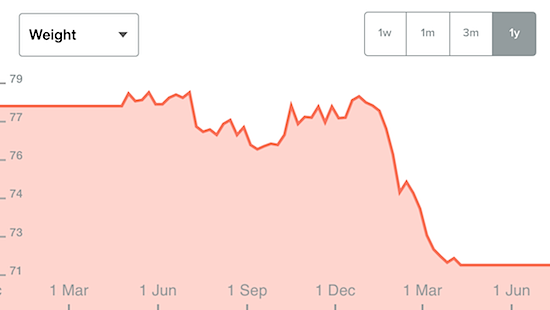
When I returned from Hong Kong in 2002 I was 82kg, today I'm fairly stable at around 71kg. My work is sedentary and losing weight is a struggle.


I hate depriving myself at every meal as you do in a traditional diet. Last year I got a Fitbit and did 10,000 steps a day - which did work to some extent. Certainly the computerised feedback on activity is a great thing with a huge future.

In December I read Michael Mosely's "Fast Diet" book. It's very simple, you just don't eat at all (or a tiny bit only) a day or two a week. My target is Monday and Thursday but often social events rule out one of those.

The other days are normal but here's the weird thing - after not eating for a day, I can't eat as much as normal. I guess the stomach shrinks a bit from not being filled every day.

For me it's been easy, I got used to not eating quite easily and it showed me how much of the time I just eat because it's time to eat. This may not work for you, but it's worth a try if you have a few extra kilos to shed.

Sorry for the off topic post, we now resume regular transmissions.

Update: It's May 2 and this morning I've achieved my goal. 69.8kg on the scales. Now it's time to back off to one day a week and just maintain this weight.

Monday, April 14, 2014

Antenna experiments curtailed in the flat

It's the down side of living in a unit. My squid pole antenna support off the balcony is virtually invisible from the ground, but not it seems to the resident one floor above. Today I received a polite but firm note.


I've only been leaving it up over weekends but unfortunately that needs to stop for a while. Here's the new more "stealthy" arrangement.


Unfortunately, due to all the metal in the balcony, the SWR is quite high. I can tune it down to about 3:1 but that's as good as it gets.

Saturday, April 05, 2014

Home made low cost keyboard tray

I'm finding typing on the dining table gives me sore shoulders so overnight I had an idea. Two $9 F-clamps and a plank and I have a nifty adjustable keyboard tray.


No doubt this is elaborate procrastination but it seems like a simple solution.

Sunday, March 30, 2014

ARNSW Home Brew Group - Smart phone and tablet apps for Ham Radio

Today at the ARNSW Home Brew group, a different kind of meeting. We turned to a survey of applications for Ham Radio that run on popular tablets and smart phone. Convener, Peter, VK2EMU rigged up an impressive camera on a tripod to project devices on to the big screen.


Peter showed a number of apps that generate audio tones, including sweeps, white and grey noise for measuring frequency response. We announced our plans to bring a tone source for an RF generator to iOS. I showed some phone apps including Morse and PSK31 decoding, antenna calculation and naturally I plugged my own free app for watching WSPR spots called WSPR Watch.

There was some home brew electronics on display with another great project from Stephen, VK2BLQ, showing a Drew Diamond design with the addition of a PIC based frequency counter.


The meeting did decline into a bit of an Android vs iOS discussion and we ended up discussing the demise of support for Windows XP and what that might mean for those who cling to it. I mentioned that people who see an iPad or iPhone as being out of reach should consider an iPod Touch as these start at AU$249 and run all the same software as an iPhone.

A huge turn out today, perhaps due to the weather, all kinds of interesting transport was on display, this one with space for your gun.


Today was also the last meeting with John, VK2ASU in attendance before he heads north to his new QTH. John has been a generous contributor to the group, net coordinator of the Home Brew nets over many years and super helpful to us newbies - we will miss you mate.

Sunday, March 16, 2014

iOS icon resizer script

Goodness, iOS 6 & 7 needs a lot of different icon sizes for a universal app. I wish Apple would support SVG. Here's my little script to resize a large icon down. It requires Imagemagick.

#!/bin/bash
# Usage: iconmaker.sh bigicon.png
# You need to brew install imagemagick
filename=$(basename "$1")
extension="${filename##*.}"
filename="${filename%.*}"
echo "resizing ${filename}..."
echo "filename = $filename"
for size in 29 40 50 57 58 72 76 80 100 114 120 144 152
do
    echo "$filename$size.png"
    convert {$1} -resize $sizex$size $filename$size.png
done

This is a note to myself really.

Made an Unun for feeding end fed wire antennas

Following pictures and diagrams from M0UKD, I've built up a 9:1 impedance transformer sometimes called an Unun.


This transformer meant that a random wire strung up on the balcony could be quite easily tuned up and achieved a 1.1:1 SWR without too much trouble.

I guess the name Unun is an adaption of Balun which is balanced to unbalanced whereas this is unbalanced to unbalanced.

Here it is all boxed up. My thanks to Stephen, VK2BLQ, for the loan of his excellent drill press.


As a test, I hung out only a few meters of wire with a short counterpoise and the antenna analyser looked pretty good near 28MHz.


My plan is to get on air with this tomorrow night for the home brew group net.

Saturday, March 15, 2014

Got to talk a little about ham radio on ABC Classic FM


The WIA is doing some work on promoting Ham Radio and this week I had an opportunity to do my bit. I was invited to be a guest on Margaret Throsby's Midday interview on ABC Classic FM.

Here she is ready to ask me a wide range of technical questions in the relaxing Classic FM studio. (14 seconds to go!)


If you wish, you can hear the interview here. I got to talk about my love of the Ham Radio hobby and the Home Brew group along with many other topics of interest to me at least.

I'm used to doing short pieces of technology explanation and analysis so the prospect of being interviewed for most of an hour was somewhat daunting, but the music helps to break it up and Margaret and her team were lovely to deal with.

FT-897 vs KX3 transmission bandwidth

I'm trying to talk with old friend Ralph, VK3ZZC, who's in Melbourne, about 1,000km away. He's on 10m which is a band I've never used before - so that's an interesting experience.

So far, no luck, but Patrick, VK2PN, kindly agreed to a contact so I could make sure my signal is getting out. Recently I purchased a second hand FT-897, a portable rig with built-in high capacity batteries and have been using that. Patrick wasn't too impressed with the transmission and sent me this image from his panadapter.


He rightly complained about the out of audio band signal and urged me to go and get the KX3 for comparison. The FT897 is running 20W and the KX3 10 so the signal levels are different but take a look at this:


The KX3 seems to transmit much more in the right band and suppression of the opposite side band is clearly superior. It's a much better rig.

Now, the FT897 has an optional SSB filter which can be used on transmit and I'd be interested to know if that helps. Thanks Patrick and do check out Ralph's web site - it's most interesting.

Tuesday, March 11, 2014

Simplest antenna - open wire fed dipole

Spurred on by the ARNSW Antenna day, and illuminated by a comment from Mal, VK2BMS, that alerted me to the fact that I've been using my Emtronics EAT-300 tuner incorrectly; I had a go at the simplest antenna - a dipole fed with a slotted ribbon.


Cut for 10m, this tiny dipole is held out from the balcony on a 6m squid pole (the heavy half is inside so it doesn't fall off). The slotted 300 ohm ribbon was 30 cents a meter at Paddy's Market. I hold it away from the metal railing in a little string sling.


I've tried open wire feeder in the past but could never find a low SWR resonance point  - it turns out the EAT-300 tuner needs a link between the single wire terminal and one side of the balanced line. There's a dotted line printed on the box but I never understood what that meant.


I'm running 20W here but when I skeptically responded to a CQ call from Charlie, VR2XMT, in Hong Kong he immediately responded and gave me a 57 which is pretty good.

The open wire fed dipole seems much wider in bandwidth than a similar co-ax fed dipole.

Obviously, while an open wire feed works for me in a location where I can get from the antenna to the tuner without encountering much metal, it's not good for other antenna - shack arrangements.

Once again, using a squid pole to push the antenna out from the building makes a huge difference compared to being on the balcony with concrete and metal all around. I'm up high enough and the squid pole and antenna is thin enough to be virtually invisible from the ground.

Sunday, March 09, 2014

ARNSW Antenna Day

My sincere thanks to the committee at Amateur Radio NSW for organising a wonderful "Antenna Day" today at Dural.


The day was a relaxed mix of informative guest speakers (my special thanks to all of them), some hands-on construction, and Commander Al making puns and deafening us with his hooter.


We learned about many interesting antenna variations from dipoles to more elaborate multi-band antennas.


There was home constructed and some nifty bits of commercial gear including this cute little tuner from Elecraft.


Everything from 160m to 2m was discussed.


For a small price of $10 those interested got a very nice dipole coax centre insulator and time to put it together.


We were lavished with tea, cool drinks, a BBQ and in the afternoon ice cream and fruit!

It was a beautiful day all around as you can see here. Incidentally, the second hand store is very well stocked at the moment too.


Sunday, February 23, 2014

Ham Radio Wyong Field day 2014

I enjoyed the Wyong field day as always this year. It was great to catch up with Nigel, John, Patrick, Peter, and others.

Lots of interesting bits of gear to look at, this one presumably Russian.


The home brew group put on the usual excellent table of gear.


Historical Radio Society was there in force.


John Maizels picked up a new microphone for his voice over business.


Nigel was in fine form.


Attendance was down a little this year but there was lots to see so I look forward to next year.