Wednesday, January 15, 2025
Tech talk on ABC Radio
Friday, January 10, 2025
Visited Australia's first computer CSIRAC with VK3ZZC
There's a terrific series of videos covering Australia's history in computing I noted in this post. After watching the episode on CSIRAC, I demanded that Ralph, VK3ZZC, join me in a visit to Spotswood to see it. (Click to enlarge).
The display is not well lit I'm afraid but Ralph was able to point out the features of it to me.
"Physicist and mathematician Trevor Pearcey and electrical/mechanical engineer Maston Beard led the design team for this computer, the first in Australia, and it was built by the CSIRO Division of Radiophysics. CSIRAC demonstrates how Australian designers, working largely in isolation, could successfully build one of the world's first computers. SIRAC ran its first program in 1949 and operated until 1964, performing computations for scientific, engineering and commercial projects.
It is now the only intact first generation computer."
The pumping station is also a wonderful thing to see.
Some images deserve to be black & white.
Also there is restoration work being done on the Melbourne Telescope in a wonderful workshop that I plan to use as a videoconference background in future.
ScienceWorks is a good thing to visit although it seems targeted at toddlers. I thought it would be difficult to get to but it's walking distance from Spotswood station which is very well connected.
Monday, January 06, 2025
Built a switched inductor L match antenna tuner
Peter, VK3YE, has a very neat portable setup that includes a nicely beaten up FT817 and a pocket sized L-Match antenna tuner that seems to work very well for him. He described it on his site and in a video and there are many descriptions of this simple circuit. I built one for QRP use in a small plastic box.
My version allows the capacitance to be switched between the input and output. (Click to enlarge).
So far I've tested with a MiniVNA plugged in to my (currently half down) off centre fed dipole and it certainly changes the reactance wildly when adjusted.
Saturday, January 04, 2025
What are all those squiggly lines on the 10m band?
The 10m, 28MHz, band seems rather lively today. I have just a low height wire dipole and am using an AirSpy HF+ but just look at all the visible activity:
(Click to enlarge).
I've often wondered what all those squiggly lines are. They usually, but not always, start and then sweep up in frequency. People have said either that they're high energy particles hitting the upper atmosphere or that they are distant welding machines that can be heard because of good propagation conditions.
It's wonderful to be able to see large parts of the spectrum like this.
Thursday, January 02, 2025
Bulk convert MOBI to ePub (or other eBook formats)
I've just switched from a Kindle to a Kobo book reader. I have a collection of old MOBI format books that I wanted to bring over the the Kobo. It does read MOBI books but I see some weird erros like this:
I've found that converting to ePub in Calibre avoids these problems but I have a folder full of files to convert. Calibre has a command line tool called ebook-convert that can convert a file and seems to work well. Based on past work by others I've created this script to convert a directory of ebooks over to ePub in a directory named "converted".
#!/bin/bash
# bulk-convert
# based on https://github.com/captaincouch/lame-bulk-convert
# Set the $SAVEIFS variable as the global Internal Field Separator character.
# This preserves the original global $IFS variable to change it back later.
SAVEIFS=$IFS
# Set the $IFS variable to a space character using substitution escape sequence
# for the space character.
IFS=$(echo -en "\n\b")
# Create a new directory for the newly-converted files, if not already existing.
mkdir -p ./converted
# Loop and convert each file "i" to mp3. Quotation marks are used to account for
# spaces and illegal characters. The files are placed in ./converted-mp3/filename.mp3.
for i in $(ls)
do
# Set a variable "c" containing the filename with the ".ext" extension removed.
# For example, "sound.wav" would become "sound", and "sound.foo.wav" would
# become "sound.foo".
c="${i%.*}"
ebook-convert "$i" "./converted/$c.epub"
done
# Set the $IFS variable back to previous value, using the value stored in $SAVEIFS
# for safekeeping.
IFS=$SAVEIFS
Switched from Kindle to Kobo ebook reader to borrow from the Library
My local library in Kyneton is part of the Goldfields Library Corporation and they have agreements with several eBook lending systems including BorrowBox and Libby. The Kindle does not support eBook borrowing - they want you to buy from their store.
Another thing the Kindle doesn't support is the Pocket read it later service. (There is some sort of workaround that uses the email to Kindle service).
I've purchased a Kobo Clara BW. (I have little interest in a lower contrast colour eInk device).
The Kobo is a bit smaller than the Kindle I have and the screen is set in from the face unlike the Kindle. It charges and connects with USB-C. Setup was quite easy, I gave it the Wifi credentials and it did a software update.
The first thing I tried was plugging it in to my Mac. It mounts as a disk. I copied over an old MOBI format book and it appeared in the library. MOBI is an old Kindle format that they still support but don't recommend. (I think the DRM has been well and truly cracked). Kobo supports a range of formats natively including ePub, PDF, FlePub, TXT, HTML, RTF and also MOBI.
The MOBI file I copied over works well enough on the Kobo but I noticed some visible formatting incantations in the text. Perhaps their MOBI implementation isn't complete?
I favour ePub and while you can put them on a Kindle you must email them to get them converted.
eBooks from the Library
Setting up the Kobo to be able to browse and download loan eBooks from my library account was a bit of a puzzle. I went to the Discover tab and selected OverDrive (which is the way one accesses BorrowBox). It asked me to add my library. I tried Kyneton without luck, next I tried Goldfields. Finally I found a library in Ballarat and, guessing that it might be in the Goldfields group, chose that. Next I entered my library card number and PIN and it worked!
I am able to scroll through or search for books they have available. They do make it look like you need to purchase the book but tapping the three dot button shows an option to "Borrow with OverDrive". I sucessfully borrowed a book which quickly downloaded. It expires in 14 days.
The option to borrow rather than buy is well hidden. Dark pattern there from someone...
Pocket is a service from the FireFox folks where you click a button in your web browser while viewing a story you want to read later and it magically gets cleaned up and sent to your reader. On the Kobo, this is in the More tab and they call it "My Articles" (although the pocket logo is easily recognised.
I had a bit of trouble getting the autentication to work and the Kobo said at one point they were having trouble too and are working on it. I tried again and it went through.
After sending an article to Pocket on my desktop computer I found that I need to tell Pocket on the Kobo to "refresh" (in the ... menu) in order to get what's new. I do like the fact that Pocket documents are separate to books rather than being mingled as they were on the Kindle.
Borrowing eBooks from a library is rediculously confusing. Things have different names, authentication seems unreliable, and I doubt that normal library users would figure it out. Perhaps Libraries are not motivated to make it easy?
Conclusion
So far I like the Kobo. I notice a bug where it seems to think I'm just 1% through books in the main listing even though I'm much more than that. Long tap to show the dictionary definition of a word doesn't work with MOBI books so perhaps that's also why the MOBI book I'm reading doesn't show progress.
Tuesday, December 31, 2024
Is VarAC legal? Is it even desirable?
I enjoy using digital modes. My favourite used to be PSK31 and these days I find Olivia 8/250 excellent for chatting to people who have high local noise. It gets through.
Quite often I've had people urge me to switch to VarAC which is a chat mode with handshaking and re-transmission, rather like Flmsg, it uses a software modem called VARA.
Mostly use Linux for ham radio and macOS for other computing. VarAC required modem software called VARA and both seem to require Microsoft Windows to operate.
The VARA modem specification says "VARA HF Modem is a propietary system developed by Jose Alberto Nieto Ros EA5HVK and can be used under shareware license".
They do say that it is actually an OFDM modem using an error correction technique called Turbo Codification.
Documentation on VarAC is not from the authors. The english manual says "Please note : These manual were written by brave VarAC users who wanted to contribute to the VarAC community. They may not be up to date... but they are super helpful!".
The VarAC Terms of use
- Selling of VarAC, whether standalone or integrated, is prohibited.
- Reverse engineering of the software is not allowed.
- Copying any part of the software is strictly prohibited.
- Modifying the software files is not permitted.
- It is forbidden to distribute VarAC through any means other than the VarAC official website (varac-hamradio.com)
- Please note that I bear no responsibility for any damage to your computer or transceiver.
- By submitting your email, you permit its use for news, updates, and marketing.
- Show courtesy to your fellow ham radio operators by avoiding the use of offensive language, discussing politics, or engaging in any behavior that deviates from the amateur radio regulations.
- You MUST use an authorized copy of the VARA modem software. Either free or paid version.
- VarAC is free for non-commercial use ONLY. For commercial use, please contact us.
The Amateur Radio operating procedures in Australia have a section as follows:
Encryption/scrambling
Transmissions from an amateur station must not be encrypted or scrambled, except for signals used to control a satellite, signals used to control a remote amateur station or by stations participating in emergency services operations or exercises.
Comments
I'm sure it works well as there are enthusiastic users but it seems to me that it's a proprietary version of an OFDM modem hosting a proprietary chat protocol. Also, VARA only runs on a proprietary commercial operating system from Microsoft.
The authors are clearly in this to make money, for example an alert is shown every time I do anything asking me to either transfer 68 euros or "continue evaluating" it. I pushed the Tune button in VARAC and it shows an alert saying that to Tune you must pay.
This all seems to go against the open philosophy of amateur radio.
Reverse engineer?
An open alternative
Tech talk on ABC Radio
https://www.abc.net.au/listen/programs/nightlife/tech-life-and-avoiding-scams/104772860
I hadn't met Tim Webster before, he's a bit of an Australian ledgend of TV, and a real pro. My anxiety about being on national radio for much of an hour was dispelled and even Tim commented on how quickly the time went.
We had wonderful contributions from the audience.
Friday, December 27, 2024
FNIRSI LCR-P1 Component tester review
I've been using my multi-meter, a nicer L/C meter, or a cheap component tester that runs from a 9V battery but recently I noticed a very smart looking new tester called an FNIRSI LCR-P1.
It's smaller than my other testers, has a USB-C rechargeable battery and a bright colour screen.
I purchased it in Australia on eBay for AU$44 which seems comparable with prices on AliExpress etc.
It has the ability to measure zener diodes and some sort of decoder for infrared remote control transmitters but I haven't tried either of those features yet.
Accuracy seems the same as my existing testers so while it's not a calibrated piece of lab gear it is handy for not accintally using a component that's out by orders of magnitude.
The infra-red decoding feature is pretty cool. Not sure that I have a use for it but it certainly works.
The zero insertion force component socket can be removed and replaced with a version designed for surface mount components. I kind of wish the ZIF socket was sunken into the body so the whole thing would actually fit in a pocket. Here's what you get in the box:
When plugged in to a computer via the USB-C port it comes up as a serial device. Presumably this could be used to flash the firmware. I tried connecting a serial terminal to it and sending a few return keys but got no response.
Tuesday, December 24, 2024
Manufactured PCB for Termination Insensitive Amplifier
The termination insensitive amplifier described by W7ZOI & K3NHI is a useful building block for the RF home constructor. I've been making these using copper pads glued on to copper boards but wondered if there were PCB designs available. I know about the Mostly DIY RF boards and kits but as the boards are out of stock I thought I've see if I could get boards made myself.
I found Craig Weston, VE3CBW, has kindly drawn up a design in KiCAD and shared it publicly. It opens up just fine in KiCad. He has a blog post here.
Craig has done a wonderful job of laying out the board in a logical way.
To get a board made I chose PCBWay, who I've used in the past. I followed their instructions on exporting the Gerber files. There are layers for the copper, hole drilling, solder mask and text - a bit daunting but I just did what they said and as you can see it worked just fine:
I've now populated the board and it works nicely.
The instructions on exporting the required files from KiCad are for an older version but I muddled through and made a zip of all the output files which was uploaded to PCBWay. I can see that they make a plugin for KiCad that does it all and I plan to try that next time. Here's what I zipped and sent. Not sure if everything is required but there were no complaints.
My thanks to Craig. I would like to comment on his blog but it requires a login to something and I haven't figured out how to get through that so if you read this - thanks! Craig has a fascinating blog and a YouTube channel.
Monday, December 23, 2024
Local ham catchup including Peter, VK3YE
Peter inspires me in a number of ways - home brew construction and getting out and participating on air.
His portable gear is satisfyingly minimal and shows beautiful wear and tear from regular use. For FT8 he uses an Android phone with a simple home made coupler.
Wednesday, December 18, 2024
Tech news spot on ABC Radio
https://www.abc.net.au/listen/programs/nightlife/tech-talk-with-peter-marks/104738420
Thursday, December 05, 2024
MeSQUAREs alternative - 1/32" board
MeSQUAREs are excellent. I've purchased them from QRPme in the past and used them with great success. I get through them very quickly and find it a bit unfortunate that the postage costs more than the product.
I've been looking at ways to do copper board prototyping in various ways including recently cutting circular pads.
Cutting copper board is difficult. It can be done with a hacksaw or Dremel but it's a tedious process and it's very hard to make small bits of board. The obvious answer is to use "tin snips" to cut the board but I find it splinters badly.
Recently I discovered 1/32 inch copper board. Kevin, VK2KB, kindly sent me a few boards and I ordered some via eBay. It seems to be used for some sort of craft activity. It cuts quite easily:
I've been able to quickly manufacture a collection of useful little squares:
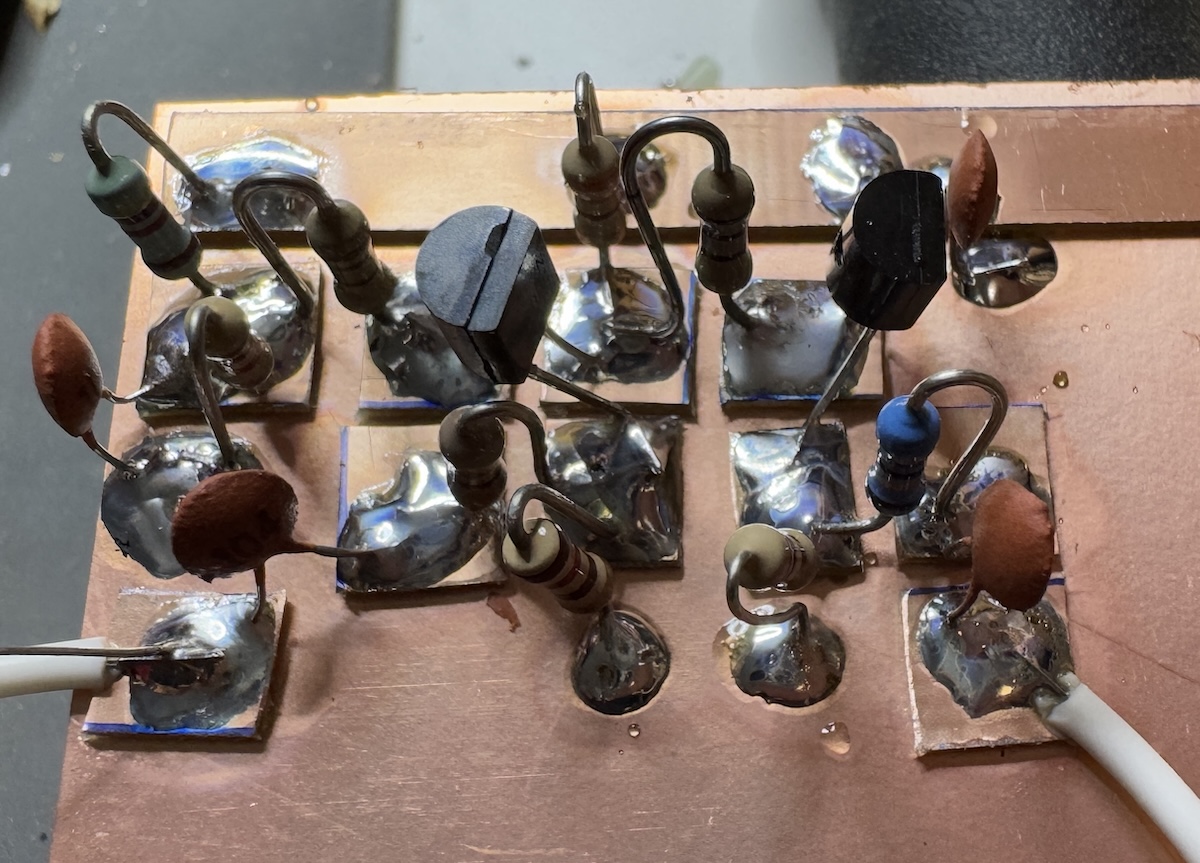
As an experiment, I've built a simple, one way, 10dB gain, Termination Insensitive Amplifier as described by Wes Hayward, W7ZOI, and Bob Kopski, K3NHI:
It works nicely! The copper does curl a bit when cut but I found it can be superglued down quite easily. I used a weight on the long power rail shown above.
Here's how I hold components while soldering the first lead:
My second attempt at a TIA is much more compact:
TIAs are very useful and I thought it might be nice to get some PCBs for them. I have bought from MostlyDIYRF in the past but the shipping US->Australia is extravagant. Looking around I found that Craig Weston has done a PCB design in KiCAD and generously shared it here.
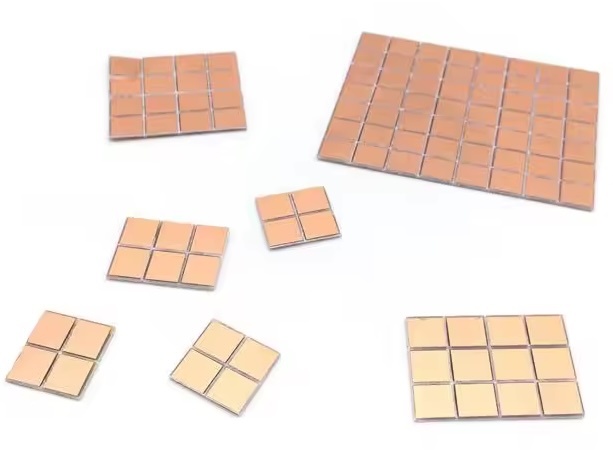
Another alternative product is on AliExpress. They are a bit hard to search for being called "100pcs FR4 PCB 6.5*7mm Double Side Copper Clad plate DIY PCB Kit Laminate Circuit Board 0.65x0.7cm 6.5x7x1.0mm". Here's how they look:
At $1.89 per pack, they're pretty economical and seem to work well. The squares snap apart quite easily.
Wednesday, December 04, 2024
Tech news spot on ABC Radio
On ABC Radio Nightlife I talked about Australian Government's efforts to reign anti-competitive actions by multi-national tech giants. Also age verification approaches, disruption of Uber, AI at the Commonwealth bank and how to kill an Ear-worm.
https://www.abc.net.au/listen/programs/nightlife/tech-talk-with-peter-marks/104680640
Saturday, November 30, 2024
AI noise removal from off air single sideband
The applications of AI (machine learning) to radio are fascinating me at the moment. This is a simple experiment where I recorded some SSB and fed it in to an AI noise remover at https://audo.ai/noise-removal This video switches between the input and the resulting output.
This was done just with the default settings. No training on just the noise was done. I think it does a very good job. My guess is that with modern CPUs and ML chips it should be possible to do this sort of processing in near to real time.
The Computer History of Australia - video series
Check out this trailer for a program covering the history of computers, and microcomputers, in Australia. So many memories for me.
"An in-depth look at the history of computers in Australia from 1949 to 2024. The series of episodes are currently in production and will be released as soon as possible."
I built many of the boards shown including the MiniSCAMP, EA 2650, Talking Electronics TEC-1, I also owned a Dick Smith System80 and a Kaypro II.
My thanks to Stephen, VK2BLQ, for alerting me to this gem on the State of Electronics channel.
Episode 1 is out:
Episode 2:
Ralph, VK3ZZC, and I are planning a trip to visit CSIR MARK1 here in Melbourne next week.
Friday, November 29, 2024
Machine learning comes to amateur radio: FreeDV RADE
The project gives us the ability to have a pretty good sounding digital voice contact which can be free of the background noise we are used to with analog HF radio. Amazing.
The new mode, which applies machine learning to both the voice codec and the modem, is Radio Autoencoder (RADE). "It combines Machine Learning (ML) with classical DSP to send high quality speech over HF radio at SNRs as low as -2dB. The speech signal has an audio bandwidth of 8kHz, but the RADE V1 signal requires just 1500Hz of RF bandwidth."
I'm a bit sad to see codec2 being superseded by the FARGAN speech synthesiser which is based on work by Jean-Marc Valin. Codec2 by David Rowe VK5DR, is a world leading low bit-rate codec with the added utility of being open source. I'm sure it will continue to live on for constrained computing applications.I like to use Linux in the ham shack and don't mind building open source software. To get RADE you need the version 2 fork of the FreeDV GUI application. It's early days and I ran into some build problems. I posted to the digital voice Google group and was quickly assisted by the author of the GUI application Mooneer Salem K6AQ and Barry Jackson G4MKT who has published a very nice build script that worked flawlessly for me on Linux Mint 22.
The machine learning parts are made with python, not uncommon for machine learning code, but it does make the build rather complex due to not only c/c++ dependencies but also python modules being required. The plan by the developers is to port the ML parts over to C++ in the future which will simplify the build and reduce the size.
The flow charts on the left show the "traditional" architecture of FreeDV on the left compared to the simpler ML based architecture on the right. The AI architecture is "simpler" in one sense but on the other hand is much bigger and more resource hungry.
There are ready to run builds for both macOS and Windows available here. (Note that this link will age so you should check for later builds). On macOS I ran into the issue mentioned at the top of the page where I opened FreeDV and got a message saying that the application was damaged. The solution is on the page, in terminal run:
xattr -c /Applications/FreeDV.app
The screenshot above shows it running on an M2 MacBook Air, receiving FreeDV's most enthusiastic user Jose Donnari from Argentina.
I'm having a bit of trouble finding people to talk to with this mode at present so to test it I transmitted on 40m and captured the signal on the excellent Ironstone Range SDR in South Australia. A path of about 700km. The recorded audio is played back in FreeDV which shows how it would be decoded by a station at the other end.
You can see there is deep selective fading on the signal but compared to past FreeDV modes there are no "beeps and burps". Another noticeable improvement is the muting when there's no actual signal seems vastly superior.
Given that this signal fits in about 2kHz of HF bandwidth, I think it's much easier to listen to than SSB once you get used to it.
There's starting to be quite a bit of activity. Here are two stations in South Australia talking on 40m, about 700km away. Even when one went to low power reception was excellent.
It's early days but this new application of machine learning to radio seems very promising. The pace of development of machine learning is breathtaking and my congratulations to David Rowe and the team for being at the cutting edge. The other big application of machine learning I can see is noise removal in HF receivers. I wonder how long it will take for commercial equipment to include this.
Wednesday, November 20, 2024
Tech news spot on ABC Radio
Scammers are a real threat to us all. Australians lost billions of dollars last year. Nightlife Tech Guru Peter Marks, a software developer and technology commentator from Access Informatics, joined Philip Clark on Nightlife to discuss the latest news in technology. https://www.abc.net.au/listen/programs/nightlife/tech-talk-with-peter-marks/104622796
Sunday, November 17, 2024
Rosebud Radiofest most entertaining
Thursday, November 14, 2024
Tried Apple Vision Pro - a glimpse of the future
You can book a personal 30 minute demo at Apple stores and it was easy to get an appointment.
The first step is that they put your glasses (if you wear them) in a machine that figures out your prescription. I had mine with me but they preferred to let the machine do it. My sight requires astigmatism correction and the magnetic clip in lenses they came back with seemed good.
There are some new user interface gestures to learn. Basically you "point" at things just by looking at them and "click" by touching your thumb and forefinger. It's hard not to try to point with your fingers at first.
After putting the headset on and adjusting the straps to keep light out the magical thing is when the outside world appears thanks to the high resolution cameras and high resolution screens in front of your eyes. It really looks like you're looking at the world through glass. Perspective seems the same and it's high dynamic range.
The first thing I did, which perhaps puzzled my demonstrator, was turn my head side to side rapidly to test the refresh rate. It's good but not perfect, the scene got a bit choppy.
There's a bit of calibration to do, looking at dots in front of you etc. It worked well.
Then a bunch of demos to run through. 2D photos, 2D video, 3D photos, 3D video and "immersive" photos and video. I have no interest in sport but the 3D video of basketball was quite impressive.
Most iPad apps can be used in a floating window and I looked up my WSPR Watch app in the App Store but it wouldn't let me install it.
The most impressive thing to me was how solidly user interface elements seem anchored in place around the room you're in. You can surround yourself in "windows" and pull or push them away.
The headset is bulky but didn't feel heavy on my head. After wearing it for about 20 minutes it did feel a bit hot and was a bit of a relief to take off. I could certainly imagine wearing one on a flight to privately watch a movie but I think that would be a waste of the technology.
I saw a couple of minor glitches during the demo but overall it was a solid platform.
The jury is still out on the future of spacial computing. One day the big flat screens we put on our desks will seem as dated as the deep CRT screens we used to use.
It was great to try this out. If you have time, take the opportunity. There was zero pressure from the demonstrator to have me buy one. At AU$5,000 and up, I wasn't tempted. If the price comes down to something similar to an 8k monitor they'll sell like hot cakes.