
I've never heard an Edison cylinder player live and was amazed at how loud the are for a purely mechanical device.

Among the goodies was this Lafayette receiver.
Lots of great stuff and Rob has such an understanding wife...

 When I started this, I thought more turns would be needed so I used computer ribbon cable held in place with Velcro straps.
 The little control box is a potting box with slots cut for the crochet hoop to slot in to it so the whole thing can stand up.
 Using a computer that reboots at random makes for a tense life.
 Just when Joost gave up the desktop client, I was directed to another streaming video client that really works: Livestation.
  Contrary to the popular image of computer nerds, I think that software development is one of the most creative, artistic fields of work.
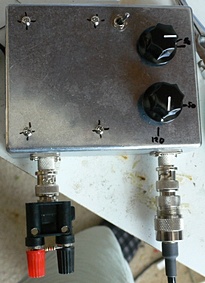 A noise bridge is a very simple circuit comprising a wide band noise generator (a conducting zener with some amplification) and a bridge arrangement with "known" variable resistance and capacitance on one arm and a socket for the unknown device.

 I've just returned from being a remote guest on a TV show. This is something I've done a few times in the past, but not since HD TV and things have changed...
mv /Library/Preferences/SystemConfiguration/NetworkInterfaces.plist /Library/Preferences/SystemConfiguration/NetworkInterfaces.plist.old



 I'm now back after a leisurely drive to Melbourne via the coast and back to Sydney via the inland route.
 Stopped off for lunch at the Berlin Cafe at Genoa where I met the wonderful Marian.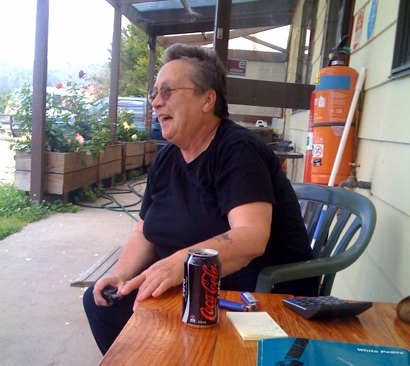
 The $80 room is clean and comfortable, decorated in a Spanish style (I presume) with exposed beam ceilings.
 Currently on the road between Sydney and Melbourne. A couple of reasons for this involving transporting stuff each way.
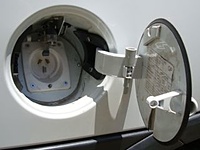 We had the bi-monthly meeting at Dural on Sunday where the largest ever item brought for "show n tell" was supplied by Peter Stuart, VK2BEU - a 2002 Holden Combo XC he has skilfully converted to all electric drive.
 He's using Trojan wet cell batteries (16kWhrs) that allow him to drive to and from work - a daily commute of 35Kms with a 4.5 hour recharge time at each end.
 Mac software I wrote some years ago, most of the old links are broken, so here it is again.
  Last night my blog received some comment spam. These are comments that at a glance look genuine but they actually contain a link to some web site the author is trying to raise in search engine ranking by having more links to it.
 "Something tells me we're not in Cairns any more.."
 This morning I wanted to do something related to banking on the web site when a box popped up offering to connect me to someone who could help, keyboard to keyboard.
 I'm doing a demo at a site that has a totally locked down Windows network so I need a wireless internet connection... Until now, my iPhone has not been jailbroken, but I finally cracked, and it works very well.
 While it's running you get a status display.
 Just watched Newstopia on SBS. It's a great show, deeply funny, surreal, including the bonus ads in the breaks.


// Control a AD9851 DDS based on the good work of others including:
// Mike Bowthorpe, http://www.ladyada.net/rant/2007/02/cotw-ltc6903/ and
// http://www.geocities.com/leon_heller/dds.html
// This code by Peter Marks http://marxy.org

#define DDS_CLOCK 180000000

byte LOAD = 8;
byte CLOCK = 9;
byte DATA = 10;
byte LED = 13;

#define MHZ 1000000

void setup()
{
  pinMode (DATA, OUTPUT); // sets pin 10 as OUPUT
  pinMode (CLOCK, OUTPUT); // sets pin 9 as OUTPUT
  pinMode (LOAD, OUTPUT); // sets pin 8 as OUTPUT
  pinMode (LED, OUTPUT);

  Serial.begin(9600);
}

void loop()
{
  // Do a frequency sweep in Hz
  for(unsigned long freq = 1 * MHZ; freq < 10 * MHZ; freq += 1 * MHZ / 4)
  {
    sendFrequency(freq);
    delay(200);
    Serial.print(freq / MHZ, DEC);
    Serial.print(".");
    Serial.print(freq - ((freq / MHZ) * MHZ), DEC);
    Serial.print("\t");
    int value = analogRead(0);
    Serial.println(value, DEC);
  }
  Serial.println("----------");
}

void sendFrequency(unsigned long frequency)
{
  unsigned long tuning_word = (frequency * pow(2, 32)) / DDS_CLOCK;
  digitalWrite (LOAD, LOW); // take load pin low

  for(int i = 0; i < 32; i++)
  {
    if ((tuning_word & 1) == 1)
      outOne();
    else
      outZero();
    tuning_word = tuning_word >> 1;
  }
  byte_out(0x09);

  digitalWrite (LOAD, HIGH); // Take load pin high again
}

void byte_out(unsigned char byte)
{
  int i;

  for (i = 0; i < 8; i++)
  {
    if ((byte & 1) == 1)
      outOne();
    else
      outZero();
    byte = byte >> 1;
  }
}

void outOne()
{
  digitalWrite(CLOCK, LOW);
  digitalWrite(DATA, HIGH);
  digitalWrite(CLOCK, HIGH);
  digitalWrite(DATA, LOW);
}

void outZero()
{
  digitalWrite(CLOCK, LOW);
  digitalWrite(DATA, LOW);
  digitalWrite(CLOCK, HIGH);
}
 There was some activity on 6m this morning, some sort of contest, and so I did a quick web search and came across this simple design for a 6m Delta Loop antenna by DL5DBM, Anwar Von Sroka.
 I've cut down the length of the main loop to bring it up to the 6m band but the resonance isn't as pronounced, not sure if the matching coax needs to be tweaked as well.


set terminal png size 410, 320
set title "Off Centre Fed Dipole"
set output "OCFD.png"
set xlabel "Frequency MHz (log)"
set ylabel "SWR"
set xrange [2.7 : 32]
set log x
plot "swrMX4.txt" using 1:2 title 'SWR' with linespoints


