Sunday, August 08, 2010

Pico life e-book reader W960 review

Why would I need an ebook reader when I already have an iPad? The iPad is a fantastic device and works wonderfully indoors, but I wouldn't take it to the beach and it's not too good even in normal outdoor light.

Officeworks are now selling a range of ebook readers and today I plunked down $238 for the Pico W960.

pico front on table.jpg

E-ink screen, superior to the old Sony one I've had for years. 2GB of internal storage and a slot for an SD card (not micro SD as the box says by the way). 800 x 600px, support for text, pdf, epub, html, unicode text, lrc, pdb, fb2 and wtxt.

It also plays music in mp3, wma, ape, flac and aac formats.

The best feature is the e-ink display seen here in direct sunlight:

pico sunlight.jpg

Opening an epub book, like the one above takes an intermidable 15 seconds so you'll be looking at this a bit:

pico please wait.jpg

(That's an epub book I purchased from O'Reilly and it works just fine).

Page turn speed is typical for e-ink displays. You change pages either with the four-way rocker on the front or with the up down buttons on the back - this is a great feature and saves putting little buttons on the edge that get clicked by accident.

pico rear.jpg

The device comes loaded with 118 text files from Project Gutenberg but they are so poorly named (A065.txt, A123.txt, etc) that I just took a copy and deleted them all. It's too slow to go in and figure out what each one is.

You plug the device in to your computer using a Micro USB cable and it simply mounts as a storage device.

pico ports.jpg

I had a few minor issues using it with my Mac - the hidden .Files that MacOS creates show up in the book list and so I use Hidden Cleaner to get rid of them, also as soon as you unmount the device it mounts again right away meaning that my quick unmount and unplug action normally leaves me with a warning about unplugging a mounted disk.

After changing the books on the device you need to select "Content Update" to get it to realise they are there.

The buttons on the front, marked home, music, zoom, and back are touch sensitive and potentially a bit too easy to trigger. Oddly the button with a home icon on it is called the "options" button in the manual and doesn't seem to work at all on my device.

All up it's a useful gadget for the money and it's great to see a range of book readers on the shelves at low prices.

Update: doesn't like some epub

I tried to open a commercial epub "Python in a nutshell", it said "please wait" so I did for about half an hour. The reset button is the little hole between the up and down buttons on the back.

It will open smaller epub files but it simply shows the text content devoid of any images or even basic text formatting. Annoyingly all text is justified.

PDFs do show up in graphical form but any A4 pdf it too small to read so this isn't really useful.

My conclusion is that this is a good little reader for just reading text files. For real books I'm going with the iPad.

Tuesday, August 03, 2010

MiniVNA Pro first impressions

A new toy arrived today, a MiniVNA Pro.

minivna.jpg

It's a very nice bit of gear and comes with calibration loads.

I've failed to get it going reliably on my primary machines, MacOS X and Linux so for now I'm using it on a Window virtual machine.

After calibration I connected up my 40 and 80m dipole antenna (both in parallel) and it gave me this wonderful SWR plot in about a second:

swr.png

It also produces a Smith chart but I don't know how to interpret it.

smith.png

It's astonishing that a home constructor can own test equipment like this.

I have much to learn.

Update: Now working under Ubuntu

The software for linux is a java application vna/J

The trick is to use the serial library installed like this: apt-get install librxtx-java

Here's the calibration dialog:

And here is the resistance of a 50 ohm terminator swept up to 180Mhz.

Here's a sweep of a 3.6864 crystal.


Very cool.

Update: Now working under MacOS X

I grabbed a copy of the rxtx library from here that works 64bit and copied it to /Library/Java/Extensions/ but as soon as the software tries to use the serial port, like during the calibration run, I'd get "VNADriverSerialPro::init() gnu.io.PortInUseException: Unknown Application".

The trick, thanks to this page, is:


sh-3.2# mkdir /var/lock
sh-3.2# chmod 777 /var/lock


Now everything's fine.

minivna mac.png

Friday, July 30, 2010

Seems like every house has WiFi now

A great application for Android is WarDrive. It records the GPS location of wireless networks it sees and exports the data as KML which can be viewed in Google Earth.

Screen shot 2010-07-30 at 5.39.55 PM.png

That's part of my bus ride home.

If you zoom in there's almost a 1:1 ratio of homes to networks.

close up.png

Green dots are open networks, yellow are WEP and red are WPA2. I love some of the names, there's lots of Netgear and linksys but a few funny ones like "baby killer".

Aside from exporting to KML, Wardrive can upload to Wigle which is a fun site if lacking in internationalisation.

Thursday, July 29, 2010

ABC News 24 a good thing

I'm enjoying having the 24 hour ABC TV news channel around. If you visit the Ultimo centre it's right there in the foyer:

abc24.jpg

Presumably it will come in to it's own when a big story breaks but it is convenient being able to flip to it any time.

It's weird that a high definition channel is being used for news, which is pretty much standard definition or less.

When ABC insider Roi was asked what he thought of News24 he simply replied "too blue".

Wednesday, July 28, 2010

Newspapers on the iPad tablet

I'm a news addict but the house is overrun with paper and it's time to go electronic. News Limited did a fine job, right at the iPad launch with The Australian for iPad, but it's not without a few glitches...

Australian.jpg

The Sydney Morning Herald launched this week with an astonishingly bad tablet version of the paper - basically a PDF of the whole thing, weighing in at 30MB to download or more, hard to navigate, slow and just plain wrong for the platform.

smh.jpg

You've got to be kidding folks..

The New Zealand Herald has shown the way to some extent with a much more fluid experience.

nz herald.jpg

The winner this week is Flipboard who have ripped content from all over the place but really given us a way to browse that's interesting and deep by including content from social media that enriches the basic story.

flipboard.jpg

There's lots to learn and I suspect that the way we read news on tablets will be nothing like it looks now in a year or two.

Wednesday, July 21, 2010

Telstra HTC Desire review for iPhone users

I've loved the iPhone 3GS and was ready to pick up an iPhone 4 but I currently have a bad feeling about them and given that my life is stored in Google's cloud I thought it was time to try an Android device.

This story is for anyone who is used to the iPhone and thinking of jumping to the Android camp.

HTC Desire.jpg

Compared to a 3GS, the hardware is mostly better. The screen is higher resolution, it feels lighter, and it's actually faster to use than the iPhone (which after the iOS 4 upgrade has got a little slower in some places). But this story isn't a hardware review.

Improvements

If you use Google mail, calendar, and contacts then the way the new phone is set up and all syncs nicely is fantastic. Push email comes through in a few seconds. You can have more than one Google account syncing (but oddly only the primary one syncs calendars).

It's nice having the phone synced to the cloud and not needing silly old iTunes to activate it.

The home screens can be customised in many ways and the background image slides a little between pages. Widgets, little apps that run right on the page, are great and I can't understand why Apple has hesitated with these.

While finger scrolling isn't quite as smooth as on the iPhone - Apple really has this figured out, it's fine.

Notifications, up the top of the screen as little icons, are much better than on iOS.

The device mounts as a disk drive over USB and supports bluetooth push and even FTP!

Having an upgradable storage card (2GB bundled) is nice but the iPhone was so big it never bothered me.

The openness of the Apps marketplace means that there's all sorts of technical apps for a propeller-head like me. Things that show where satellites are, things that graph the channels of WiFi hotspots, and so on.

The camera is better than the 3GS but it sounds like that's been fixed in 4.

It's great that the charger socket is USB but what a pity that it's micro rather than the common mini socket.

The headphone is 3.5mm but, what a tragedy that phone makers haven't standardised on microphone and inline button connections.

Google has some great apps to amuse your friends like the language translator that you speak to and then have it speak back in the other language and the Maps application does street view but as you turn the phone it pans the map.

What's inferior to iPhone 3GS

Music player is nowhere near as good as the iPod functionality, fast forwarding is hard.

There's no built-in support for podcasts although a few apps, such as DoggCatcher seem to offer podcast subscriptions and downloads, the directory is limited and the functionality clunky by comparison with iTunes/iPhone.

I know it's probably hardware but the touch calibration of the screen is not accurate. Yes I've re-calibrated but it only did the keyboard and I find the close button up the top is out by quite a few pixels.

Typing on the keyboard is not as good as on the iPhone but I do like the "hold to popup numbers" entry method and the vibrate on key press is almost haptic.

The speaker is really tinny and while I would consider listening to voice on the iPhone while pottering about, it's just horrible on the Desire. (Headphone audio is good though).

The bundled earphone/microphone is uncomfortable and tinny like the speaker.

Battery life seems about half of the iPhone 3GS so far. Hard to tell as I'm using it a bit more, but now I'm definitely in the red by the end of the day and probably need to get a charger for work. Update: Battery life has now improved. Not sure if it just needs a few discharge/recharge cycles to get going or if the new firmware (below) has improved it. No complaint now.

Telstra's mess

Why do the telco's think that we'll think warmly of them if our phones are covered in their products? Telstra has gone mad and really cluttered up the phone with links to their brands.

Telstra crap.jpg

And that's not all, there's also: Bigpond Travel, Bigpond TV, Bigpond Weather, White Pages, and Yellow Pages! A simple Google search does a better job than most of these.

First, all of these just clutter up the phone. Second, most of them don't work if you are on your WiFi network - they must connect via WAP and you just get a connection error when you try them. Finally, some of them, like MySync popup and tell you that this device isn't supported, so why install it?

Why duplicate Weather and Maps when the built-in apps are excellent, it just makes Telstra look amateurish. Annoyingly, these are all in firmware and can't be deleted.

Future

By all accounts the next firmware upgrade to 2.2 will make it better and faster and I'm looking forward to that in Q3. It's only been a few days and I'm still finding the Apps I want to live with. So far I've installed or purchased: gReader (Google Reader), Barcode Scanner, doubleTwist Player (and the Mac client), Text-To-Speech Extended, Google Translate, Compass, Google Earth, Wifi Analyzer, DoggCatcher Podcast Player, Grid Locator, Android System Info, WiFinder, Google Maps, Google Maps Navigator, Twitter, GPS Test, Dropbox, and Listen.

Android Market works well and purchasing is easy with your Google checkout.

iPhone Apps I miss

I'm looking for replacements for: OmniFocus, Skype, TouchPad, Instapaper and most of all TripView Sydney.

In a sense, having an iPad frees me to try a different phone while still keeping a foot in the portable Apple camp.

Update

Watch out for background data use! Yesterday I got an SMS from Telstra to say that I've burned through 80% of my 200MB monthly data. I think the combination of background apps and software such as DoggCatcher that downloads podcasts has caught me out.

Chatting with another Android user, Ross, I find that he turns off data access unless he specifically requests it. There are settings to stop background access to data and DoggCatcher has specific settings such as only sync when on Wifi for when plugged in.

Lesson learned.

"Root" the android

I "rooted" the phone painlessly using unrevoked. You need to turn on debug over USB but then it's as simple as running the program and plugging in the phone.

One benefit of this is that I can run software that lets me use the phone as a Wifi hotspot (a feature of Android 2.2 anyhow when that comes) using android-wifi-tether.

Pity I'm almost out of data..

It doesn't let me get rid of all the Telstra crap though.

Getting rid of carrier crap

I'm now running Android 2.2 "froyo" on my HTC Desire. It's perfectly usable but there are a few bugs. Basic functionality is all there and the best bit is that it's free from all the rubbish Telstra had put on there.

Here's the trick: Install "ROM Manager Premium" from the store, US$3.99. Through that I backed up my current ROM to the storage card, flashed the ClockworkMod Recovery software, downloaded OpenDesire-2.3 and flashed it.

Along the way I found the memory had to be cleared, or it just looped while booting. No great loss though as all my contacts and calendars are easily synced again from Google. Apps I'd purchased are remembered by the store and can be re-downloaded without any trouble.

At this point I'm very happy with this phone and having fun. It's a bit of a worry flashing firmware and you run the risk of bricking the phone but for me it all worked out and I'm sure I'll continue to play in this area.

Two things I've noticed with OpenDesire-2.3: Recording video causes a full reboot. Sending a Buzz in the Maps application causes Maps to force exit. Otherwise everything I've tried seems stable and I'd recommend it. Well done OpenDesire compilers!

Podcast solutions

I'm still hunting for a good way to load up podcasts. DoubleTwist looks promising but the podcast part isn't done yet. Right now I'm trying Missing Sync for Android, here's one message I got:

extra space needed.png

I'll have to order a larger MicroSD card.

Update: flashed radio

When I shoot video the phone would crash, turned out I needed to flash the radio firmware as well as the phone rom. I followed the instructions here (note that you must download the radio firmware, rename the downloaded zip to update.zip).

Video works now.

Monday, July 19, 2010

IPv6 working here on Telstra Bigpond, mostly

Screen shot 2010-07-19 at 9.41.26 PM.pngI was impressed when Alastair tweeted reporting that he's got IPv6 internet connectivity working thanks to #internode and #openwrt.

Recently I've been learning a bit about the basics of TCP/IP by watching tcpdumps of my local lan. There's a lot of IPv6 on the LAN and I wondered if it makes it out to the broader internet via Telstra Bigpond.

Turns out the turtle dances for me too! Other test sites also report that IPv6 is working too.

That last one finds that the only thing that isn't working yet is an IPv6 DNS server.

Screen shot 2010-07-19 at 9.50.11 PM.png

So well done Bigpond on IPv6 but please fix the DNS.

Saturday, July 10, 2010

python multiprocessing pays off

The python global interpreter lock (GIL) has not worried me up until recently when I've been deploying applications on quite well equipped machines.

There is a particularly CPU bound task I run, building cluster markers for use on a Google Maps API application. There are about 100,000 markers that need to be turned into cluster points on each of the zoom levels that they need to be displayed for on the map.

My current code has a web front end, running on django under mod_wsgi and it uses threads to run long running tasks like this while returning to the browser quickly.

normal.pngThe clustering job takes about 12 minutes to run and I see that one CPU is doing all the work, while another is doing all the mysql database work.
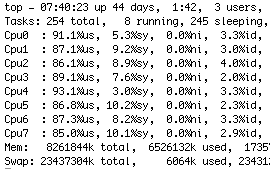
With nothing else significant on the box, load average is about 0.8 (out of a theoretical 8.0 for an 8 core machine).

As an experiment I quickly converted my code to use python 2.6's multiprocessing module to hand the work for each level to a process in a Pool. This kind of job is particularly well-suited as it's easily split into separate parts that don't depend on each other.

multiprocessing.pngHere you see how top looks running the new code.

I'm getting excellent utilisation of all the cores and load average is now 6.4 which is using the machine without killing it.

The end result of all this is that my 12 minute, 4 second task now completes in 3 minutes, 16 seconds, so about 3.7 times faster. Now mysql is looking like the bottleneck:

top.png

I mentioned that my app runs under mod_wsgi and kicks off threads. For some reason I can't get multiprocessing Pool to work in this environment so I'm running these tests (both single and multi) as command line versions. Here's a dummy implementation to illustrate how I'm using it.


import multiprocessing
import os
import random
import time

def completedCallback(layer):
print("completedCallback(%s)" % layer)

def dummyTask(layer):
print("dummyTask(%s) processid = %s" % (layer, os.getpid()))
time.sleep(random.randint(1,5))
return(layer)

if __name__ == "__main__":
print("processid = %s" % os.getpid())
pool = multiprocessing.Pool()
layers = ("one", "two", "three", "four", "five")
for layer in layers:
pool.apply_async(dummyTask,
(layer,),
callback = completedCallback)
pool.close()
print("pool closed")
pool.join()
print("pool joined")


Here's how it runs (different every time though).


processid = 6651
dummyTask(one) processid = 6652
dummyTask(two) processid = 6653
pool closed
dummyTask(three) processid = 6654
dummyTask(four) processid = 6655
dummyTask(five) processid = 6656
completedCallback(two)
completedCallback(five)
completedCallback(one)
completedCallback(three)
completedCallback(four)
pool joined


Pool() gives you a pool equal to the number of cores on your system (you can ask for more or less if you wish).

You apply_async tasks to the pool as shown, the first argument is a function, then the args to the function and finally a completion callback.

Closing the pool means no more tasks can be added to it. Join causes the main thread to pause until all of the processes have finished.

Pretty easy to use but if you mess up with the arguments to the task it just doesn't work and I haven't figured out how to show what went wrong.

I've converted another tool that does polygon simplification. This one is particularly CPU intensive and this time I'm getting everything possible out of this 8 core box.

simplify.png

The multiprocessing module is easy to use and works well, recommended.

Saturday, July 03, 2010

Monitoring household power with a Clipsal Cent-a-meter

A conversation at the recent Pycon in Sydney got me thinking about reducing the base load power use at our house.

Today I purchased and installed a Clipsal "Cent-a-meter", $148 from AGL.

You install a sensor that clips around the active line to the house in the fuse box, wired to a transmitter. Indoors a receiver displays the Kilowatt reading. It can also calculate what you're paying in cents (hence the terrible pun in the name), but I haven't set that up yet.

We had an electrician here for something else so I got him to help put the sensor in but it's a simple job with no electrical connection required.

Without any changes to the number of computers, plugpacks, set top boxes and other devices, we are running at about 0.74KW.

low reading.jpg

Turning on the stove, oven and kettle quickly spikes us up 6.7KW:

high reading.jpg

The plan is to watch this thing for a few days to get the hang of what's normal and then try to unplug all those un-used things around the house to see how much it can be reduced. I'll update this post to report how we go.

Update

We've un-plugged a few devices and encouraged computers to sleep and this morning base consumption was 340W.

There's still a long way to go.

Off-peak usage

Up early this morning, 6:30, and I see we're running at 5.7KW. This will be the electric hot water system which is connected to the off-peak meter and remote controlled. When I put the kettle on we went over 8KW which is the highest I've seen so far. I wish this thing had a data logger...

Google Developer Day on maps 3 in Sydney

Attended a very well organised and content rich Google Developer Day that hi-lighted the new Google Maps version 3 API (version 2 is now deprecated).

The presenters have an interesting style going where they have two presenters who have a (rather contrived) conversation as a mechanism for moving the talk forward.

After the morning's lecture style, we lunched with luminaries and then set to work coding for the afternoon. The day ended with some of us showing our work.

google dev day.jpg

The conversion to the new API is quite easy although some things work a little differently. V3 is well thought out and the performance greatly improved.

FusionTables is a new product that lets you upload lots of data (up to 100MB at the moment) to Google's store and then visualise it both as charts and maps. Performance and ease of use are fantastic.

I mentioned how Twitter was used to good effect at the Python conference last weekend, well naturally Google uses Wave in a similar way, it's particularly good for audience chit chat and the distribution of links to the sample code. It's hard to imagine a conference without live tools like these.

Sunday, June 27, 2010

Conferences are awesome especially #Pyconau

I've just finished a weekend at the first PyCon held in Sydney. A fantastic conference, well done to everyone involved. Here's Mark Pesce giving the opening keynote where he unveiled his Facebook killer:

pesce.jpg

For me, it only takes one or two new insights to make the whole thing worth while and this year is was Graham Dumpleton's talk on his mod_wsgi where I discovered I should be using DaemonMode. After his talk I rushed out and updated my deployment to use this and now I can go to top and see my processes named after the virtual host they are serving right in top.

As a Django user, it was great to see presentations by Russell Keith-Magee and Malcolm Tredinnick.

Google not only sponsored but provided first-class speakers Pamela Fox and Brian Quinlan.

Brian showed some snippets of this video of creator of xkcd, Randall Munroe speaking at Google. I like the bit where he takes a question from Don Knuth then figures out who it is.


Twitter seems part of all conferences today and it was a great way to follow comments from others as well as useful urls from speakers. I question whether IRC would be just as good though.

The funnest talk was a "war story" by Simon Wittber who provided a war story about controlling 15 tonne industrial robots with Python and ended with a hack that let him control them using a Wimote.


A great conference, a great crowd, lots of fantastic insights. Thanks to everyone.

Monday, June 21, 2010

Visted the fantastic Kurrajong Radio Museum

Finally, I managed to visit the famous Kurrajong Radio Museum and catch up with the friendly proprietor Ian O'Tool VK2ZIO. We'd met at Wyong with Nigel Holmes and I was embarrassed to know all about the place but never made my way there.

Ian made us most welcome.

ian and peter.jpg

In the collection is a C42 a rig I had when I was young.

c42.jpg

There's lots of stuff for those of us who've worked in broadcast over the years.

2ws.jpg

And a huge collection of radios with wooden cabinets.

radios.jpg

Racks and racks of all sorts of interesting gear.

racks.jpg

Even an AM transmitter.

awa transmitter.jpg

My dear wife Phillipa took it all graciously and even said she found the visit "mildly entertaining".

phillipa.jpg

Take the Bells Line of Road towards the Blue Mountains and drop in.


Recommended.

Saturday, June 19, 2010

A pleasant weekend at Blackheath

To counteract the long days of sitting in an office staring at a computer screen full of code I'm having another weekend away, this time in the Blue Mountains west of Sydney.

By accident, our visit coincides with the "Winter Magic" festival at Katoomba.

R0012226.jpg

Lots of costumes and music including a local ukulele band:

R0012230.jpg

A huge crowd turned up:

R0012237_2.jpg

For some peace we headed off for a walk at Govetts Leap.

R0012245.jpg

I can't help wondering what Ansel Adams would make of this place.

R0012249.jpg

Big sky and all. (I don't have my RAW tools with me).

R0012255.jpg

Along the walk someone took the leap:

R0012259_2.jpg

Happily a parachute opened.

R0012262_2.jpg

Now back to base for a complimentary port by the fire, or three.

Tuesday, June 15, 2010

Seven periods with Mr Gormsby - recommended

We're a bit slow on this one but have just caught up with a fantastic show out of New Zealand called "Seven periods with Mr Gormsby".

gormsby.png

It was aired by the ABC in Australia but without promotion from what I can tell. While it's clearly a satire about NZ education it generally critiques political correctness with great humour and heart. Highly recommended.

A pleasant weekend of ham radio and low noise

I've just returned from a weekend away with two other hams about four hours west of Sydney. The country and the site was lovely:

Site.jpg

We erected an impressive tilt up tower, with a concrete base and steel guy wires:

Tower up.jpg

We participated in contests:

Barry.jpg

I'm not a big contester myself but it was entertaining tuning around quiet bands outside Sydney. 20m was amazing, stations from all over the world were booming in.

I learned lots of things by observing my more experienced fellow campers and next time I'll bring warmer clothes - it was sub-zero and I was wearing tennis shoes with holes in them. Brrrr.