Sunday, August 28, 2011

Blue Mountains Winterfest 2011

Just returned from a wonderful day at the Blue Mountains Amateur Radio Club's Winterfest.


A new venue this year, with more space, and it was fabulous. Lots of interesting new and second hand stuff.


Familiar faces from Dural were in attendance.


Some really great equipment in various states of working or not. I purchased some PCBs at reasonable rates.


Lots of fine discussions were had amongst the junk.


There was a working satellite station set up with steerable beams.


The Home Brew group had a small display table where I showed my "shambles" transceiver.


My thanks go out to the organisers of this event, all was very smooth and professional and the sausage sandwiches were very tasty.

Thursday, August 25, 2011

How to win at Sydney's Star City Casino

We dined last night at the Casino before attending the musical "Hair Spray". I do not have the gambling gene but am pleased to report a significant win on the night in the form of an ice-cream.


My daughter went and claimed the prise and when she finished the free ice-cream it also had a free voucher stick!

Who says you can't win at the casino.

Sunday, August 21, 2011

A wonderful weekend of #pyconau

Just returned home after a full weekend of the second Python conference here in Sydney.

 
Main hall 005
Attendance was up on last year but still has a way to go. The Wifi worked really well, thanks GitHub. Programmers seem to carry Macs these days, next is Linux and then there are a few Windows users.

  Deploying 003
There were some wonderful talks and some disastrous demos, but that's the way it goes. I came away with a big list of things to find out more about, often not the topic of a talk but something that came up along the way.

  Scipy 002
Great to see two whiteboards full of Python jobs (well, one PHP job too).

  Job board 001
Thanks to the organisers once again, it was super smooth and professionally run. Some things that caught my eye: Nginx web server, Gunicorn web server, requests module, new relic performance monitor, pymite embedded, CoolTerm serial terminal, weatherboard, USB Bitwhacker, Sublime text editor, map-reduce for Google App Engine.

This year the videos are up on YouTube here.

Thursday, August 18, 2011

New addition to shack: Yaesu FT-7

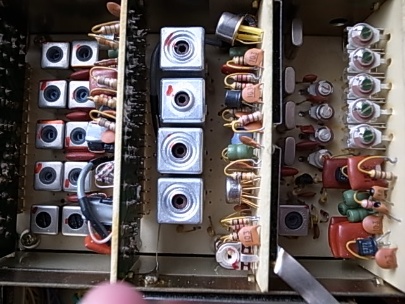
I remember being impressed with one of these when I was young and jumped at the chance to pick one up for $180. The FT-7 is totally analog, no digital anything, and they have a good reputation for a nice sounding receiver.

  R0014031
This is not a "B" so it's 10W out but that's fine for me. The case has a few "dings" and there are some holes presumably for adjusting things, but inside it's clean.

  R0014026
One nice thing about this rig is the low receive current, 400mA, and it's said that about half of that is the dial lights.

  R0014027
This one has a few quirks, AF gain doesn't seem to do much and RF gain seems very dramatic in its operation. Something is loose somewhere and the audio level jumped up dramatically when I moved the lid and has stayed that way. The S-meter seems to read rather high most of the time as well.

  R0014028
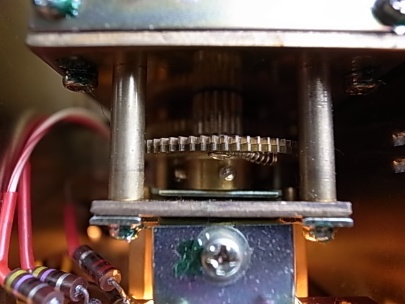
I heard lots of stations on 40 and 80m this morning but haven't had a chance to have a contact and get a signal report. The receive audio is indeed very pleasant although some QRN from distant lightning was more obvious than on more modern sets. The old "Fox Tango Seven" seems to have a few fans around which is great for a set that came out in the 1970s. It even has gears:

 
R0014030

The excessive audio gain was fixed by re-seating the audio board (the edge connector must be a little dirty). The only remaining issue is that the S meter reads a minimum of S9. I suspect something in the AGC area.

Thursday, August 11, 2011

Spintron centrifuge

Had a blood test today at a small place and they had this nifty desktop centrifuge:


It's used to force the blood cells to the bottom of the tube, where there is some sort of transparent gel that holds them in place. Entertained me anyhow.

Tuesday, August 09, 2011

Wonders of the Universe vs Cosmos

200px Brian CoxIn recent weeks we've greatly enjoyed the "Wonders of the universe" program with Professor Brian Cox.

The filming has some annoying aspects: the sun is often in shot, presumably to remind us of this close star, but it is rather glarey.
There's lots of faux bad lens photography with blurred edge images and bogus lens flare.

Brian gets about, and is sometimes in remote locations for very little reason.

Having said all that, I really enjoyed the show and Prof Cox's presentation reminds me very much of a childhood hero - Carl Sagan.

Over the past few days, I've gone back and watched "Cosmos - A personal journey" by Carl Sagan.

  Carl Sagan Planetary SocietyGiven that it aired in 1980, it has stood the test of time very well. Some of Sagan's comments about global warming are amazing for their time, although his concerns about a nuclear winter have dated somewhat. The images of scientists smoking, sometimes pipes, in the workplace look hilarious.

The spaceship of the imagination is a little dated but he carries it off well. The sound track, in part Vangelis's "Heaven and Hell" is memorable.

Cox is a worthy ancestor to Sagan (who died too young at 62). I'm glad we have him on our screens.

I hope billions and billions of people get to watch these shows.

Monday, August 08, 2011

Radio Australia antenna used for reception

It works rather well as you might expect. I just spotted this video by Dallas VK3EB where he visits the Shepparton RA transmission site during an outage for maintenance and couples a receiver to the feed line.


Great stuff, pity it wasn't used for a QRP contact too. Dallas is a great video producer, here's another one on measuring signal strength measurements with his Pegelmesser RF level meter. 252 views.


Friday, August 05, 2011

House block loop antenna for 160m

At the urging of old mate Ross, VK1UN, I've run a wire loop antenna right around the suburban block we live on and I've just had a contact on 160m. I bought a roll of 100m of figure 8 electrical flex:

R0014019

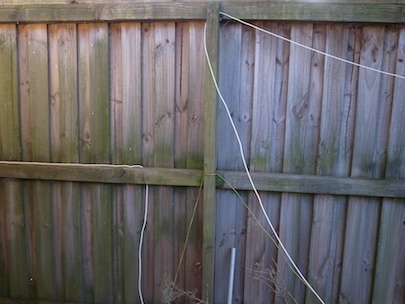
It runs at fence height on three sides of the block (well short of 160m in length though):

R0014023

But at the back I run it up a tall tree:

R0014024

It's not quite long enough for a full wave on 160, so it turns out to be resonant at 2.25MHz:

R0014021

Happily, my antenna tuner is able to match it on 160m and tonight I had a nice contact with Ian, VK3XN who I figure it about 800km from me:


160 faded so we switched to 80m where I have an excellent dipole high above the house. The loop was about 2 S points worse than my current dipole, but still readable.

So, a simple loop antenna, not very high off the ground turns out to be a simple way to get on low bands in a suburban setting. Count me impressed.

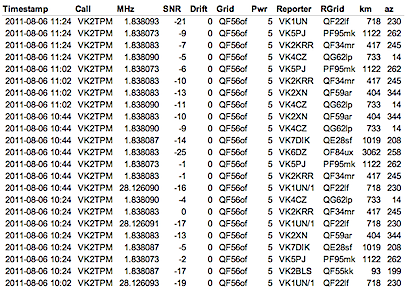
Thanks Ross, and Ian for the contact.Running WSPR it appears that I'm being heard around Australia running 5W (note that VK1UN is mis-reporting me as being on 10m)

Screen Shot 2011 08 06 at 8 53 11 PM

There's quite a group on 160m WSPR on a Saturday night in Australia:

Screen Shot 2011 08 06 at 9 00 26 PM

Special thanks to VK6DZ who is hearing me 3,000km away.

Screen Shot 2011 08 06 at 9 31 28 PM

And here's what I'm hearing:

Screen Shot 2011 08 06 at 9 32 31 PM

Monday, August 01, 2011

Convert Fuji 3D MPO to Anaglyph

The cheap Fuji 3D camera has been lots of fun but viewing the pictures is a challenge. I ordered some Red/blue specs on ebay and have been figuring out how to automate conversion of the MPO files from the camera through to good quality anaglyph images. (If you have red/blue glasses this will look good, believe me). Dural trash n treasure The code is pillaged from a couple of places including here where it is mangled by the blogging software and doesn't work with the current bumpy. I've fixed it up and here it is for your entertainment:
"""Make a red-blue 3d Anaglyph image from an MPO file
Based on code from:
http://www.velocityreviews.com/forums/t357242-anaglyph-3d-stereo-imaging-with-pil-and-numpy.html
"""

import Image, ImageOps
import numpy
import sys
import os

_magic = [0.299, 0.587, 0.114]
_zero = [0, 0, 0]
_ident = [[1, 0, 0],
[0, 1, 0],
[0, 0, 1]]

# anaglyph methods from here: (fantastic demos)
# http://mitglied.lycos.de/stereo3d/an...comparison.htm

true_anaglyph = ([_magic, _zero, _zero], [_zero, _zero, _magic])
gray_anaglyph = ([_magic, _zero, _zero], [_zero, _magic, _magic])
color_anaglyph = ([_ident[0], _zero, _zero], [_zero, _ident[1], _ident[2]])
half_color_anaglyph = ([_magic, _zero, _zero], [_zero, _ident[1], _ident[2]])
optimized_anaglyph = ([[0, 0.7, 0.3], _zero, _zero], [_zero, _ident[1], _ident[2]])
methods = [true_anaglyph, gray_anaglyph, color_anaglyph, half_color_anaglyph, optimized_anaglyph]

def anaglyph(image1, image2, method=true_anaglyph):
    m1, m2 = [numpy.array(m).transpose() for m in method]
    im1, im2 = image_to_array(image1), image_to_array(image2)
    composite = numpy.dot(im1, m1) + numpy.dot(im2, m2)
    result = array_to_image(image1.mode, image1.size, composite)
    return result

def image_to_array(im):
    s = im.tostring()
    dim = len(im.getbands())
    return numpy.fromstring(s, 'uint8').reshape(len(s)/dim, dim)

def array_to_image(mode, size, a):
    return Image.fromstring(mode, size, a.reshape(len(a)*len(mode), 1).astype('uint8').tostring())

for filename in sys.argv[1:]:
    if filename.lower().endswith('.mpo'):
        print "reading %s" % filename
        basename = os.path.splitext(os.path.basename(filename))[0]
        file = open(filename, 'rb')
        data = file.read() # read both images
        offset = data.find('\xFF\xD8\xFF\xE1', 4)
        firstData = data[:offset - 4]
        leftFileName = '%s-left.jpg' % basename
        left = open(leftFileName, 'wb')
        left.write(firstData)
        left.close()

        rightData = data[offset:]
        rightFileName = '%s-right.jpg' % basename
        right = open(rightFileName, 'wb')
        right.write(rightData)
        right.close()

        nativeWidth = 3584
        nativeHeight = 2016

        desiredWidth = 1000
        fullHeight = desiredWidth * nativeHeight/ nativeWidth

        left = Image.open(leftFileName)
        left = ImageOps.autocontrast(left)
        right = Image.open(rightFileName)
        right = ImageOps.autocontrast(right)

        os.remove(leftFileName)
        os.remove(rightFileName)

        left = left.resize((desiredWidth, fullHeight), Image.ANTIALIAS)
        right = right.resize((desiredWidth, fullHeight), Image.ANTIALIAS)

        combined = anaglyph(left, right, half_color_anaglyph)
        #combined.show()
        outFileName = "%s_Anaglyph.jpg" % basename
        combined.save(outFileName, "JPEG")
        print("Wrote %s" % outFileName)

You run it like this:
$ mpo_anaglyph.py *.MPO
reading DSCF0005.MPO
Wrote DSCF0005_Anaglyph.jpg
reading DSCF0006.MPO
Wrote DSCF0006_Anaglyph.jpg
reading DSCF0007.MPO
Wrote DSCF0007_Anaglyph.jpg
DSCF0081 Anaglyph DSCF0077 Anaglyph DSCF0072 Anaglyph

Sunday, July 31, 2011

Amateur radio home brew group show and tell

Today was a meeting of the Amateur Radio NSW Home Brew and Experimenter's group at Dural. The topic was duplexers, diplexers and filters. I shot some video which begins with some footage of the VK2WI broadcast.


Thanks to everyone who presented. Sorry about the hand-held video but this time I'm using a wireless mic for the first time so audio is much more intelligible.

The video has been tweaked and updated but it's the same as before.

Friday, July 29, 2011

Ripping the CD collection ready for iCloud

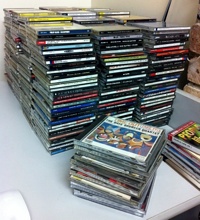
CdsWhen I was young I used to buy lots of records. When CDs appeared I bought them all again! In recent years the CD collection has gathered dust and the only music that gets listened to is the stuff that's been moved on to computers and iPods. One of the great pleasures of having my music collection on computer is having it play random tracks and discovering wonderful tracks of unexpected albums. I decided to rip the entire collection. It's time consuming, although much better than it used to be, my Mac Mini imports at 8x these days. Going through the process threw up a few observations about the age of the Compact Disk that is drawing to a close:
  • CDs don't last for ever. Quite a few have lost the silver coating in parts over the years.
  • Mould spots have grown on some, Sydney humidity I guess, hard to get off.
  • Jewel cases have always been hard to open and brittle - a bad combination.
  • Jewel cases are a very bulky way to store data these days.
  • What kind of idiot publishers have used duplicate id numbers?
  • The little cover pictures are not a patch on impressive 12 inch albums. Cover art on a tablet is a great improvement.
  • It was a wise choice to use an un-compressed format.
  • I bought the same CD twice on a few occasions.
I've been looking around at the possibility of selling my CDs. It doesn't look like you get much for them any more. The eBay auctions often end without bids and the thought of sending hundreds to little packages out via the post office for a dollar each doesn't sound like a good use of time. Syncing my collection to iCloud seems like a good way to go. I hope it works! Backing up 52Gb of data is a responsibility I'm keen to offload. It would be nice not to have to buy all these tracks for the third time.

Wednesday, July 20, 2011

The Lion wakes tonight

Maccentric ChatswoodTomorrow a new MacOS X version, called Lion, will be released by Apple.

For the past two releases, mate Coops and I have formed a queue outside our favourite Mac store, Maccentric in Chatswood to be the first to purchase a copy.

Manager Hendrick comes out and laughs at us but it's been fun.

This year, alas, Lion will be released for electronic download only and worse - Maccentric in Chatswood has closed their doors. (They're still open at Warringah Mall and doing a "roaring" trade).

It must have been rough for them when Apple opened up a store just a block away in Chatswood Chase.

We'll look back and laugh at the idea of software coming in boxes, but it did make me feel like the fruit of my work was somehow a physical thing.

Monday, July 18, 2011

Digital 3D camera on super special

Pic header 01I have a long interest in 3D photography, and even a couple of old film cameras in the bottom drawer here.

There is a digital 3D camera from Fuji that is basically two 10Mpx cameras in one body with a nifty lenticular LCD panel. These used to sell for over $500, which was a bit much for me, but today I noticed that Harvey Norman Balgowlah has them in the red spot discount bin for $128.

It's a Fuji FinePix Real 3D W3.

Stereo pair

The target market is consumers with 3D TVs (I don't) so viewing is the challenge. The images do look good on the on-camera display, but that's no good for sharing. I purchased some +3.5 reading glasses for $4 and by using a card I can view the images nicely on the computer screen.

I have an old viewer for side by side prints which can work and you used to be able to get one off prints with lenticular screens on the front. The other interesting option is viewing on an iPod/iPhone with the Hasbro my3D viewer.

Wobble2

The camera has a few ergonomic issues, it's really hard to avoid covering the right lens with your finger for example, but seems like a bargain at this price. It also shoots movies and as they say in the store - can be used for 2D as well.

The store I went to had about ten in the bin so be quick if you want one.

Splitting MPO files

The Fuji 3D camera, and others apparently, store 3D images in a .MPO file. This file is simply two Jpegs one after the other. I wrote a little python command line tool to split these files into left and right images.


"""Split an MPO file which is just two JPEGs back to back
"""
import sys
import os

for filename in sys.argv[1:]:
if filename.lower().endswith('.mpo'):
print "reading %s" % filename
basename = os.path.basename(filename)
file = open(filename, 'rb')
data = file.read() # read both images
print "read %d bytes" % len(data)
offset = data.find('\xFF\xD8\xFF\xE1', 4)
print "second image starts at %d" % offset
firstData = data[:offset - 4]
print "first image is %d bytes" % len(firstData)
left = open('%s-left.jpg' % basename, 'wb')
left.write(firstData)
left.close()

rightData = data[offset:]
print "second image is %d bytes" % len(rightData)
right = open('%s-right.jpg' % basename, 'wb')
right.write(rightData)
right.close()


It runs like this:


$ python mposplitter.py sample.MPO
reading sample.MPO
read 3655848 bytes
second image starts at 1799552
first image is 1799548 bytes
second image is 1856296 bytes
done.

2023 Update


Just came back to this and python3 requires some changes:

#!/opt/homebrew/bin/python3
"""Split an MPO file which is just two JPEGs back to back
"""
import sys
import os

for filename in sys.argv[1:]:
    if filename.lower().endswith('.mpo'):
        print("reading %s" % filename)
        basename = os.path.basename(filename)
        file = open(filename, 'rb')
        data = file.read() # read both images
        print("read %d bytes" % len(data))
        offset = data.find(b'\xFF\xD8\xFF\xE1', 4)
        print("second image starts at %d" % offset)
        firstData = data[:offset - 4]
        print("first image is %d bytes" % len(firstData))
        left = open('%s-left.jpg' % basename, 'wb')
        left.write(firstData)
        left.close()

        rightData = data[offset:]
        print("second image is %d bytes" % len(rightData))
        right = open('%s-right.jpg' % basename, 'wb')
        right.write(rightData)
        right.close()
        

To view the images in my old 3D print viewer I need two side by side pictures.

R0014018

The Python Image Library can do what's needed pretty simply:


import sys
import Image

nativeWidth = 3584
nativeHeight = 2016

fullWidth = 400
fullHeight = fullWidth * nativeHeight/ nativeWidth
halfWidth = fullWidth / 2
halfHeight = fullHeight / 2
print halfWidth
print halfHeight

if len(sys.argv) != 3:
print "Usage: %s left.jpg right.jpg" % sys.argv[0]
sys.exit(1)

leftFileName = sys.argv[1]
rightFileName = sys.argv[2]

left = Image.open(leftFileName)
right = Image.open(rightFileName)

combined = Image.new("RGB", (fullWidth, halfHeight))
left = left.resize((halfWidth, halfHeight), Image.ANTIALIAS)
right = right.resize((halfWidth, halfHeight), Image.ANTIALIAS)
combined.paste(left, (0,0))
combined.paste(right, (halfWidth, 0))
combined.save("output.jpg", "JPEG")


Here's the output file:

Output

Email via HF radio with Winmor

Ross, VK1UN, is in the country and so I fired up the WSPR station so we could see if it's practical to have a QSO between Sydney and Melbourne. 40m was pretty dead but 20m was alive on Sunday afternoon.

I got a signal report from James, VK2JN, who lives near by and runs a packet radio email gateway. I've tried to get this going in the past using a physical packet modem without much luck but he suggested trying a soundcard TNC called Winmor.

Screen Shot 2011 07 18 at 9 49 12 AM

I have a netbook with Windows XP and a Signalink USB interface and following the instructions in this pdf all worked pretty much as advertised.

What you get
  • A decent email client
  • The sound card TNC (with the pretty display above)
  • A session control app that can get the latest frequencies
  • Lots more I haven't figured out yet


Here's the window that tells you what local channels are available (it can be updated over the air too):

Screen Shot 2011 07 18 at 10 10 29 AM

At this point I'm merrily exchanging email from internet to radio, radio to internet and radio to radio.

The great thing about all this is that it will work in the outback or out to sea - pretty much wherever a digital HF signal can get through. You get a limited number of minutes per day but it's a great service.

Screen Shot 2011 07 18 at 10 02 43 AM

Now, where's the MacOS and Linux version of this?

Sunday, July 10, 2011

On a cold day, a small shack is a big plus

It feels very cold here in Sydney at the moment. My workplace is sometimes overly hot which got me interested in measuring, and plotting, the temperature.

My radio shack is cupboard size and has a small fan heater in it which very quickly warms the space. But just how quickly…

Heater

A while back I built a PIC based thermometer that reads a Maxim 1-wire temperature sensor and sends the readings out a serial port at 9600 baud.

Device

USB serial cables seem to just work out of the box on linux these days:

Serial port

A little bit of python using pyserial to read lines from the serial port and log them to a text file suitable for reading in to a spreadsheet.


#!/usr/bin/env python
"""Utility to log temperatures from a serial device.
"""

import serial
import time

LOGFILE = '/tmp/temperatures.txt'

ser = serial.Serial('/dev/ttyUSB0')
log = open(LOGFILE, "a")

line = ser.readline()
while line:
logline = "%s\t%s\n" % (time.ctime(),
line.split()[0])
log.write(logline)
log.flush()
line = ser.readline()


Here's a bit of the log file:

Sun Jul 10 14:31:07 2011 28.0
Sun Jul 10 14:31:09 2011 28.5
Sun Jul 10 14:31:11 2011 28.5
Sun Jul 10 14:31:13 2011 28.5
Sun Jul 10 14:31:15 2011 28.5
Sun Jul 10 14:31:17 2011 29.0


Here is the temperature in my shack from window close to toasty warm.

Temperatures

Saturday, July 09, 2011

A day doing PA sound

Armed with a bag of adapter plugs, clip leads, a multi-meter and a torch, I spent today running PA sound for a local community group's annual festival. All sorts of technical hilarity ensued.


The day was a mix of speeches and musical performances ranging from solo voice, to stringed instruments with singers to dance groups. The music to accompany the performers was handed to me on CDR disks shortly before they went on. In other cases it was played from a laptop, sometimes an iPod.

One act asked for the singers in the backing track to be removed (there's software to do that apparently), I did what I could with the equaliser but it wasn't enough. Another singer wanted lots of reverb, which unfortunately wasn't available. All the performers wanted more volume, while some audience members cursed me for the overly high sound levels.

The most amazing request was this guy who handed me his phone showing YouTube and asked me to play a video over 3G to provide the audio over the PA while he sang along to it. He has more faith in technology than me.


He said if a call came in I should reject it and play on. A detailed explanation of the loading bar in the YouTube player ensued. In the lead up, his phone slept and asked for a PIN, which I had to hastily get from him. Amazingly it was "alright on the night".

At the end I had to patch a DVD player's sound via a canon mic socket back to the mixer.

My compliments to the Allambie Heights School Community Centre which has excellent PA and mixer facilities these days.

All good fun but it's nice to be curled up at home where life is simpler.