Saturday, October 31, 2009

Talk: GeoDjango with Google Maps

Screen shot 2009-10-31 at 6.34.33 AM.pngOn Thursday, November 5 2009, I'll be presenting at the Sydney Python group SyPy.

SyPy Nov 5th: "Using GeoDjango with Google Maps" - Peter Marks

GeoDjango is the GIS branch of the Python Web Framework Django. It aspires to be a world-class geographic web framework. The project goal is to make it as easy as possible to build GIS web applications and harness the power of spatially enabled data.

Peter will:

  • Give some background on the GeoDjango face of Django

  • Demonstrate a simple mapping application that overlays a Google map with markers, polylines and polygons

  • What you get for free - GeoAdmin with OpenStreetMap

  • Software dependancies: GEOS, GDAL, and PROJ.4

  • Geo enabling your models.py

  • Discuss using MySQL as the spatial database and the short-cuts they've taken so far...

  • Talk about performance:

    • loading just the visible overlays

    • using json for mapping

  • Show a real application


*RSVP: Please RSVP on Anyvite to get your name on the door*

Time: 6:30PM (for a 6:45pm start) - 7:45PM (then pub after)

Getting There: It's a 10min walk from Town Hall station over the pyrmont bridge (directions) or catch the light rail to the casino station.

Go to level 5 or if the doors are locked wait outside and look for smiley happy google people to let you in.

NB. Snacks are provided by google and we also go to a pub afterwards that has dinner available.

Andy Todd will be the man in control. Also a big thanks to Google for hosting us again.

The slides are available via SydneyPython.

Friday, October 23, 2009

Ubuntu 9.10 release candidate on Acer Aspire One

ubuntu.pngThanks to Telstra Bigpond's excellent unmetered download feature it was a breeze to grab the ISO of the release candidate of Ubuntu 9.10 "Karmic Koala" to be released on October 19.

I'm installing on a netbook, the Acer Aspire One, and for the first time there are no problems of installer windows extending off the bottom of the small screen (1024x600). The installer is more beautiful than ever, I was particularly taken with the new timezone chooser.

Although I had Fedora 11 on the machine before, Ubuntu's installer didn't detect it and happily offered to wipe the disk saying there was no operating system found. Fair enough but it's always been a criticism of Microsoft's installers that they never want to co-exist with other OS's and it's a pity if this feature is broken.

First boot graphics are lovely, like a stage with a single spotlight from above. Unlike Fedora 11, sound on the Acer was smooth.

Wireless worked right off and found my network with ease. The menu bar icons are looking lovely and very "Mac like" these days...

The trackpad works well and the right edge window scroll is enabled.

Bumps

I got a warning about "Incomplete Language Support" saying the language support files for my selected language were incomplete which is a bit weird for English. The window suggested an action and had a button to run that action. I clicked and it then wanted to update more stuff. In the end the language support install took a long time - it was getting English - Australian, it did get there after 17 minutes. Perhaps the release candidate servers aren't ready.

The Acer Aspire One fan has always been a problem, requiring a kernel module to stop it running flat out all the time. I've always had to build acerhdf which does the trick very nicely. Under Ubuntu 9.10 the fan seems to be changing speed so at this point I'm not sure if something is there to control it or if I'm just imagining things, I'll let it go for a while until I figure it out. Hmm, it seems to be under control but does run more than with acerhdf. Update: the fan was running all the time. Fixed now.

On a soft reboot, the wireless didn't come up. I've seen this before and it's fixed but shutting down and then starting up so I suspect that the wireless firmware gets in a strange state from time to time.

Great things

I guess it's Gnome, but visually everything is smoother and even on a low power netbook, visual effects, such as menu actions seem to fade in a little - rather like the Mac.

Browsing the network shows all our devices both windows and mac services. Fedora didn't show anything for me. Looks like it can see Bonjour adverstised services including ssh and Mac screen sharing - unfortunately the remote desktop doesn't support Apple's encryption yet. Browsing for ssh worked just fine though. I was able to browse for my mac and copy files to it using sftp all very transparently.

Finding printers didn't work for some reason, although it has in the past. Incidentally, I find the distinction between the Administration and Preferences menus a little puzzling. Printing is in the Preferences.

On the AAO suspend and hibernate both worked just fine although with the fast boot time I experience hibernate seems redundant.

What's new

There's a lot new in this release. Faster boot times thanks to continuing work on Upstart that has optimised the time to get going. The Aspire One boots in 25 seconds.

departments.png


There's a new way to find and install software called Ubuntu Software Center.

Gnome has been revved of course and is on 2.28. Before this install I had a look at the latest KDE and it's looking very nice these days too.

With this release Ubuntu is offering a storage in the cloud service. Despite some bad press thanks to Microsoft/Danger, backup to the cloud is really a good idea - I'm a long time dotmac/mobileMe subscriber and having lost a disturbing number of hard disks and even CDs I'm happy to let professionals manage that.

Conclusion

This is a very slick desktop. Visual effects, speed, graphical beauty. If your Windows 7 upgrade didn't go well, or you don't want to pay the Microsoft tax, I would definitely recommend Ubuntu 9.10 on a PC. Clearly being influenced by good things from MacOS which is a good sign. I wonder when a dock will appear?

Recommended.

Wednesday, October 21, 2009

Checked out the unibody MacBook

Dropped by the Chatswood Apple store this morning to check out the new plastic MacBook this morning. The unibody plastic case feels very solid and the round corners are pleasing. It's heavier than I'd hoped and the lack of ports is a bit of a pity.

The design is clean, the battery life sounds outstanding, and I'm sure they will sell really well.

Like many, I've succumbed to the impulse purchase of a netbook, in my case an Acer Aspire One. I do like it, but the small screen, small keyboard, short battery life and bad trackpad means that when I want to do more than just look up the TV guide I reach for a proper computer. I think Apple's right to hold off delivering something too low in usability to satisfy for more than a few minutes.

The new magic mouse was not on show yet, very keen to try it out to see if Apple can win me back after the disappointment of the mighty mouse. The only Microsoft product I use these days is a mouse - they are good at those.

Sunday, October 18, 2009

Splitdorf radio - Scientifically correct!

My neighbour, Rob VK2ZNZ called on 3.595MHz just after the WIA broadcast this morning and invited me over to "see a thing of great beauty". He was not wrong.

radiotop.jpg

I can't find many mentions of the Splitdorf radios, but it looks like it's missing a big wooden case.

radio front.jpg

Certainly a thing of beauty. My impression is that it's been restored at some point.

radio side.jpg

A very simple circuit.

radio coil.jpg

They sure have a lot of patents!

radio patents.jpg

It is so simple it would have to be a TRF or perhaps regen radio. Anyone know anything about these radios?

Sunday, October 11, 2009

Apple Macbook Pro 13 inch on the road

Screen shot 2009-10-10 at 6.29.40 PM.pngWhen I purchased this laptop a few months back I was looking forward to a snappy machine that, while a little heavy, would be solid and durable enough for travel.

While in Malaysia recently, I spent a day in a small room with a group of people who had all been issued with very nice looking Lenovo Thinkpads. There were not enough power points for everyone and all day they took turns desperately topping up their batteries.

To their amazement, I didn't pull my charger out until an hour before the end of the day, even then the Macbook Pro said it had an hour to go and probably could have lasted.

The figure shown top right is not realistic but when not hammering the machine I do see almost seven hours, this kind of battery life changes the way I think about the laptop. Apple made the right decision to switch from a removable battery in favour of a larger flat system.

My only concerns are that there is something strange about the return key on mine and sometimes I think I trigger the G force drive protection (it makes a clunk).

Those icons in the menu bar are Google GMail Notifier, Expandrive, and Evernote all recommended.

Saturday, October 10, 2009

Google Apps is an exchange server for iPhone

googleExchange.gifJust found this out the other day. My employer uses Google Apps for our domain - Mail, Contacts, Calendar, Sites, all that good stuff.

If your administrator turns on Google Sync for the domain and you have iPhone version 3 or above, you can configure a Microsoft Exchange mail account according to these instructions.

With this turned on, you get push mail, contacts and calendars. It's fun to have your calendar open, go to the web, make an appointment and see it appear in seconds on the iPhone.

I was a little anxious about what would happen to my existing contacts, sync'd with my Mac, but all is well. The contacts from my company's list appear as a separate group and further I get a "Global Address List" group as well.

It's funny how Google never once mention the word "Exchange" and try to refer to this protocol as Google Sync.

Note that you can only have a single Exchange account set up on a phone.

Friday, October 09, 2009

Todd Sampson fan club

todd.jpgAlways liked Todd Sampson, CEO of Leo Burnett advertising on the Gruen Transfer but on Q and A on the ABC last night he totally blew me away.

This guy is the smartest, quickest, most sensible person I've ever observed. His instincts are spot on. His emotions are well placed.

What sweet irony that he works for a spin company!

Why on earth did the Nobel peace prize go to the president of the United States? Obama is already the most powerful leader in the world, why not give the prize to a Tebetan activist in a Chinese prison or something? Something that will make a difference.

How lucky we are to have Todd in Australia as a contributor to the intellectual debate in this country. Hang in there mate, and one day you'll get the Nobel prize too.

Thursday, October 08, 2009

Airbus A380 experience

Just returned from Singapore flying on an A380 for the first time.

a380seatback.jpg


It's a big plane, two stories throughout, and getting on and off takes a little while. Interior is modern and LED lighting is used throughout to good effect. The big feature for me is the back of seat entertainment system.

connectors.jpgThe screen is much larger than anything I've seen before, pretty good quality and has a very directional filter so you hardly see your neighbour's picture.

As you can see above, the controller mounts in front rather than in the arm rest, there's a cup holder which is really handy, not sure what you do in that cavity behind it. On the right is the panel you see here with analog video in, USB port for plugging in a key drive containing audio or video and an ethernet port - I think. (In the instructions there's a diagram that kind of suggests there is a cable available for iPods that plugs in here).

To fit all this, the tray table is folded in half but it works well.

There's a good selection of movies and TV shows plus heaps of on demand music to play. I enjoyed The Hangover and a Flight of the Conchords.

I flew with Singapore airlines, checking in on-line is very worth while, I skipped the long queue and joined the few clever internet users to check in my luggage.

On the way back my new ePassport is fantastic now in Sydney. You poke it in to a machine that scans it and asks a few questions, then you go straight to a machine that takes your picture, although it's rather confusing which camera to look at as they all ask for attention, and then you're through.

Saturday, October 03, 2009

Ricoh GR Digital 3 review

The thing that annoys me about digital "point and shoot" cameras is the delay between when you see the decisive moment and push the button, and when the camera captures the image.

One camera in this category happily does not have this disadvantage, the Ricoh GR Digital III.

R0010017.jpg


(Click the image for the full size view).

Like the wonderful film version GR1, the lens is fixed and excellent quality.

While a little slow to start up, the key feature of this camera is that when you push the shutter, it takes the picture within a fraction of a second. Fans of street photography will appreciate the ability to pre-set the focus and just shoot with that - very much like Henri Cartier-Bresson used to do with his Leica.

The camera is compact, not as much as many consumer cameras, but considering the features, much much more pocketable than an SLR that might deliver some of the features and speed.

Features, in order of interest to me:

  • Fast response to clicking the shutter button. If you don't pause to focus it shoots a reasonable focal distance.

  • Wide angle fixed focus lens at the equivalent of 28mm F1.9

  • Amazing macro down to 1cm

  • The battery lasts 370 shots but if stuck you can run it on two AAA batteries

  • Programmable buttons for access to the features you prefer

  • HDR High Dynamic Range feature that takes two shots and combines them

  • Bracketing

  • Adjustable everything

  • The mode button has a push lock

  • Hot shoe and the option of a nice optical viewfinder - a little expensive...

  • Big 3 inch display

  • Shoots RAW in DMG format


Now Ricoh has included all sorts of in-camera stuff, such as perspective adjustment, but I really feel that this should be done in the computer rather than the camera.

coffee.jpg


The best thing about this camera is that it looks pretty much like all the other pocket cameras and won't attract attention.

Recommended.

Update

Just installed version 1.21 of the firmware from Ricoh here. To find out what version you have, turn the camera off, hold the macro (down) button and press play for a few seconds. The firmware is the "main" version shown.

Thursday, October 01, 2009

Working in Singapore

I'm working out of Singapore and Malaysia for the next week or so.

P1040422.jpg


Spare time is devoted to walking around the electronic gadget shops checking out what's on sale and the prices. There's no doubt that gadgets in Singapore is 10-20% cheaper than in Australia.

There's a dizzying array of digital cameras on display but my impression this year is that there are fewer print shops.

Thursday, September 24, 2009

Switching audio output device in Snow Leopard

audio selection.pngJust discovered this nifty tip, to switch the current default audio input or output in Snow Leopard, hold down the Option key and click the sound icon in the menu bar and you get this menu.

In the past this functionality used to come from a piece of software called Sound Menu that itself used something alarmingly called Menu Cracker.

I enjoy the extra audio quality that comes with an external audio USB DAC and specialised amplifier and it's vital to be able to switch easily.

Some of the other little menu icons include extra items if clicked with the Option key down, Sync tells you what was sunk, bluetooth has some debugging tools, and the Apple menu changes a little.

Wednesday, September 23, 2009

Life on Mars - well a dust storm in Sydney

This is what we woke to this morning...

redyard.jpg


Vege garden needs a bit of work by the looks.

Tuesday, September 15, 2009

Phenylephrine review

After congratulating myself for surviving all winter without catching swine, or any other, cold or flu; I've been struck down with a dose of Man Flu.

Normally I just dose up on cold tablets and soldier on but this year the pharmacy sold me a poor replacement for the old medicine in the form of tablets which replace good old Pseudoephedrine with innefective Phenylephrine.

Poor me.

Sunday, September 06, 2009

A fond farewell to physical media (and Quickflix)

Screen shot 2009-09-06 at 4.19.34 PM.pngWe wanted to watch the movie "Milk" but didn't make it to the cinema. Around here we gave up on the local video store several years ago - the range is really poor and having to go to the store physically to pick up a collection of data seems down right archaic.

Quickflix has been great, they have a wide range of titles but they don't carry many of each from what I can tell. We really wanted to watch "Milk" but there was a wait so I took a look at the iTunes store and it was there, immediate gratification. So that was it.

Screen shot 2009-09-06 at 4.20.28 PM.pngWe have an Apple TV and a decent internet connection so it was ready to play just seconds after purchasing. It's a little more expensive than I'd like to rent some bits, and the 48 hour window to watch once you start is punishing, but it's very convenient.

I've enjoyed Quickflix especially for some of the Blu-ray disks we've seen (The BBC Earth series for example), but many Blu-ray disks are disappointing and I hear if you have a good DVD player the quality is getting closer. Quickflix doesn't have enough Blu-ray range and I hate the way they constantly warn me that I'm hiring a Blu-ray disk - surely after I've hired a few without issue they could lay off the warnings?

Milk's a lovely film, with great performances all around. Harvey runs a camera store and there are scenes in the dark room that brought back memories (not quite the ones in the film). I morn the loss of the dark room, I morn the friendly local video store, I even morn for Quickflix (although I'm sure there's a few good years left in them yet).

But bits are bits.

Thursday, September 03, 2009

SyPy - Sydney Python meeting

Attended a great presentation by Dylan Jay at the SyPy meeting tonight.

IMG_0440.jpg


Dylan talked about and demonstrated various test driven development techniques and tools including an amazing thing called TestBrowser that simulates a browser at the command line for running unit tests.

IMG_0443.jpg


I learned a lot and caught up with some old mates. Thanks to Google for providing the lovely venue and food.

Thanks Dylan for an informative talk.

Monday, August 31, 2009

Best feature of Snow Leopard - Dashcode 3

There's an amazing rapid application development tool for the web bundled with Snow Leopard called Dashcode. I always thought it was for making dashboard widgets, but it seems to have broadened its focus.

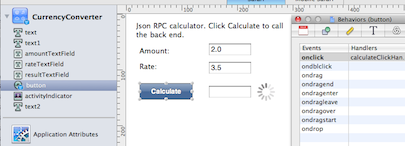
You drag and drop your user interface in Dashcode, choosing from a decent array of nice looking widgets.

Screen shot 2009-08-31 at 6.53.39 PM.png


To connect to a back end server, you create "dataSource" objects which have a nice interface for setting the query strings and then automatically parse either returned xml or json.

Screen shot 2009-08-31 at 6.56.05 PM.png


Objects in the UI, such as the value of fields or the animation or visibility of the activityIndicator are key:value bound in a way similar to Cocoa's Interface builder (by drag and drop linking the little dot at the right of the fields).

Here's the onClick() code for the Calculate button:


function calculateClickHandler(event)
{
amountField = document.getElementById("amountTextField");
rateField = document.getElementById("rateTextField");
resultField = document.getElementById("resultTextField");
var dataSource = dashcode.getDataSource("calculatorDataSource");
dataSource.setValueForKeyPath(rateField.value, "parameters.rate");
dataSource.setValueForKeyPath(amountField.value, "parameters.amount");
}


On the web it looks like this:

Screen shot 2009-08-31 at 6.58.35 PM.png


The back end that does the calculation is just this:


#!/usr/bin/env python

import cgi
import cgitb
cgitb.enable() # errors to the browser

def main():
form = cgi.FieldStorage()
rate = form["rate"].value
amount = form["amount"].value
result = float(rate) * float(amount)
response = ' { "result": %s }' % (result)

print "Content-Type: text/json"
print # blank line, end of headers
print response

main()


(My host doesn't have the json module installed so I've done the json printing manually for now).

I'm still coming to grips with all this but the design UI is magnificent and the concept of webservices as "datasources" with key value coding is just fantastic. While developing you can point it at an xml or json service and you get a wonderful structure inspector that lets you drill down and choose which parts get linked to parts of your UI.

It looks like Dashcode will deploy your app to MobileMe but I haven't figured this out yet, for now I'm getting it to ftp to a Dreamhost service which works rather smoothly. (I hope Dashcode supports sftp soon!)

Other great things in Snow Leopard


  • Column selection in Preview

  • The display colour just looks more vivid

  • Speed - particularly Safari

  • Cisco VPN client

  • Andale Mono font

  • The extra disk space I got back

  • Screen shot date and time stamps


I've had a few crashes today, mostly while printing in Pages, but I blame the Sharp printer driver which does all sorts of bad things according to Console.app.

Dashcode = Awesome.

Friday, August 28, 2009

Snow Leopard in Sydney

I'm waiting for the Chatswood Apple store to open.


They have stock and might open up a little early.

The staff are being briefed by the looks of it.


Here's the staff preparing to open the door:


And here's the queue:


The store opened half an hour early for us, very kind. They applauded as we ran in. The mystery guy waiting said he wanted the Exchange integration so I said I wanted the Cisco VPN. Ben just wanted a new Tee shirt.

Update

Back at the office now, installing on my laptop.

It took 47 minutes to upgrade from Leopard. I got 23Gb of extra space as a result of the install. All seems to be working smoothly so far.

Two issues

I had Mail crash after our internet connection was interrupted and more annoyingly I don't seem to be able to print at home to our HP LaserJet 1022n Printer any more.

Screen shot 2009-08-28 at 5.55.32 PM.png


Found the driver at HP and all is well again.

The Cisco VPN client is outstanding. Easy to configure and really fast to connect - certainly better than the official client from Cisco I've had to use in the past. (It was so bad there was an application that just gave users a better user interface to the same underlying code).

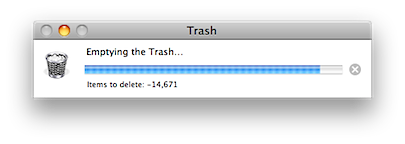
Negative trash count

Noticed a negative remaining count when emptying the trash. I guess the Finder re-write left a few minor bugs around.

Negative Trash.png


The thermometer progress was fine so no real drama.

MacPorts

I noticed that mysql5-server hadn't started after the upgrade. It seems that MacPorts, which needed to be upgraded to 1.8 to run, now builds in 64 bit mode by default (the default in Snow Leopard). The problem is that some existing libraries (zlib in the case of MySQL) were 32 bit.

Still working this through but I think the best approach might be to uninstall MacPorts and build it all freshly.

Old libraries

I'm running in to a bunch of issues relating to libraries I've built in the past that are 32 bit and the fact that under Snow Leopard python 2.6 runs 64 bit by default. (You can set an environment variable to make it switch to 32 bit but that would be a shame - man python for more).

The error message is clear and I go and delete the old library and rebuild.

Everything is getting there, I've installed the 64 bit MySQL server and got python-mysqldb running now.

Sometimes, for a developer, a clean install might be more straight forward.

Thursday, August 27, 2009

Bring on Snow Leopard

I'm queuing at the local Apple store in the morning, always nice to get an operating system update.


Will post a review after a bit of use.

Saturday, August 22, 2009

Blue mountains amateur radio Winterfest

Dropped in to the BMARC annual "Winterfest" today and the new venue seems to have worked out very nicely.

DSC02904.jpg


Inside there were displays of old equipment and new equipment available for sale. A wonderful collection of morse keys were on show.

DSC02900.jpg


My favourite club, the NSW Home Brew club had a table manned by John VK2ASU and Peter VK2EMU.

DSC02915.jpg


Outside there was "trash and treasure" on display to pick through.

DSC02909.jpg


Congratulations to the organisers for a very professional "fest", it was great to catch up with some radio friends and look at all the bits and pieces on display. I did not buy a spectrum analyser or 6kHz - 2GHz signal generator.

Monday, August 17, 2009

TomTom for iPhone in Australia review

tomtom icon.PNGI have used a TomTom navigator in the car for a year or so and I'm pretty happy with it in most respects. Having said that, I want fewer gadgets and the car navigator has a few disadvantages - it's flat mostly, it is left in the car and risks being a target for a break-in, having to select the suburb before choosing the street is annoying (as sometimes the street isn't in the suburb people give you).

When TomTom for iPhone in Australia appeared in the store this morning I didn't hesitate to purchase it, even for AU$99. The download is 157.1Mb, which seems modest given that the maps are built in. I'll give my existing hard TomTom to my wife so it's not really a duplication.

Choosing a destination involves choosing the major city, like Sydney, and then searching for the street which is an improvement. The map is no-where near as nicely designed as Google maps.

IMG_0427.PNG


When you pan the map it erases and completely re-draws, which is a step backwards from the browser based Google Map. I'm assuming at this point that the routing algorithm is the same as their other devices so probably pretty good but we're hitting the road shortly and I'll report back soon.

IMG_0428.PNG


Obviously I'm now in the market for a car mount with charger.

In Use

The Australian "Ken" voice sounds loud and clear through the iPhone speaker. The interface is familiar to users of the normal TomTom devices. Route re-calculation is really fast.

When you turn the phone on its side, the screen re-orients to that format as you'd expect.

The biggest disappointment is that there are no computer synthesised voices so there is no pronunciation of street names. This is a significant disadvantage compared to the "hard" units and I hope it will be fixed in a software update.

During operation the screen stays lit and the iPhone feels warm so my guess is that a car power source will be needed for full time use. Position updates are very frequent and I feel that the GPS hardware in the iPhone is possibly better than in a hard unit.