Monday, October 19, 2020

Worth buying an iPhone 12 with no mmWave 5G?

A recent article by Dr Stanley Shanapinda published on The Conversation warned against purchasing iPhone 12 phones because they don't include mmWave 5G outside the US has triggered some controversy.

I respectfully disagree with what he's saying for a number of reasons:

  • mmWave spectrum hasn't been auctioned in Australia yet and won't be available probably until 2022.
  • 4G LTE in Australia is already very fast
  • Future 5G modems are likely to be more power efficient
  • mmWave is a very high frequency, around 26GHz, and is suitable for very small - line of sight - areas.
Modern phones often cover different frequency bands for different countries. I understand that iPhone 12s include the mmWave 5G bands in the US because there are some places there where 5G is only available on those bands.

Stanley and I were guests on ABC Sydney Radio program "Focus" hosted by the fabulous Cassie McCullagh. You can hear the interview here.

Saturday, October 17, 2020

Micro Mountaineer 40m Xtal locked CW transceiver review

I've just completed a build of a kit I haven't seen before. The Micro Mountaineer is a crystal locked 40m CW transceiver that is a step up from the widespread Pixie kits that you see on Ebay.


I purchased mine for AU$20 from AliExpress here. It came with crystals for 7023kHz (it uses one as an oscillator and the other as a bandpass filter).

The printed instructions appear to have been machine translated. Presumably from English to Chinese and then back again. Documentation is therefore a bit strange but understandable.

The circuit is credited to W7ZOI (he mentions it here) and K7TAU. The design is an NE602 mixer and LM386 audio stage. Receiver is based on the Neophyte design.

The original description and circuit is in the wayback machine here.

My kit arrived with a tiny surface mount LM386 and a little carrier board but happily I have full sized chips in the junk box so I used one of those.

There's no keyer circuit so this would be easy to use with Feld Hellschreiber mode - a great trick for those of us who have failed to learn morse but like the simplicity of these CW rigs.

The waveform doesn't look great. (This is via a 10x probe). Getting about 1W into 50 ohms.

I enjoyed building the kit and it was good practice before I take on the uSDX when the board arrives. All parts were supplied and even some extra passive components were added. It's a pity the supplied LM386 was surface mount but the carrier board would work - I guess it's a sign of the times that full sized through-hole components are getting harder to find.

After several months, the TinySA arrived. Initial impression is good.

Appeared on ABC Download this show - Tinder abuse

It was my pleasure to participate in the ABC's Download this Show again this week. On the radio show we discuss a range of topics but the bit for TV was some comments on the 4Corners/JJJ Hack story about Tinder being used by sex abusers.


We also talk about AI face to do your video calls for you? The push to break up huge tech companies coming from Washington DC. You can hear the radio show on ABC RN or here. It's also in most podcast apps.

Friday, October 09, 2020

uSDX - Modern multi-mode SDR radio with class E output

Like many home brewers, I've been patiently waiting for the QSX from QRP-Lab. I hope it gets finished as it sounds fantastic and the QCX was such a great kit radio. 

In the mean time, clever Guido PE1NNZ, has come up with a modification of the QCX that turns a simple CW radio with class E output into a software defined SSB capable radio. The great thing is that it's open source and being actively developed. 

From Soldersmoke: "The SSB transmit-stage is implemented in a completely digital and software-based manner: at the heart the ATMEGA328 is sampling the input-audio and reconstructing a SSB-signal by controlling the SI5351 PLL phase (through tiny frequency changes over 800kbit/s I2C) and controlling the PA Power (through PWM on the key-shaping circuit). 

In this way a highly power-efficient class-E driven SSB-signal can be realized; a PWM driven class-E design keeps the SSB transceiver simple, tiny, cool, power-efficient and low-cost (ie. no need for power-inefficient and complex linear amplifier with bulky heat-sink as often is seen in SSB transceivers)."


There is an active discussion board about the evolving circuit and parts bill of materials (BOM) on groups.io here

There are two board designs, one is a "sandwich" that supports multiple bands, the other is a single board shown above. (Photo by Dan Reynolds posted in the group).

The CAD files for the board, now at revision 1.02 are available in the group and I found someone selling them on Ebay so I ordered there (currently sold out).

While I have some of the parts on hand I decided to order the full parts list from Digi-Key and this would normally be a tedious task but I've found the secret! Digi-Key has a feature called BOM management. 

  • From the files area on groups.io get the file “Bom_8397236.csv”
  • Log in to Digi-key
  • Choose BOM manager from the menu top right
  • Click upload bom, select the CSV file.
  • Adjust the column headers to make sure digi-key product codes and quantity are correct.
  • Click Add to BOM.
  • Click Add to cart.
    I got a few items which it said had “improved values” for. I just accepted them all - we’ll see how that goes.

    The order came to $64.52 which is over $60 so gets free shipping. In the end it was $70.97 including GST.
    They claim it will be here in 5 days which will certainly beat the board which is coming from EU.


    Manuel K has made a video showing how the transmitted SSB audio sounds at the moment:


    Here's Guido PE1NNZs original QCX-SSB off air recording:


    Interesting times in the home brew radio world. I hope Hans finishes the QSX soon or he may have missed the boat!

    Dave Russel, VK2DKE, has died

    I've just heard that a friend I met through the wonderful Malcolm Sinclair, Dave Russel, VK2DKE has died. Here he is in his wonderful under house workshop.


    Dave lived at Tascott, in mid-NSW and I visited on a few occasions. Dave would catch the train down to Sydney where another mate of Mal's, Merv Sinden and I would meet up at one of the clubs for a few hours of beer tasting and interesting talk.

    When Mal was about, there was a regular sked on 20m where they would talk with old friends in New Zealand.

    A few pictures of Dave.


    Saturday, October 03, 2020

    Ripping my CD collection in lossless FLAC format

    There was a time when I bought a lot of CDs. Years ago I ripped them to AAC files to save space but now disks are cheap and I've decided to repeat the process but using the lossless flac encoding

    For a while I used fre:ac on macOS to rip the CDs. It's free and does the job but is a bit annoying to use when ripping a series of disks - it doesn't reliably recognise disks when they're inserted, doesn't find cover art, and doesn't eject the disk when done.

    Now I've switched to Linux and am using the excellent command line utility called abcde. (A Better CD Encoder).


    Not much of a screenshot! It works and does all the things I want. Installation on Ubuntu 20.04 was easy using apt to install abcde and flac.

    abcde -o flac -B -x -N

    One speed bump is that the only CD drive I have is an old Apple external USB SuperDrive and when plugged in to anything except a mac with high power USB it refuses to power up. Happily smart people have been here before and figured out the little string of data it needs to be sent to wake it up. 

    I can play these files on the computer but I also use, and recommend a FiiO M3K player.

    Listening back to music I'm very familiar with from my teens, such as Jean-michel Jarre's Equinoxe, track 4, it's clear to me that my hearing has deteriorated. I guess I could try to boost the high frequencies to compensate. It's nice to know that I have all the bits backed up without loss, but I'm not sure I could tell the difference any more. There is some evidence that the tricks that audio compression does taxes the brain as it tries to restore the missing signals so I figure I'm better off, if only unconsciously.


    Friday, September 25, 2020

    Google is publishing scam ads featuring Dick Smith

    I'm getting tired of seeing these scam ads that, if you click through them, take you to fake news pages that look like ABC news reporting that you can make millions in a few weeks with crypto currency.

    Presumably Dick Smith isn't happy about this.


    If you try to report the ad, there's only a few options to choose from and none really capture what is going on.


    It's not just me, there's a Reddit thread here about the problem. Here's another:


    It leads to this fake news page:


    This page is hosted on a domain registered to Eugenii Ermolenkov at Atarbekova St. Moscow.

    I think Google needs to take some responsibility for taking money to advertise scams and to illegally use people's image to add weight to these scams. Obviously there is a bit of a battle going on as recently Dick Smith is being spelt with diacritical marks.

    It looks like the advertisers are fighting some sort of detection using Dick Smith's name, perhaps Google needs to use face recognition?


    Here's an ad I just saw on a YouTube video:


    More variations I just saw.


    Wednesday, September 23, 2020

    Ham radio in lockdown

    Although I moved from Sydney to Melbourne, the COVID lockdown has ironically led to me staying in touch with my Sydney friends more than I would have under normal circumstances. Here in Melbourne we are under a strict "stage 4" lockdown which means that very few shops are open (basically food, alcohol and chemists) and we can't visit anyone.

    Happily people have gotten used to using video conferencing and so each week a bunch of us meet for a shared lunch while on Zoom. We did try Skype but the consensus is that Zoom worked better.

    During the call Kevin, VK2KB and I made contact on 40m using JS8Call which we've been playing with lately. Conditions are not great and it's been useful to check the Sydney/Melbourne path using WSPR before attempting voice contacts.

    The terrible RF noise here has stayed away and my end fed antenna is working pretty well although I'm getting a bit of RF into computer gear so I think the counterpoise which lays on the ground is not a good enough ground.

    I'm very interested in all this new SDR development using small CPUs and have been following the uSDX project with great interest. Bill & Pete discussed this on a recent Soldersmoke podcast.

    In an attempt to understand a bit more about how I & Q samples are transformed into a nice spectrum display and even demodulated I've been hacking some code to read samples from devices and trying to get those samples into the right format for FFT. So far I have code that can find and read samples from an RTL-SDR and an AirSpyHF+. I'm doing this on macOS and naturally I want to use the accelerated DSP libraries in Apple's Accelerate Framework. This is all changing thanks to a new "overlay" which makes it easy to use from Swift. My thanks to Barry Medoff for drawing my attention to the WWDC presentation on this.

    It's starting to work, here's what the 40m band looks like with a few CW stations on it:


    I've done some work on my WSPR Watch app for iOS and macOS recently. Graphs are better and some of the tiny text is now more legible. WSPR Watch can pull data from PSKReporter and JS8Call sends reception reports there so it's handy to be able to use the app to see who I'm hearing.

    Sunday, August 30, 2020

    Local interference pattern emerging

     The terrible RF interference I see here right across HF looks like this:

    But for three weekends in a row it goes off at 2:35pm local time on Sunday and the band looks pretty good for a suburban block. It comes back on again at 35 minutes after midnight. So, exactly 6 hours of peace a week.


    What kind of appliance would be on all week except for Sunday afternoons?

    The fundamental frequency, where it's strongest, seems to be at 421kHz where it's stronger than the local ABC Radio National transmitter here.


    Another interesting pattern is that every 60 seconds, with good accuracy, the noise shifts slightly and then back. There is one example on the waterfall here.


    Tecsun PL-365 on Longwave

    Now that I've found the base frequency it seemed that I could locate it with a radio that receives longwave. I have a Tecsun PL-365 but it didn't seem to offer longwave even though it's listed as a feature. It turns out that longwave is disabled by default and frustratingly the manual's instructions for enabling it aren't quite right. 


    The procedure that works for me is:
    • Turn the radio off.
    • Press the DEL (9/10k) button until it displays 9kHz (it switches between 10 and 9)
    • Press the MW key until it displays "150-" (it alternates between 522)
    • Turn the radio on, press MW and it will tune from 150kHz
    As you can imagine, I've been walking around the neighborhood trying to find the source but it's very difficult to track down, perhaps due to the long wavelength.

    Noise gone!

    The broad spectrum noise I've been writing about ceased on Tuesday and hasn't come back. It's been three days now. Obviously it's possible that it could return but my theory is that it was some sort of battery charger that was being used by workers doing renovations next door.

    I've just had a decent contact on 40m SSB with Kevin, VK2KB, who is in Sydney 677km from me. We have been running WSPR to figure out the best times to talk.

    Saturday, August 22, 2020

    WSPR Watch update

    There is an update to the WSPR Watch app in the iOS App Store. The recently added signal to noise graph has changed to a line chart and if you search the spot list for a callsign and then switch to the graphs the search stays.

    This means you can use the SNR graph to find the best time to have a contact with a certain call.

    Another welcome change is that there's a setting to show times in local rather than UTC.

    Here's a graph showing SNR between me in Melbourne, Victoria and VK2ATZ near Newcastle NSW.

    A few people have asked me about the use of colours on the map and graphs. Each band has a colour and I took the set used by WSPRnet.org. Unfortunately these colours sometimes have low contrast against Apple maps so it might help to switch to dark mode.

    The dots on the map are as follows:

    • Green is a receiving station
    • Red is a transmitting station
    • Purple is doing both
    Note that I have limited the number of spots shown on the map as it gets too slow. I stop adding them at 2,000 which I know annoys at least one user (Hi Ross!).

    Friday, August 21, 2020

    A Telstra or NBN internet slowdown incident.

    A few days ago we noticed that the internet was very slow. Pinging Google's DNS 8.8.8.8 showed about 20% ping loss. I logged in to the Telstra Wifi router and used the diagnostic to ping the same address and it also lost packets - so it's not within my network.

    Here's how traceroute using mtr looked:

    Checking for NBN outages on their status page found nothing.

    I checked for any known outages on Telstra's outage page. They showed no known problems.

    Next I ran their diagnostic and it seemed to agree that there was a problem and told me to ring a number, commenting that the operator would know what steps I'd already taken.

    I powered off the cable router, waited a minute, powered it back on and after quite a long time all four lights became solid but the ping loss was the same.

    Ringing the number, I was asked by the IVR to enter my account number, then day and month of my birthday. It asked if the phone I was calling from was linked to the account - it is. Pretty quickly I got on to someone (I guess in the Phillipines), they asked me again for my date of birth and for my name. They seemed to have no information about who I was or what I'd done.

    They did some tests and asked for the MAC address of the cable modem. They asked me to turn it off, wait two minutes and turn it back on. I did. Eventually the lights came back on but the ping loss remained.

    Yes! there's a fault. An NBN co technician would come to the house the next day between 8am and 12pm to fix my issue. Pretty good service I thought.

    A few hours later the fault was resolved and I got a text saying that NBN co have competed further testing and no longer needed to visit.

    Not much to complain about except to say that it surprises me that they can count every byte of upload and download for billing purposes but can't detect that the service is suffering major ping loss. Perhaps I'm quicker than the neighbours but I seem to be the first one to report an outage.

    Things are back to normal and a trace route looks like this:

    I'd love to know a bit more about the network. What is a vb08? What is a win-ice301? What's a win-core and ken-core?

    A few more days have passed and an SMS just came in saying that I'll get a $7 credit to compensate for the disruption.

    Nice.

    Sunday, August 16, 2020

    Unreliable Wifi on a 2018 Mac mini - a workaround

    When I bought this Mac mini (2018) it was used with a permanent ethernet connection and all was well. It's only now that we're in a new house where I must use Wifi in my office that this problem has emerged.

    For periods of time, up to about 24 hours, all will be fine and I can reliably ping the Wifi router over 5GHz Wifi, but then things will slow down and I can see terrible ping loss as shown on the right.

    As you can imagine, this causes all sorts of trouble using the machine on the internet.

    Searching for a fault with an Apple product, or probably any product, makes you feel that the problem is incredibly widespread but I think that it's just the illusion of being able to find similar stories with great ease on a search engine.

    I have found many similar stories and tried all of the suggestions. Finally, I've found a workaround that is working for me. I have tried:

    • Rebooting everything (Wifi router, Mac)
    • Moving the Wifi router to get a better signal (RSSI -65, Noise -90)
    • Using a different Wifi router (Telstra modem and I tried a Google Wifi)
    • Turning off Bluetooth (there are stories of it interfering with Wifi)
    • Wiping the Mac and doing a clean install of macOS 10.15.6 Catalina (This seemed to work for about a day)
    • Unplugging USB devices (Again, stories of interference)
    • Running the built-in diagnostic, which found no hardware faults

    In the end the solution for me is simply not to use Wifi. 

    I have an old Thinkpad X230 on my desk running  Ubuntu 20.04.1 LTS which is used for WSPR, Fldigi, and other ham radio software. Following the instructions at Cesariogarcia I ran nm-connection-editor (which was already installed) and (slightly varying those instructions) edited the ethernet interface to set it's IPv4 settings to make it "Shared to other computers".

    Open the Ethernet interface:


    Edit the IPv4 settings to set the method like this:

    I also changed the name so I'd remember. A pity this option isn't in the Sharing settings.

    The Mac is plugged in with a normal Ethernet cable. (All recent Macs figure out if they need to cross over.) When I saved the setting on Linux the interface changed from "self assigned IP" to 10.42.0.42 with the router as 10.42.0.1.

    I'd rather the laptop used bridge mode but I haven't figured that out yet.

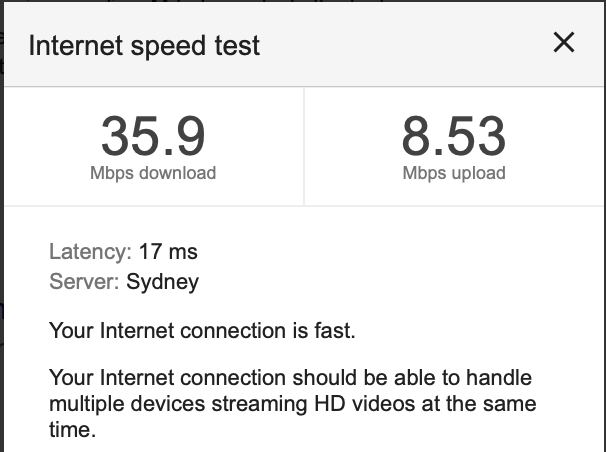
    Speed test isn't quite as fast as I can get when the Wifi was working reliably but it's much better than it was with 30% packet loss.


    You can no doubt use a Raspberry Pi for this task and there are little Wifi routers that can do this too. The Thinkpad barely idles even when running a speed test. 

    I hope this helps someone else with this issue. Incidentally, the Mac mini is out of warranty and I fear that if I take it to Apple it will work perfectly while they have it. I know I should give it a shot and I have had great experiences with the Genius folks in the past.

    I've been monitoring with PeakHour and you can clearly see that ping loss (blue graph) has stopped since adding the linux gateway to the mac's network.

    Apple has some tips on resolving Wifi and Bluetooth interference issues but this hasn't helped in my case. It might be worth trying before following my radical path.

    What about printing etc?

    One problem of having the Mac off the main network is that Bonjour zeroconf can't see the rest of the network so devices like the printer aren't immediately visible. (You can still get to them but you need to figure out the IP address).

    The solution is to configure avahi-daemon on the Linux machine to "reflect". You do this by editing /etc/avahi/avahi-daemon.conf

    [server]
    allow-interfaces=enp0s25,wlp3s0

    [reflector]
    enable-reflector=yes

    (I got the interface names by running ifconfig).

    You need to restart avahi:

    sudo service avahi-daemon restart

    It takes a minute or two for the names to propagate. I check them on the Mac by using the excellent Discovery app from Lily Ballard.

    Update - a USB Wifi adapter

    As a simpler alternatie I ordered a Hungwu USB 3.0 Wifi Adapter via Amazon


    It came with a mini CD containing the driver but I don't have anything that can take these disks. I found an open source driver that works here. It's a bit weird in that you get an additional Wifi menu bar item that has found networks in a non-standard font.


    Pretty bad that it tries to take over Command-W and Command-O but happily this doesn't affect the Finder or other apps.

    The seller responded to my message quickly and sent a link to a driver but the one I found is working fine so I'll stick with it for now.

    So far it's working well with no ping loss 24 hours later and as good a speed as I've had with the native Apple Wifi interface.


    Call me an old "fuddy-duddy" but I find <2ms ping times over a wireless network pretty amazing.  For now, I've retired the Linux wifi to ethernet router described above. Note that Airdrop and watch unlock don't work with this Wifi adapter.