Sunday, November 07, 2010

Best time for an HF contact using WSPR Data

I'm hoping to have a contact with old friend VK3ZZC and to figure out the best time to suggest a sked I look to the WSPR data between my station and Ross VK1UN/1 (who's actually located in Melbourne at the moment).

I grabbed the historical data of Ross receiving me from the WSPR spot database and plotted it in local time.

Sydney to Melbourne spots.png

Although Ross spots me all through the 24 hours, the best times are 5am and 7 to 8pm.

It would be nice if it was a little easier to grab the data for this kind of plot, but it's a very useful resource.

Saturday, October 30, 2010

Dual-band "fan dipole" for 40 and 30m

I've been having great success with 40m WSPR with my 1W going right around the world (at certain times of the day) but much of the WSPR activity is on 30m.

Today I ran a second wire dipole cut for 30m below the main dipole suspended with strings cut for 30m and connected to the same coax.

VNA_101030_103640.jpg

It worked out pretty well and I'm keen to see how it goes over night. That plot is from a MiniVNA which makes it very easy to get everything adjusted.

There's a half G5RV on it's way and I'm looking forward to getting more bands but it's unlikely that I'll see the exceptionally low SWR I get with my simple wire dipoles.

Looks like it's working nicely:

Screen shot 2010-10-30 at 5.37.36 PM.png

As the "grey zone" approaches it gets better:

Screen shot 2010-10-30 at 6.59.06 PM.png

A nice balance of hearing and being heard. I'm running 1W here and have just been spotted by W1BW 16,209Km away. (The earth's circumference is 40,000Km, so I'm on the way to the other side).

Screen shot 2010-10-31 at 6.19.07 PM.png

I'm using a new centre connection with screws so I can switch wires more easily.

centre.png

Sunday, October 24, 2010

Visit boat supplier for wire dipole supplies

A new wire dipole for 40m has gone up at chez marxy.


As it's suspended by the wire itself I decided not to use a balun in order to avoid the weight. The coax to wire joins are attached to a perspex sample square the local perspex supplier appears to happily give away. It's soldered and the whole lot is smeared with silicone bathroom sealant.


The wire is held at the ends with 3mm braided cord from the boating supply shop. They sell 100m for $30 and I find cord made for yachts survives the weather better than venetian blind cord.

At each end I have a pulley mounted on the house and tree.


Finally, for ease of fix and release, I've mounted cleats suitable for 3mm cord.


All this makes it very quick and easy to raise and lower the dipole.

This (no balun) wire dipole seems to be working extremely well, at least according to my wspr spots. I called back on 40m after the VK2WI broadcast  this morning and they clearly heard me better than I could hear them. Despite the lack of balun I'm not getting RF in the shack.

I notice that the resonant dip is very sharp but I got it resonant at 7.1Mhz without too much trouble.

All the bits and pieces from a boat supply shop are tested on ships at sea and seem far superior to the stuff I get at the local hardware store. The tension on an antenna is much less than what a sail causes and the ability to survive salt air means that it will last in my yard.

Monday, October 18, 2010

HF Radio lives, and is fast, at least for the military


Thanks Nigel for pointing this out. They say the've made HF communications so easy to use that no specialist knowledge is required. No mention of antennas though.

Sunday, October 17, 2010

Higher quality aerial imagery at nearmap.com

This was mentioned on the VK2WI Sunday broadcast. They have aerial imagery that is higher quality than what you get on maps.google.com and it's updated every few months by the look of it.

Here's a sample near Circular Quay.

Screen shot 2010-10-17 at 11.07.57 AM.png

If you go to nearmaps.com it's worth trying different dates as the quality varies and sometimes exposure is out.

Saturday, October 16, 2010

Shelves in the shack, thanks SolderSmoke

On a walk this morning I listened to a brand new SolderSmoke podcast, back after taking a break while Bill's family moved back to the US.

My workbench was such a mess that it's been hard to get in there and melt solder. Basically, I need to dispose of some junk or add some shelves.

shack before 016.jpg

I took the easy option and put in some nice new shelves.

shack after 015.jpg

It's really not cramped, it's cosy.

We've had big wind here in Sydney and one leg of my 40m wire dipole has fallen off so my next priority is to fix that.

It was great to hear the podcast again, and Bill, I think your audio on the old laptop running Ubuntu is the best its ever been. I wish you'd put out a podcast every day.

Thursday, October 14, 2010

Ubuntu desktop 10.10 no ntp by default?

I've been running my WSPR station on a new Ubuntu Desktop 10.10 install on an MSI laptop and for mysterious reasons hadn't been spotting anyone or being spotted. I could see strong traces though.

Happily, this is now fixed quite markedly:

wspr.png

My thanks go out to Nick, VK2DX who wrote to point out that my clock was off.

It turns out that this Ubuntu install does not include the NTP daemon.


I think this may cause problems for other software as well.

Sunday, October 10, 2010

Is Pygame faster than PIL? How about pyglet?

In my work I draw a lot of polygons on PNG images.

pil.png

Currently I use Python Image Library (PIL) for all my drawing and I'm pretty happy with the performance. Intriguingly, I read here that "Pygame is three or four times faster than PIL" and that got me interested.

I guess it makes sense that a library designed for games would be better optimised than alternatives. I created this simple test to render a random polygon and measure the speed.


import time
import random
import os
from PIL import Image, ImageDraw
import pygame


def PolygonPILTester(polygon):
width = 256
height = 256
img = Image.new("RGBA", (width, height), (255, 255, 255, 0)) # rgba
draw = ImageDraw.Draw(img)
draw.polygon(polygon, fill="blue")
f = open("pil.png", "wb")
img.save(f, "PNG")
f.close()

def PolygonPyGameTester(polygon):
width = 256
height = 256
os.environ['SDL_VIDEODRIVER'] = 'dummy'
pygame.display.init()
pygame.display.set_mode((1,1), 0, 32)
surf = pygame.Surface((256, 256), pygame.SRCALPHA)
pygame.draw.polygon(surf, pygame.Color("blue"), polygon)
pygame.image.save(surf, 'pygame.png')


if __name__ == "__main__":
polygon = []
for i in range(100):
polygon.append((random.randint(1,255), random.randint(1,255)))

start = time.time()
PolygonPILTester(polygon)
end = time.time()
print("PIL took %s seconds" % (end - start))

start = time.time()
PolygonPyGameTester(polygon)
end = time.time()
print("pygame took %s seconds" % (end - start))


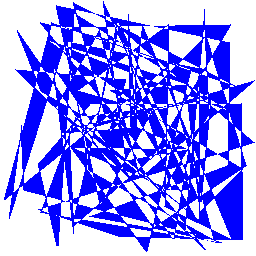
Here's pygame's version:

pygame.png

Interestingly in this test, PIL is twice as fast as pygame, here's a typical result:

PIL took 0.015594959259 seconds

pygame took 0.0300869941711 seconds

My guess is that as the author of the gheat code found the reverse that pygame is better at image compositing which is used more for games than for just drawing polygons.

There's another python image library out there, pyglet, but so far I haven't figured out how to do a simple drawing on a new image and save to a PNG file without it wanting an X server. I get "pyglet.window.NoSuchDisplayException: Cannot connect to ""." Any pointers would be appreciated..

Friday, October 08, 2010

Mac Ports geodjango libgeotiff breakage

At some point in the last few weeks I did a Mac Ports update and gdal, which I use in Django broke.

Here's the exception (which gets silently captured and turned into HAS_GDAL = False):


>>> from django.contrib.gis.gdal.driver import Driver
Traceback (most recent call last):
File "", line 1, in
File "/opt/local/Library/Frameworks/Python.framework/Versions/2.6/lib/python2.6/site-packages/django/contrib/gis/gdal/driver.py", line 5, in
from django.contrib.gis.gdal.prototypes import ds as capi
File "/opt/local/Library/Frameworks/Python.framework/Versions/2.6/lib/python2.6/site-packages/django/contrib/gis/gdal/prototypes/ds.py", line 8, in
from django.contrib.gis.gdal.libgdal import lgdal
File "/opt/local/Library/Frameworks/Python.framework/Versions/2.6/lib/python2.6/site-packages/django/contrib/gis/gdal/libgdal.py", line 37, in
lgdal = CDLL(lib_path)
File "/opt/local/Library/Frameworks/Python.framework/Versions/2.6/lib/python2.6/ctypes/__init__.py", line 353, in __init__
self._handle = _dlopen(self._name, mode)
OSError: dlopen(/opt/local/lib/libgdal.dylib, 6): Library not loaded: /opt/local/lib/libgeotiff.1.2.5.dylib
Referenced from: /opt/local/lib/libgdal.dylib
Reason: image not found


So something is linked to s version 1 of libgeotiff and it's been upgraded to 2. Here's what I have installed:


sh-3.2# ls /opt/local/lib/libgeotiff*
/opt/local/lib/libgeotiff.2.0.0.dylib
/opt/local/lib/libgeotiff.dylib
/opt/local/lib/libgeotiff.2.dylib
/opt/local/lib/libgeotiff.la
/opt/local/lib/libgeotiff.a


My workaround for the moment is:


ln -s /opt/local/lib/libgeotiff.dylib /opt/local/lib/libgeotiff.1.2.5.dylib


which seems to work but is obviously risky.

This post is really just a note to myself.

Tuesday, October 05, 2010

Django documentation in epub format

I'm getting used to referring to technical documentation on the iPad and so I'm on the hunt for epub versions of things.

Daily my development is with Django and it was great to find that the documentation, which is built with Sphinx, can easily generate very nice epub output like this:

django epub.PNG

Here's how to generate your own:


pip install -U sphinx
svn co http://code.djangoproject.com/svn/django/trunk/ djangosvn
cd djangosvn/docs
make epub
Django.pngThe output is in _build/Django.epub which you then drag to iTunes to install on an iPad.

The only thing missing is a cover image.

For your convenience, I've stuck a copy here.

Update: built Python 2.7 doc as epub

After that success I had a shot at building the Python documentation. The sphinx that comes with the python source is old and doesn't include the epub builder so I used a separate sphinx. All seemed to go well:

epub build.png

Here's the command line:


sphinx-build -b epub -d build/doctrees . build/epub
python.pngFor your convenience I've put a copy here: Python 2.7 epub documentation. (That's a goo.gl shortened url by the way).

The output looks excellent on an iPad, it's 3,943 pages at normal font size and the iPad does groan a little but it is quite usable. epub is much much better than pdf for reading on tablets.

Tuesday, September 28, 2010

Your computer has been attacked scam call

credcontact.pngA phone call came in this evening presumably from India. The woman explained that the computer in our house had some problems and they were going to help us.

"What kind of computer, is it Windows XP?" I said yes.

"Press the flag key and the R as in Romeo, both at the same time."

"In the Run box type "eventvwr". Click Application, Security, System, etc, do you see the errors in there? That means that your computer has an infection".

"Your computer having too much problem.

1 Error means 62 infections.
1 Warning means 65 infections.

I can help you. Hold while I transfer you to a supervisor who can help you...."

"I am Peter, I am the senior supervisor on the floor. I guess my analyst has already shown you all the error and warning signs.

You know why the call has been placed to you? We got some error reports from your computer, as we are a Microsoft Certified Partner we have to check whether your computer is fine or not".

Me: How did you get the error report, did you get that from Microsoft?

"Exactly, but we are not Microsoft, Microsoft doesn't call any customers".

"The thing is that as you are using original Microsoft operating system you are registered with Microsoft.

We need to scan your computer to tell you the exact reason. We are Microsoft certified engineers".

He got me to run "iexplorer" from the run box, presumably to avoid me using Firefox or Chrome.

I was directed to: www.credentit.comcredentit.png

Click Australia.

"I'll give you a six digit code, which is confidential, do not give it to anyone else".

Then this downloaded something called LMIRescue which is an installer for some sort of remote control software.

Screen shot 2010-09-28 at 5.12.13 PM.png

As you can guess, I did not install this software and ended the call politely. A quick search shows that I am not alone in receiving this scam call.

credentit.com is controlled by:

Administrative Contact:
n/a
Siddharth Sengupta (credent2010@live.com)
Flat 1/ BC Victoria Appartment
Duke Gardens , VIP Road
Kolkata
West Bengal,700059
IN
Tel. +91.9051255072


Be very careful. Audio here, enjoy.

Sunday, September 26, 2010

Amateur Radio Home Brew at Dural

A lovely day for a trip to Dural. The photographer in me appreciates the nice side light.

Here's Tim, VK2ZTM:

Tim VK2ZTM 009.jpg

And Peter, VK2EMU:

Peter VK2EMU 010.jpg

Peter showed a neat idea for testing toroid cores without needing a non-50 ohm dummy load, he made a step down and step up pair:

Testing Toroids 011.jpg

Graham, VK2GRA, showed his excellent work with a 9m squid pole used as an HF vertical with tape measures as non-resonant counterpoises:

Graham VK2GRA 012.jpg

But the star of the day was Bob Mutton VK2ZRM showed his fantastic work on a high power solid state linear amplifier:

Bob Mutton VK2ZRM 013.jpg

One of the many interesting things is the ARF463 A and B which are a matched pair but with different pin outs designed for push pull operation while earthing the source on each.

ARF463A and B 014.jpg

I had to rush off to a family function but happily the dog hadn't got the apple pie by the time I arrived.

Saturday, September 25, 2010

Film night at the Mu-Meson archive

I've been mourning the death of true HD (1080p) broadcast television as one by one the stations re-allocate their digital bandwidth to create channels for junk TV repeats rather than HD.

What a tragedy it was to see the marvellous BBC series Life broadcast in standard definition on ABC1 over past weeks. If it's anything like the BBC Earth series, with it's stunning HD camera work, it would have been breathtaking. Apparently the Australian public doesn't care too much about quality of the image.

This week I had the great pleasure of watching a reel film at the Mu-Meson archive.

projector 001.jpg

Irving Gribbish, AKA Mr Q, (who runs Splodge! in Melbourne) came to town with an excellent 16mm copy of "All this and World War II".

Q 003.jpg

He gave an informative introduction and analysis of the film and we settled back in comfortable chairs to watch.

room 002.jpg

At half time, while the film re-wound, the friendly Miss Death even served soup.

MissDeath.jpg

All this joy for just $10. Thanks Mu-Meson!

Thursday, September 16, 2010

Android Everywhere

screenshot.pngGartner group is predicting that the war between mobile phone operating systems will end with Google's Android on top.

I decided to forego the iPhone 4 and try living in Google land for a year or so. As previously blogged I purchased an HTC Desire. After my intense dislike for all the Telstra rubbish it came with I rooted the phone and have been installing each version of the OpenDesire build as they came out.

Until this week it's been a pretty good experience but for some reason the phone started hanging every few hours. Unfortunately I broke the programmer's rule and made two changes at the same time - updating the Radio firmware and the OS, so I couldn't be sure which was the problem.

Anyhow, the firmware that seems most popular is CyanogenMod. One difference is that the Google apps need to be installed separately.

24 hours later all seems to be well with the phone. I can't blame OpenDesire as it may well be that simply wiping the phone fixed up some sort of corruption.

For some reason my phone burned through 105% of my 200MB data allowance last month. I can only think that it was something running in the background sucking down podcasts when I didn't know. Everyone yelled at Apple for not doing multi-tasking but when you get what you wish for sometimes it not what you want.

My current stable configuration is Android 2.2, Baseband 32.47.00.32U_5.10.05.23, and OS CyanogenMod-6.0.1-Desire.

Update: changed ROM

I found that on Cyanogen and also then when I switched back to OpenDesire, the phone would work fine for a few days and then hang. It's still alive at some level because the message LED would flash, but nothing would wake it except removing the battery.

Now I've switched to AuraxTSense_7.8.1_Official_OTA_2.2_FRF91 and radio 32.44.00.32U_5.09.05.30_2 and 48 hours in all is well so far. One clear improvement over the others is that when I start using the phone and am in a Wifi area that it knows about the phone now uses the Wifi first rather than starting on 3G data and later switching.

Update: wifi problems

Unfortunately I am seeing some intermittent problems re-connecting to wifi. Sometimes it seems to be connected but apps can't load from the internet.

Android Tablets

There are a lot of cheap Android tablets on eBay and thankfully my colleague Dennis saved me the trouble and bought one.

tablet.jpg

Yes it runs Android, but the touch screen is so bad and the OS is so unresponsive that a quick play with the gadget leaves you with the impression that it's only use is as a bad digital picture frame.

Android may well being on every device on the planet but it may end up with a reputation for being dodgy compared to Apple's closely curated world. I do miss the iPhone and have recently ended up carrying an iPod just for podcasts.

Climbing towers video

Do not watch if you suffer from vertigo.

An earlier copy of this has been removed so it's likely this one will disappear soon too.

Update

It was removed, you can now see it at the Make blog.

Sunday, August 22, 2010

Winterfest Ham Radio Festival in Sydney

Dropped in to Winterfest today. It was a stunning day and I took a few shots with the HTC Desire. Here's the Home Brew table where I displayed a "Retro 75".

Home brew table.jpg

There was lots of electronics on sale at crazy prices, all I came back with were some nice little SMA cables for $2 each (I recently paid $17 for one so that was a bargain for me).

Winterfest.jpg

Here's a look around the room including the morse key display.


Thanks to the organisers for a very professional setup.

Wednesday, August 11, 2010

Some thoughts on broadband policies

I had a chance to chat about the broadband policies of the government and the coalition this morning on ABC Radio National. You can hear it here.


At the end I had an opportunity to mention a few technology policies that are missing from the current debate including:

  • Net neutrality
  • Government 2.0
  • Open Source in Government
  • Electronic text books for schools


Tony Abbott is my local member, if he comes door knocking I've got a few ideas for him..

Sunday, August 08, 2010

Uniwave DRM receiver

Digital Radio Mondiale is the digital radio system for short wave. There are few broadcasters and even fewer receivers. Here's one of them that's available locally:


The video shows reception of Radio New Zealand International (RNZI). (One of my kids came in at one point to ask if "Seven periods with Mr Gormsby" was on the radio).

Kindly loaned to me for evaluation by the fine folks at Radio Australia, I've had the Uniwave receiver for a few months and while fun to play with, especially "expert mode" you see in the video above, there's not much to listen to.

The Uniwave 100 DRM receiver is available locally but I honestly can't recommend it for Australian users.

In the heart of Europe it is probably a different deal and the features of DRM seem compelling, but here in the Pacific I'd stick with an analog receiver for battery life alone.

Having said that, the "expert mode" display is fantastic.

Pico life e-book reader W960 review

Why would I need an ebook reader when I already have an iPad? The iPad is a fantastic device and works wonderfully indoors, but I wouldn't take it to the beach and it's not too good even in normal outdoor light.

Officeworks are now selling a range of ebook readers and today I plunked down $238 for the Pico W960.

pico front on table.jpg

E-ink screen, superior to the old Sony one I've had for years. 2GB of internal storage and a slot for an SD card (not micro SD as the box says by the way). 800 x 600px, support for text, pdf, epub, html, unicode text, lrc, pdb, fb2 and wtxt.

It also plays music in mp3, wma, ape, flac and aac formats.

The best feature is the e-ink display seen here in direct sunlight:

pico sunlight.jpg

Opening an epub book, like the one above takes an intermidable 15 seconds so you'll be looking at this a bit:

pico please wait.jpg

(That's an epub book I purchased from O'Reilly and it works just fine).

Page turn speed is typical for e-ink displays. You change pages either with the four-way rocker on the front or with the up down buttons on the back - this is a great feature and saves putting little buttons on the edge that get clicked by accident.

pico rear.jpg

The device comes loaded with 118 text files from Project Gutenberg but they are so poorly named (A065.txt, A123.txt, etc) that I just took a copy and deleted them all. It's too slow to go in and figure out what each one is.

You plug the device in to your computer using a Micro USB cable and it simply mounts as a storage device.

pico ports.jpg

I had a few minor issues using it with my Mac - the hidden .Files that MacOS creates show up in the book list and so I use Hidden Cleaner to get rid of them, also as soon as you unmount the device it mounts again right away meaning that my quick unmount and unplug action normally leaves me with a warning about unplugging a mounted disk.

After changing the books on the device you need to select "Content Update" to get it to realise they are there.

The buttons on the front, marked home, music, zoom, and back are touch sensitive and potentially a bit too easy to trigger. Oddly the button with a home icon on it is called the "options" button in the manual and doesn't seem to work at all on my device.

All up it's a useful gadget for the money and it's great to see a range of book readers on the shelves at low prices.

Update: doesn't like some epub

I tried to open a commercial epub "Python in a nutshell", it said "please wait" so I did for about half an hour. The reset button is the little hole between the up and down buttons on the back.

It will open smaller epub files but it simply shows the text content devoid of any images or even basic text formatting. Annoyingly all text is justified.

PDFs do show up in graphical form but any A4 pdf it too small to read so this isn't really useful.

My conclusion is that this is a good little reader for just reading text files. For real books I'm going with the iPad.

Tuesday, August 03, 2010

MiniVNA Pro first impressions

A new toy arrived today, a MiniVNA Pro.

minivna.jpg

It's a very nice bit of gear and comes with calibration loads.

I've failed to get it going reliably on my primary machines, MacOS X and Linux so for now I'm using it on a Window virtual machine.

After calibration I connected up my 40 and 80m dipole antenna (both in parallel) and it gave me this wonderful SWR plot in about a second:

swr.png

It also produces a Smith chart but I don't know how to interpret it.

smith.png

It's astonishing that a home constructor can own test equipment like this.

I have much to learn.

Update: Now working under Ubuntu

The software for linux is a java application vna/J

The trick is to use the serial library installed like this: apt-get install librxtx-java

Here's the calibration dialog:

And here is the resistance of a 50 ohm terminator swept up to 180Mhz.

Here's a sweep of a 3.6864 crystal.


Very cool.

Update: Now working under MacOS X

I grabbed a copy of the rxtx library from here that works 64bit and copied it to /Library/Java/Extensions/ but as soon as the software tries to use the serial port, like during the calibration run, I'd get "VNADriverSerialPro::init() gnu.io.PortInUseException: Unknown Application".

The trick, thanks to this page, is:


sh-3.2# mkdir /var/lock
sh-3.2# chmod 777 /var/lock


Now everything's fine.

minivna mac.png